by

Office 365 Fix: The Search Request was Unable to Connect to Search Service

After a few deployments and customizations, somehow my Office 365 environment got trashed and I started to see the following error when searching *anything* on it.

office-365-search-request-was-unable-to-connect-to-search-service

“the search request was unable to connect to the Search Service”

After several hours spent trying to fix that I think I found the issue. The most likely cause for this is because the Search Application proxy could not be found in the farm, or it is stopped. Since we are talking of an Office 365 application, it is very unlikely that a Search Service has stopped, which leaves us with the other option of inexistent Search App.

sharepoint-online-management-shell

To fix this, open your SharePoint Online Management Shell (which is the PowerShell for Office 365) and create the search app manually using the following code snippet:


$myO365SearchService = Get-SPEnterpriseSearchServiceApplication
New-SPEnterpriseSearchServiceApplicationProxy -SearchApplication $myO365SearchService


How Did my Search App Got Deleted?


This is beyond me Smile but I can tell you this (and to cut the ammo for the critics): Office 365 is an extremely reliable platform. It just does not break like that. The culprit was probably one of my own scripts or done via some collateral effect; anyhow, this fixed it for me and I hope it should fix it for you as well.


by
by

How to Enable Bitlocker for Windows 8 without TPM

BitLocker is probably one of the most important single advances in computing security. It is the requirement now for all the serious enterprises using windows systems. Read this post to understand more about BitLocker.
If you have windows 8, you will notice it will try to enable BitLocker with TPM, which is a property of the processor. The possibility to marry a software security encryption and a processor dispositive is perfect.
But what if your tablet/notebook does not have a processor TPM-enabled? If one try, it might see this message.
this device can't use a trusted platform module. your administrator must set allow bitlocker without a compatible tpm option in the require additional authentication at startup policy for OS volumes.
 
Here’s how to enable BitLocker for windows 8 in these cases.
In your windows 8, call the gpedit.msc.
enable-bitlocker-windows-8-1
in the group policy manager navigate to Computer Configuration/Administrative Templates/Windows Components/BitLocker Drive Encryption/Operating System Drives. Once there, double-click the option Require additional authentication at startup
enable-bitlocker-windows-8-6
Choose the option Enabled and in the options pane select the checkbox Allow BitLocker without a compatible TPM.
enable-bitlocker-windows-8-5
That’s it. Your device is now ready to be encrypted with BitLocker. Right-click your disk and the option to Turn on BitLocker will be available.
enable-bitlocker-windows-8-2
You will need to keep a USB memory stick to save your BitLocked credentials. Additionally you can save to a file and upload this file to your preferred storage location.
enable-bitlocker-windows-8-4
 
enable-bitlocker-windows-8-3

By
by

How to Activate Feature in a SharePoint Online Site Using Client-Object Model

Here’s how to activate a feature in a SharePoint Online site (Office 365), via client object model (CSOM).
/// <summary>
/// Activates the feature.
/// </summary>
/// <param name="webUrl">The web URL.</param>
/// <param name="featureId">The feature identifier.</param>
/// <param name="forceActivationFlag">if set to <c>true</c> [force flag].</param>
/// <param name="featureScope">The feature scope.</param>
/// <returns></returns>
public bool ActivateFeature(string webUrl, Guid featureId, bool forceActivationFlag, FeatureDefinitionScope featureScope)
{
    var output = true;
    try
    {
        using (var clientContextToken = new ClientContext(webUrl))
        {
            // retrieves a list of the features 
            // and add activate the one with the specified ID
            var listOfFeatures = clientContextToken.Web.Features;
            clientContextToken.Load(listOfFeatures);
            clientContextToken.ExecuteQuery();

            listOfFeatures.Add(featureId, forceActivationFlag, featureScope);
            clientContextToken.ExecuteQuery();
        }
    }
    catch(Exception ex)
    {
        output = false;
        //If something goes wrong, you can catch it here and
        // display on a page, message, add to log etc.
    }
    return output;
}


There is a Catch…


This only works for Site and Farm scopes; doesn’t work for Web scope. You can have a look at the FeatureCollection signature here and see that FeatureDefinitionScope does not have Web as an option for SharePoint 2010.

Update: There is a Web property in the FeatureDefinitionScope for SharePoint 2013


by
by

Dangerous Animals in Australia (and amongst us…)

One post from Scott Hanselman ( @shanselman ) regarding venomous creatures attracted my attention.

oregon-spider

This might look as scary spider, however from my experience here in Australia the most scary spiders are not the big ones but the small ones.
Just to give you an idea, have a look at the sequence of photos below. All these photos are from residential areas, I am not talking about going out the city and to the forest etc.


The Australian RedBack Spider

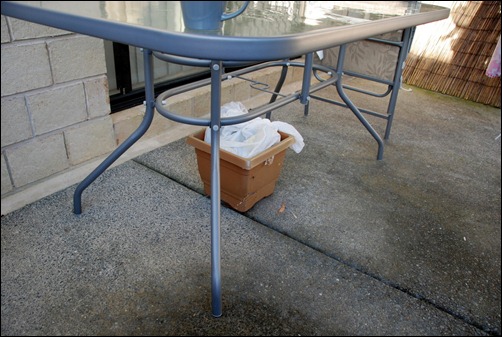
It was a beautiful Saturday afternoon and we were preparing for a great Aussie tradition: BBQ. When my 3 year old daughter pointed me a 'spydie'. We could not see it at first, but after a closer look we did...it was an Australian Red Back spider.
1 2

3

After a bit more of searching, we found another one, this time inside the kids plastic swimming pool. See how small they are:

4 5

6

Let me tell you that we do not live in the outback. We live in a typical Australian family suburb. So for you who don't know it, yeah...they can show up pretty much anywhere. Of course, they favour quieter places.

Two important points to make from this experience:

  1. Despite being a small thing, that IS a dangerous spider. One of the most dangerous Down Under. If this spider bites you, you will be in a world of pain for more than 24 hours, but you won't die because antivenom for them are readily available.
  2. Since young age, Australian kids seems to be able to identify danger because of experiences like that. We do not kill these animals, the most we can do is let them pass or move them do a more distant place. After all they did not invade our homes, we did invade theirs.


The Brown Huntsman Spider

spider-brisbane-huntsman-aranhaAnother encounter was the day I was going to make myself a nice cup of coffee. I reached to the mug and I noticed a shadow going behind it. And there it was, an Australian Brown Huntsman spider. You can see its size compared to this 10cm tall coffee mug. It is a bigger spider, however it IS NOT a dangerous spider. As a matter of fact, this little creature helps your home to be clean of cockroaches, silverfish and small insects.
What I did:

  1. I called the kids. Gave her a name "mr. Huntsman" and explained to them the whole thing.
  2. after that, we moved the spider away and said we all said:"good bye mr. Huntsman"…you know, to make the whole experience more friendly to them instead of “OMG…a freaking deadly spider!!!” :-)

Great experience for everyone involved: me, wife, kids… ( well, not so much for wifey ) and to make them understand these animals are our friends.


Australian Sea Snake

DSC_1109The other day we and some friends went to Noosa, a very beautiful region from Australia with some stunning beaches. And then our kids found this playing around the rocks: a Sea Snake.

All the animal lovers around here, please excuse me but I had to capture this beautiful and exotic thing for a few minutes. So I run with the sand bucket and caught it to explain the kids what it was. It was great, I did not know what it was as well so I did some online search and we literally had a classroom in the wild with a whole bunch of highly excited kids making all kinds of questions: it is a boy or a girl? can she see? where she lives? can she hear us? Hellooo missy!!

This is a highly venomous snake, and can only live in the water. She is very shy so she will flee away at the closest encounter, only when she cannot swim away and there is no other alternative she will bite. And she bites, it is very unlikely the venom will be transferred. Despite that one thing I learned is that sea snakes must be handled with extreme caution. It was great, again for us adults and kids.


The Golden Orb Spider

DSC_0068This spider was one of the most scariest things I’ve seen here in Oz. It can grow very big and some of them can reportedly eat birds. However, it all comes down to education and exposure. I’ve seen so many of those here during summer that I don't worry about them anymore, yet I must say it is funny to see hordes of tourists taking photos of them as very exotic things.


Australian Brown Snake

This "cute" 1.8 meters Australian Brown Snake showed up in the beach of Surfers Paradise. She is the second most venomous land snake in the world.

australian-brown-snake-beach (4) australian-brown-snake-beach (1) australian-brown-snake-beach (2) australian-brown-snake-beach (3)

She is extremely aggressive and can pursue humans in a run. So if you see one of those, run! Of course on this day, she immediately became news and people all over the place came to see, instead of running away.


Australian Python Snake

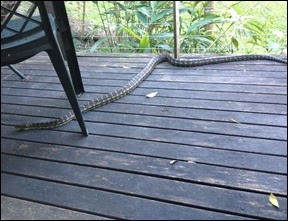
This little girl showed up the other day during a warm summer day. She is very common python, around 2 meters long, called Coastal Carpet. Main thing is its bite is not venomous, however because of it's large fangs it will make a big laceration. The most common victims of the Coastal Carpet are possums, frogs, dogs, cats etc. This snake lives in suburban backyards, which is the thing that scares most people.
australian-python

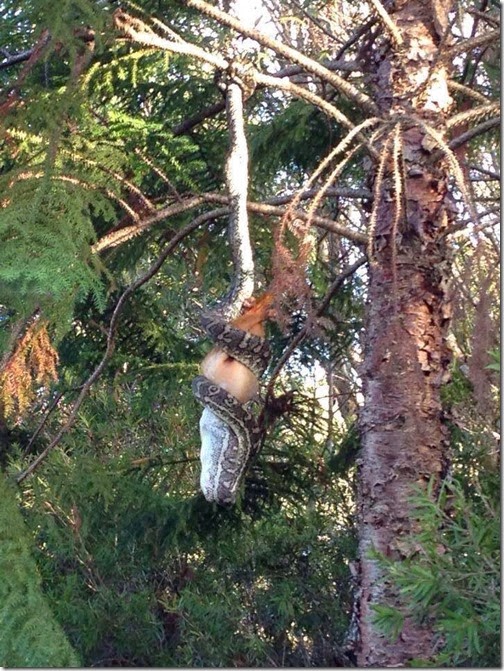
And here’s another one, this time on a suburban street.
snake-australia-north-lakes


By

by

Nokia 1020 is not displaying on Windows Explorer via USB

My gorgeous Nokia Lumia 1020 Windows Phone used to be recognized and displayed in Windows Explorer when connected via USB, and now all of sudden is not anymore. How to fix it?

If you also had this annoying experience, here’s what you can do in 4 Steps.

1) Open your device manager: Once there, locate the Universal Serial Bus node and you will see Nokia Lumia 909 listed (you might even see it listed twice, like I did). That’s the first clue something is wrong, after all your mobile is *not* a Nokia 909!!

But fear not, if I remember correctly Nokia 1020 was going to be called 909 until they changed the name and added a 41MP camera…Anyways..

nokia-1020-device-manager-nokia-909


2) Right click and listed devices and select ‘Uninstall’: Do this each 909 devices listed there. Don’t worry, this will not damage your files or computer.

nokia-1020-device-manager-nokia-909-2

 3) Turn your Nokia Off, then turn it on: And then connect it back to your laptop/tablet/computer via USB port. Windows will recognize it and it will start the driver installation again.

You should see the following screen indicating a phone is being installed.

nokia-1020-device-manager-nokia-909-3

4) Go to Windows Explorer: and now you see your Windows Phone displaying back again.

nokia-1020-device-manager-nokia-909-4

As you see, this is not a complicated thing to fix, once you know it…of course Smile

I hope it helps.

-Edge

by

How to eject cd drive using windows code

Nice prank to play on your friends. This will eject the CD-drives in the local computer every 2 minutes.

Copy the code below into a text file. Rename it to .vbs and execute.

'get hold of the object who controls the windows media player
set mediaPlayerManager = CreateObject("WMPlayer.OCX.7")

'make a list of all CD-Roms installed in the computer
set CdROMCollection = mediaPlayerManager.cdromCollection

' put the process to sleep for 10 minutes
' just enough time to sound like unexpected when it runs
wscript.sleep 6000000

' performs an eternal loop (or until the user restart the machine or kill the process)
do
'if there is at least 1 cd-rom in the machine,

if CdROMCollection.Count >= 1 then
'go through all the cd-roms found and eject each one of them
For i=0 to CdROMCollection.Count-1
CdROMCollection.Item(i).Eject
Next
End If

' put the process to sleep for 2 minutes
wscript.sleep 120000

'return to the beginning of the loop and repeat
loop


by

Cycling training program French Alps

This is my program to my ride the French Alps in August 2014. Since we came up with this plan recently, I’ll post here my training log updates, the itinerary, nutrition and anything else I might find along the way until the ride day.

A bit of myself for you who doesn’t know me: I am your average family man, middle-aged, who mainly rides the bike to work, definitely not a semi-pro. I’ve never done any specialized cycling training. So I hope this guide can help motive others to achieve similar goals. Trust me: If I can do it, anyone can.

If you have questions about it, feel free to contact me at edge@superedge.net. This will be a curious experiment and hopefully I’ll have some fun while at it Smile Below is my project plan:

Where will be the ride.

Well, below is just a list of intentions. I am setting the goals very high by planning to ride the following mountains. Ideally I’ll be doing them all in 5 days. Some mountains will be short. And note I am including the mythical Alpe d’Huez; if I am going to do it once, I might do it properly and unforgettable as well.

  1. Le Semnoz
  2. Col de Tamie
  3. Col de la Madeleine
  4. Col de Glandon
  5. Col de la Croix de Fer
  6. Col du Mollard
  7. Col de Maurienne
  8. Les Lacets de Mountvernier
  9. Col de Chaussy
  10. La Toussuire
  11. Col du Telegraphe
  12. Col du Galibier
  13. Alpe d’Huez (WOW moment!!!)
  14. The other side of Alpe d’Huez
  15. Les Deux Alpes
  16. Villard Reculas

Buy proper cycling shoes.

[TODO] do I really need this? I need to research.

Nutrition plan for mountain cycling.

[TODO] I might need special nutrition to be able to ride on altitude. Never done that before. Need to research

Find time and training locations.

[TODO] There is no way around here. Need to find the time!! Smile 

Keep a training log.

[TODO]

By

by

How To Separate Multiple Users Selected with InfoPath People Picker–No Code

If you reached this page, you’re likely looking for an answer to the dreadful issue of how to separate the selected users from the InfoPath People Picker control in a string. Well, there are a few solutions using code, but if we can come up with something that does not need to use code deployment, any web services etc. and it is good enough, then this is your answer.

First of all this is the structure we will be using in this example:

infopath-xpath-expression-people-picker

Note the pc: Person has a blue arrow? That’s the catch. The People Picker is actually a Repeating Table with a person object underneath! Keep that information for now, we will come back to it in a minute and it all will make sense. Smile

Next thing we will do is to add a regular textbox control to your form. Click “Properties” and then choose to define a formula for the default value. Also make sure the “Refresh value when formula is recalculated” is checked.

infopath-xpath-expression-people-picker-semicolumn-text-properties

In the default value dialog box, click “Edit XPath (advanced)”. Here we will use a combination of 2 powerful functions: xdMath and Eval. Essentially xdMath will recalculate the position of the xml node in the parser and the Eval an loop though collections.

Remember when we saw that People Picker control is a Repeating Table? yep, a collection. So we will use the Eval to navigate the rows of that collection, and using Concat in the create a string attach a semi column at the end of each row.

infopath-xpath-expression-people-picker-semicolumn

Don’t worry about the advanced bit, It took me a bit to get the XPath formula right. So skip thinking about it and here’s the expression all nicely done for you.


xdMath:Eval(xdMath:Eval(../my:ReviewTeamSection/pc:Person, 'concat(pc:DisplayName, "; ")'), "..")


Make sure to replace the my:ReviewTeamSection path and use yours instead. Also you can play around with the XPath expression above and replace DisplayName for AccountId or AccountType to get different values.

I hope the time I spent figuring this out can be used to save yoursSmile


By

by

How to Fix: Restore-SPSite. The site collection could not be restored. Content Database, Sufficient Free Space.

If you try to restore a site collection backup from another location, performing a simple Lift-and-Shift, you might be confronted with the following error:

restore-spite-error-space

“Restore-SPSite : The site collection could not be restored. If this problem persists, please make sure the content databases are available and have sufficient free space.”

What this Error Means?

In short, it can be MANY things. You know that your database actually has enough space for the restore file. You know that you have the right permissions. You check that the command actually runs for a period of time… and yet, after several minutes the restore operation fails.

What’s Causing This?

Unfortunately, like many warning emitted by SharePoint, this error sends a message which leads to an incorrect conclusion.

Let’s read again this warning, slowly and we will discover that it actually says: “…please make sure you have enough space…”, this is not saying that you don’t have. That’s very tricky and misleading, because it leads people to believe that “hey, such a trivial operation doesn’t work, must be space related”

What to do?

Actually this is a blanket message, a very high level warning covering the real cause of the problem. So, next time you see this check the SharePoint error logs. The first thing you should do is: in the error trace level, keep an eye in the “High”, “Critical” and “Unexpected” types. They will clearly indicate the error that this message is covering.

It might be a database permission problem, it might be a corrupted restore file, if could be a failed SharePoint service. I’ve seen this error message a few times already and both times they had nothing to do with space in the database server. For example, last time I saw this error message it was nothing to do with SQL server space, it was a corrupt backup file.

corrupt-backup-file-encountered

So, next time you see this error message, remember: thing are not really what they seem! especially in regards to SharePoint Smile

By

by

How to Fix: “The process cannot access the file” Error on SharePoint 2010

Most the developers I know have a stand-alone deployment of SharePoint in their own laptops, it gives them the capabilities of SharePoint without having to go with a full-blown SharePoint 3-tier farm. However most of the times they try to upgrade from SharePoint 2007 (aka. MOSS) to SharePoint 2010, they are confronted with the following and annoying error message:

“The process cannot access the file '<Path\FileName>' because it is being used by another process.”


The Issue:

Just so you know, when SharePoint configuration says "files are locked", what it really means is "a few rows in the SharePoint configuration database are locked for updates." These are not really real files in the sense of our windows explorer files. And that sort of behavior is as expected and per design by SharePoint. The Timer service is supposed to have this power to lock/update/release resources in the SQL Server; Unfortunately, a few times the locks are not released properly or quickly enough for the upgrade to continue Smile

The Fix:

In the start Menu of your SharePoint server, call the “services.msc” shortcut, this will lead you to the Services interface running in the local machine.

services-msc

Once there, find the “SharePoint 2010 Timer” and double click-it so you can see the “SharePoint 2010 Timer Properties”

sharepoint-2010-timer-service 

IMPORTANT: In the properties select “Manual”or “Disabled”. You need to perform this step in order to force the service to release the hold on the files.

sharepoint-2010-timer-service-properties

Then restart your machine. When the server is back online again,  call the “SharePoint 2010 Products Configuration”, this will realign the Sharepoint Timer Service and will fix your new upgraded server.

sharepoint-2010-configuration-fix

I know it sounds weird this solution to “restart and everything will be OK”, but that’s how it worked for me and some friends a couple of times already.

By