Watch me here http://projectvirtualconference.com and join the conversation!
Showing posts with label ProjectManagement. Show all posts
Showing posts with label ProjectManagement. Show all posts
Wednesday, June 6, 2018T6/06/2018 12:18:00 PM
by


2018 Virtual Project Conference - Your Project Online Migration Will Fail, Unless You Do This...
Labels:
cloud,
cycling,
General,
Office365,
ProjectManagement,
sharepoint,
videos
It is my privilege to present @ Project Virtual Conference. Let's talk about project delivery, migrations and cycling.
Watch me here http://projectvirtualconference.com and join the conversation!
Watch me here http://projectvirtualconference.com and join the conversation!

Friday, November 3, 2017T11/03/2017 01:44:00 AM
by
Live Show: Business Productivity Reinvented
Labels:
BYOD,
cloud,
General,
Office365,
ProjectManagement,
security,
sharepoint,
videos

Title: Productivity Reinvented
Session Abstract: Edge is joined by Ryan Darby to discuss how Office 365 is Microsoft's fastest-growing commercial product ever and is now the number one deployed application in the enterprise. It is the company's most profitable business and productivity product. but how does this translates into productivity for business users and project delivery.
Suitable For : Business Analyst, Consultant, IT Architect, IT Pro, Sales
Track : Collab365 Live Show
Live Video : Live Show – Business Productivity Reinvented
T11/03/2017 01:39:00 AM
by
Live Show: Office 365 User Adoption
Labels:
BYOD,
cloud,
General,
Office365,
ProjectManagement,
security,
sharepoint,
videos

Title: Office 365 User Adoption
Session Abstract: In this session Edge is joined by Sonia Cuff MVP and Paul Woods.
End-users often see technology from a very personal point of view. While IT is likely focused with the mechanics and logistics, your clients, the users are scratching their heads thinking "what's the real benefit here?". Cue for the adoption strategy. With Office 365 becoming so pervasive in our business, adoption is now a key consideration in any rollout. Let's discuss the challenges, the goals and risks of this fascinating topic.
Suitable For : Administrator, CIO, COO, CFO, CMO, CTO, End User, Power User
Track : Collab365 Live Show
Live Video: Live Show – Office 365 User Adoption
T11/03/2017 01:30:00 AM
by
Collab 365 Conference: 10 Myths About Moving Your Project Management to the Cloud
Labels:
cloud,
General,
Office365,
ProjectManagement,
security,
sharepoint

Title: 10 Myths About Moving Your Project Management to the Cloud
Session Abstract: Most companies that go to the cloud do so because they need business agility and cost savings. But how can you know if you're getting all the benefits? Or worse, what are you missing? Let's separate fact from fiction and bust these 10 myths about moving your projects to the cloud.
You Will Learn :
- How to make your projects more agile and effective
- How to increase savings on your projects
- Cloud security
- Protecting your business against hackers in the cloud
Suitable For : Business Analyst
Download Slides: Collab 365 – Edge Pereira - 10 Myths About Moving Your Project Management to the Cloud
T11/03/2017 01:23:00 AM
by
Collab365 Conference: How the Jedi Use Project Online to Manage Projects
Labels:
cloud,
General,
Office365,
ProjectManagement

Title: How the Jedi Use Project Online to Manage Projects
Session Abstract: A city-planet, Coruscant is the vibrant heart and capital of the galaxy, home of the Jedi. Let's have a look how they use Project Online to manage government projects. From citizen's ideas list to final infrastructure delivery.
You Will Learn :
- What is and how can you use Project Online
- How to manage projects using Project Online
- How Project Online integrates with other systems
- The project manager track from newbie to expert
Suitable For : Administrator, End User, Power User
Download Slides: Collab 365 Conference – Edge Pereira - How the Jedi Use Project Online to Manage Projects ?
Tuesday, September 5, 2017T9/05/2017 05:42:00 PM
by
Are You Ready? Guest Access in Microsoft Teams is Coming !!
Labels:
cloud,
General,
Office365,
ProjectManagement,
sharepoint
Microsoft Teams is fantastic! It is the ultimate collaboration tool for your business without all the heavyweight of SharePoint.
If your team have Office 365 and use Skype for Business you will love Microsoft Teams! I love Teams, my team love Teams, my customers love Teams…there is only a problem: my customers and my team cannot use Teams in the same project. Sad face! 
Microsoft actually promised this when they launched Teams…you know… that you could invite external folks to your conversation. That promise never eventuated…Until now. Happy Face! 

Guest Access for Microsoft Teams
In June 2017, a few lucky folks started to use guest access in Teams, but then somehow Microsoft went silent on it. Maybe they are doing a closed POC, I thought. So I asked around and actually that’s the case, they have a group of people testing this feature.

If only I had this for my projects I would be a happy chap ….
Microsoft Teams, please I want to be loved!!
Public Access, Anytime, Anywhere, Everywhere, for All Your Team Mates!!
And the best part I noticed: This test is not only internal. The people testing guest access are actual Office 365 people in the wild! It means, yeah you too can soon give it a try.
Anyone keen to invite me to pilot-test it this feature
Why Guest Access Matters?
This is an massive step forward for Teams as many people often work with 3rd parties. I lost count of how many times I went to my customers and thought about it: “oh man, if only I could bring you guys to our common Teams umbrella…oh well, we’ll have to use Groups with External Access”
Guest access matters because without it Teams is a cut-down version of Slack…and we want Teams to be ABOVE Slack…To make it AWESOME!!

Are you part of this Microsoft Teams Guest Access trial? Let me know! I want to have a chat with you!!
Saturday, July 15, 2017T7/15/2017 04:46:00 PM
by
The Case for Privileged Access Control
Labels:
BYOD,
General,
Office365,
ProjectManagement,
security
Another day, another big data leak. Do you have a minute? Let's talk a bit about basic security and how even the “big guys” can have it wrong.
Since you're a young IT professional you hear the mantra that login credentials (username, password etc) should never be shared nor written in plain-text (Hello, TickeTek!!). So, why do we keep seeing these things in workplaces? Passwords for network shared on stick notes, handwritten in walls, displayed in big monitors for the sake of convenience…


The answer is: Unfortunately, this is quite a common practice and worst coming from bad decision making.
The Weakness Stand
According to a report from Centrify: State of Corporate Perimeter about 50% of the USA and 1/3 of UK leaders believe it is easy for someone with old passwords to login into company systems.
Even considering that most of the companies have an off-boarding process for contractors, it can take up to a week to completely sanitize access rights and passwords to all the sensitive data once handled by those individuals. One week is enough time for anyone with ill intentions to go back and hack into systems. And that isn't a rare incident.

Privileged Accounts: Free as in Free Beer
It gets worse. The report revealed that privileged accounts for systems, and network devices are being shared without any policies to protect them. 40% of U.K. IT leaders working for big companies (over 500 employees) said more than 10% of their staff have privileged access to data in some form.
This number jumps to 50% for small and mid-sized companies (less than 500 employees). Too many people with too much, unnecessary, power in their hands. We are talking about confidential and highly sensitive information kind of access. Rightly so, 62% of U.S. IT leaders believe their companies have too many privileged users. Look at this: Security Auditors guess Australian government database passwords on first attempt! That’s shocking!

Cultural Differences?
Now one thing to consider. This report was done with 200 companies in the USA and 200 in the UK. One might think that a more liberal economy would pose a bigger risk to IT security systems. Truth is, it does not. The overall pattern is consistent across all groups in both countries. For example, around 50% percent of all companies involved in the study confirmed that their companies had a data breach. And the bad guys are there for the taking like sharks.
A Backup Always Work, The Restore Is What Fails
Almost all companies have some sort of identity keys in place but nearly half of them have monitoring, auditing or privileged identity management in place. Quite surprising, 1/3 of these companies don't have trained employees to respond to a data breach or how the accounts are used. They are simply given to folks and trusted they will do good with them. No wonder so many breaches happens.
The Disaster is a Decision
Often times we hear that a disaster is a series of small events that lead to a big event. It is very surprising that experienced senior managers and leaders on this day and age are still following bad decision making frameworks, yet admitting they do need to do a better job with their data. The quote "When a data leak happens, it is probably your fault" is becoming more alive than ever.
Monday, July 3, 2017T7/03/2017 04:45:00 PM
by
I am Speaking at the Collab365 2016 Event
Labels:
BYOD,
General,
Office365,
ProjectManagement,
security,
sharepoint,
videos
Once again I got confirmed as a speaker for the Collab365 Conference. This is one of the coolest conferences around from the people organizing it to the folks participating online. A single session can easily reach thousands of people, so you can imagine my excitement. And as a plus, it is always great being at Microsoft HQ in Redmond. Also a good time to reconnect with folks from the Office 365 team in their offices. (*cough*also visit the Microsoft store*cough*)

My session is as usual around Office 365 Compliance and Data Protection and it is called: "Office 365 eDiscovery: DLP for your Business and Your Data".
Join the Collab365 Summit and watch the sessions, there is an incredible amount of brilliant minds and souls behind this event, doing this for the community at large.
Where Can You Get More Information and Watch the Sessions?
Go to http://collab365.events/collab365-summit-2016/ . You can also follow the twitter @Colla365 and the hashtag #Collab365
Also, who doesn’t love an opportunity to visit Microsoft Headquarters in Redmond


Tuesday, May 23, 2017T5/23/2017 04:59:00 PM
by
Facebook
Microsoft vs Apple vs Facebook vs Google vs Amazon (in 2017)
Labels:
cloud,
General,
Office365,
ProjectManagement,
security
Here some interesting stats collated by Visual Capitalist. I thought of creating this post just so I can reference it later. In short:
- Microsoft is the leader in portfolio diversification.
- Apple and Alphabet have a good portfolio but little diversity.
- Amazon has good market cap and some diversity.
- Facebook is a one-trick pony

Apple

Microsoft

Alphabet


Amazon

Source: companies annual reports, May/2017 – visualisation by www.visualcapitalist.com
Monday, May 22, 2017T5/22/2017 05:10:00 PM
by
My Project Online Administrator is Locked! How to Fix?
Labels:
cloud,
General,
Office365,
ProjectManagement,
security,
sharepoint
Today I've got a call from a very worried customer: "Help, our Project Online Administrator got locked out! What do we do???"

First, let's bring calm into the conversation. You know people will live after that. If your Project Administrator got locked don't panic, the site collection administrator automatically has administrative privileges. So to fix it quickly, ask the tenant or SharePoint online admin to fix this for you and assign you or someone as site collection admin and then you can go and fix the Project Admin. Done!
Now let’s talk about the B-side.
First, How Did you Get Into this Situation?

I know, soul searching is not easy. If you know what caused the issue, great otherwise you should start asking questions. That's a very important first step to understand what happened. Generally think about the last steps performed in the site. Look for things like:
- Any changes happened to the Administrators in Project Server or in the Administrators from Active Directory
- Any synchronization happened to the AD group in the Resource Center. Maybe this happened and your Admin became inactive.
- Any bulk password changes happened in your organization
- Any user migration recently happened in your organization
You know, things like this to give you a sense of what caused the issue.
So well done! You fixed the problem and you understood what happened.

Let's Learn from this Event…
Let's lay the basics out here. Your company's Office 365 tenant have:
- A global administrator,
- A SharePoint administrator,
- A site collection administrator,
- A Project Online administrator.
Experience tells us that 90% of the time, there is someone which is incorporate ALL of these roles. Pick the person that is the Global Administrator and let's have a chat with this person and find out if anything special has been done to the Project Administration role. If this is the person that helped you reverting the situation as we talked before, even better. Discuss the situation with him/her. Share with him what you think caused the lock.
What About Licencing?
Often times Active Directory changes alone can fix lockout situations, in these cases a site collection admin does not require a dedicated Project Online license. The challenge here is sometimes to fix the issue, the person needs to log into Project Online and in this circumstance the site collection administrator needs a Project Online license. It’s possible that he or she already has one.
I Don't Have Licences Left. What Do I Do?
You can temporarily remove licences from an user and assign to other for this. The licences are not named licences, so that's a perfectly legal manoeuvre. Better yet, remove the license assigned to the locked out user since he/she is not able to use it anyway while you fix this.
Tuesday, April 11, 2017T4/11/2017 03:21:00 PM
by
Managing Thousands of Projects in Project Online
Labels:
cloud,
Office365,
ProjectManagement,
sharepoint,
windows
If you work with Microsoft Project Online you know how great this product is at streamlining project, resource and portfolio management activities. All this is for a single purpose, to allow you to deliver better projects, on time, on budget.
And now a few changes were released this month. Let have a look at 2 very special ones that I would like you to know:
Create and Manage Up to 30,000 Projects
Traditionally, Project Online allowed for up 5,000 projects. Starting April/2017 this limit will have a significant jump. 6x to be more precise. Now project managers will be able to create and manage up to 30,000 projects in the cloud using Project Online. What was already a fantastic number, now has just increased to great lengths.
Why This is Good?
It offers a better scale, 30,000 projects allows for a much bigger room to move and improve and at the same time offer more flexibility to get more things done.

Pick and Choose the Site URL for your Project Site Configuration
Another great improvement on the way things are done in Project Online is on how information is organized in SharePoint sites. Now project managers can create more project sites and every project now can have a 1-1 relationship with their project site.
Why This is Good?
Again, traditionally this number was limited to 2,000. Often times more sites were needed but this limit was reached, then what people used to do was to split your landscape into several PWA sites, which then extended to another batch of 2,000 sites but the trade-off was that it impacted in the team productivity with a fragmented environment.
…One More Great News Before You Go…
In addition to these great improvements, there is one more fantastic improvement done in Project Online this month: Now users can set the destination URL of the project sites in the Enterprise Project Type template. This not only helps with the meta-hierarchical structure of the organization but also streamlines the process of project creation allocating sites based on similarities and functional equivalences.
How It Works?
For example, if you company has a site collection dedicated to a specific department and all sites are located on it (Sales, Marketing, IT etc), let’s call it https://superedge.sharepoint.com/sites/demo for demonstration purposes, now you can configure your all your departmental projects EPT to provision sites directly into this site collection

You do this by going into each EPT, then in the Project Site section, select Allow users to choose:

What if You Can’t See these Things in Your Environment…
This is a Question that many times people ask me when they see these cool announcements and all the new features and yet they don’t seem to get them. Don’t worry, that’s the nature of Office 365 Releases. Releases are done by zones and via multiple channels. Very often these changes are done slowly and according to geographic zones, so if you don’t see them yet, don’t worry. They are coming!
Wednesday, March 15, 2017T3/15/2017 01:34:00 PM
by
The Test of the Machine
Labels:
cloud,
General,
ProjectManagement

The test of the machine is the satisfaction it gives you. There isn't any other test.
If the machine produces tranquillity it's right. If it disturbs you it's wrong until either the machine or your mind is changed.
One day, the machine will break and you will be in charge of fixing it.
- "Is it hard?" people will ask you
- "Not if you have the right attitudes!! " You will say. "Its having the right attitudes that's hard.”
T3/15/2017 12:32:00 PM
by
The Importance of Continuous Development and Training
Labels:
cloud,
General,
Office365,
ProjectManagement
![2013-01-11T13-02-32_10[3]](https://blogger.googleusercontent.com/img/b/R29vZ2xl/AVvXsEiVfEP1FzUHBPD8lZlV9AEiTNdgTBnVzmHk0ydDurkUQzRVM8-oazAuzJC19gPCAsILDjMwOgwRru261Qw2Iqzv2luy-1h4DwQKlnlMlAEiijwYcOM6XbrpvkeStYSueYu4XSbg/s1600-h/2013-01-11T13-02-32_103%25255B1%25255D.jpg "2013-01-11T13-02-32_10[3]")
‘’Sensei is the Japanese word generally associated with 'teacher'. In the Samurai culture, a sensei aim to be a samurai, and through continuous improvement a samurai is always a Sensei. Tokugawa Ieyasu, one of the greatest Samurai in history was not only an expert swordsmen but also a Zen practitioner. He believed that through Zen a state of no-mindedness was reached. Once in combat, he believed, an empty mind is free and has no need for doubt, fear, calculation. The actions are done automatically by the technique and pure focus. Keep that intro in mind, we will come back to it in a minute.
Looking at the project challenges as battles, it is important to have an empty mind in the Zen sense. We should let our pure focus and technique (developed and filtered by successful project experiences) should drive the outcomes.
Thus the importance of constant training, to sharpen the PMO skillset for battle, so then when we’re in the midst of a challenging project task we let all thinking go and let the purity of action to take over and move forward. A focused mind is the formidable tool against scope creep.
Now, back to the intro, Tokugawa Ieyasu practiced cutting bamboos hundreds of times a day, every day, to demonstrate to us, modern day warriors, that not only we are learning everyday but also that it requires a life-time of dedicated practice to achieve great swordsmanship. Become the Samurai warrior in your project you too as well.
What do you think? How has continuous training (of the lack of) shaped your professional role?
T3/15/2017 12:30:00 PM
by
Why Cloud Projects Fail?
Labels:
cloud,
Office365,
ProjectManagement,
sharepoint
Businesses are moving to the cloud faster than ever with the premise that, in the cloud, project challenges can be tackled faster and efficiently. Yet, new research reports staggering cloud project failure rates. In this session we will discuss the 6 not-so-obvious reasons cloud projects fail and fool proof strategies to make sure project managers are prepared for them.
Thank you everyone who took the time to join the webinar and discuss this very interesting topic. Fee free to reach out to continue the conversation!
Presentation slides can be downloaded here: The 6-not-so-obvious Reasons Why Cloud Projects Fail

Saturday, July 23, 2016T7/23/2016 04:39:00 PM
by
How to Write a Better Technical Document…and Use Windows Bash with it
Labels:
cloud,
Code,
General,
ProjectManagement
Writing a good technical documentation is hard. Most people don’t appreciate this fact. It is hard because we are emotional beings by nature and technical writing is…well…emotionless 
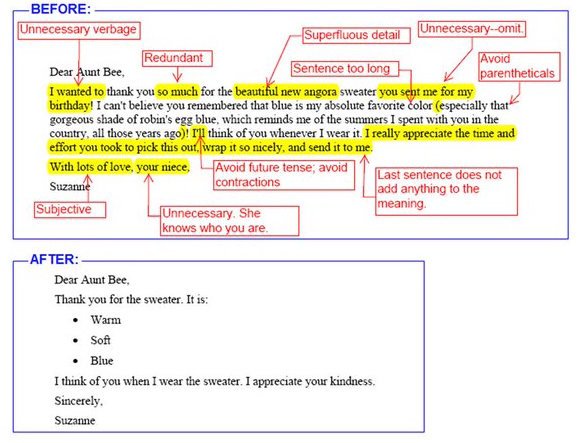
As a person from a Latin background, it is especially hard for me to avoid emotion in my writing. So after many years of hits and misses, I’ve compiled my own guide that helps me stay in check. It is not perfect but I believe it is a good start. Using it helped me to increase the number of hits while lowering the misses and at the end of the day that’s the goal: Not aiming for perfection, but continuous improvement

Interesting thing is, you can use this even when writing in social media. I am also someone who is slowing moving away from the operational IT tasks and more into the business and stakeholder dialogues. Understanding is paramount for this phase of my career.
Oh yeah, before I forget: I don’t care about these recommendations here in my blog. I want my blog to be organic and the closest as possible to the way I speak in real life. Cool?

Checklist for a Better Technical Writing
| # | Check for This… | If Yes, Do This… |
| 1 | Words “I” or “We” | Replace them. The document must be written in the 3rd person |
| 2 | Sentences are written in different verbal tenses | Make sure the whole document is written in past tense |
| 3 | A section called “abbreviation/nomenclature” section in your document | Make sure it towards the start of the document |
| 4 | Use of jargon. (eg.:“the system will go live on xyz”) | Avoid jargon with a clearer expression (“the system will be available for general use on xyz”) |
| 5 | Abbreviations in the “executive summary” or “abstract” sections | avoid them. Expand to their real meaning. |
| 6 | Usage of word “that” | All “that” has to be used when you know whom you are replacing |
| 7 | Usage of word “which” | All “which ” has to be used when you are unsure who is being replaced |
| 8 | Word “So” | Make sure “So” does not start sentences |
| 9 | Word “but” | Replace them with “however” |
| 10 | Word “To” | Make sure it is not at the start or end of a sentence |
| 11 | Words with “-ing” suffix | Make sure they are not starting sentences |
| 12 | Graphics, equations, tables in the document | Make sure they are addressed in a table of contents |
| 13 | Check for judmental constructions “It is very easy to perform the steps A, B, C” or “it is very difficul to determine the result of D, E, F” | Consider removing it or replace with cold, hard construction. What’s easy for you might not be for others and you are telling the readers are incompentent if it does not work. |
| 14 | Statistics and numbers | Make sure their sources are mentioned |
| 15 | Word “will” | Replace them with “may”. |
| 16 | Word “Obvious”, “Of course” | Remove them at once. If it is obvious, no need to state. You’re implying the reader is incompetent. |
| 17 | Sentences with exclamation marks | Remove them at once. |
| 18 | Words “can’t” and “won’t” | Replace them with “cannot” and “will not” |
| 19 | Expressions in parenthesis “()” | Consider replacing them with a comma |
| 20 | Numbers in sentences | Replace for their full wording: “it is 5 MB” should be “it is five megabytes” |
But I am Still an Techie at Heart
and considering that I still love to be a hands-on kind of guy. What you will see now is a series of scripts that can be used in your documents to automate the repetitive task of finding words and expressions that convey a colder and more understandable way to send a message. If you are a techie at heart like me, you will enjoy them

Bash is coming to Windows platform and now there is an expectation that people will quickly pick it up like they did with PowerShell. Once that happens and you also become a fan of Bash, use the following scripts for your work (from Matt):
Bash Script to Find Weasel Words
Weasel phrases or words are those that make you sound too good but does not really convey any meaningful information. Basically they make things unclear for the reader. For example: ”It is quite difficult to find untainted samples” when a better was is “It is difficult to find untainted samples”
#!/bin/bash

weasels="many|various|very|fairly|several|extremely\
|exceedingly|quite|remarkably|few|surprisingly\
|mostly|largely|huge|tiny|((are|is) a number)\
|excellent|interestingly|significantly\
|substantially|clearly|vast|relatively|completely"

wordfile=""

# Check for an alternate weasel file
if [ -f $HOME/etc/words/weasels ]; then
    wordfile="$HOME/etc/words/weasels"
fi

if [ -f $WORDSDIR/weasels ]; then
    wordfile="$WORDSDIR/weasels"
fi

if [ -f words/weasels ]; then
    wordfile="words/weasels"
fi

if [ ! "$wordfile" = "" ]; then
    weasels="xyzabc123";
    for w in `cat $wordfile`; do
        weasels="$weasels|$w"
    done
fi


if [ "$1" = "" ]; then
 echo "usage: `basename $0`  ..."
 exit
fi

egrep -i -n --color "\\b($weasels)\\b" $*

exit $?
Bash Script to Find Passive Voice Usage
Passive voice is a hard one. You can find it everywhere because it is related to the way we think and process sentences. When people advise to read and re-read the text before publishing it, it is because we want to pickup the passive voice. Passive voice usage is bad because often it hides explanatory information, for example: “Termination is guaranteed on any input” instead of “Termination is guaranteed on any input by a finite state-space”
#!/bin/bash irregulars="awoken|\ been|born|beat|\ become|begun|bent|\ beset|bet|bid|\ bidden|bound|bitten|\ bled|blown|broken|\ bred|brought|broadcast|\ built|burnt|burst|\ bought|cast|caught|\ chosen|clung|come|\ cost|crept|cut|\ dealt|dug|dived|\ done|drawn|dreamt|\ driven|drunk|eaten|fallen|\ fed|felt|fought|found|\ fit|fled|flung|flown|\ forbidden|forgotten|\ foregone|forgiven|\ forsaken|frozen|\ gotten|given|gone|\ ground|grown|hung|\ heard|hidden|hit|\ held|hurt|kept|knelt|\ knit|known|laid|led|\ leapt|learnt|left|\ lent|let|lain|lighted|\ lost|made|meant|met|\ misspelt|mistaken|mown|\ overcome|overdone|overtaken|\ overthrown|paid|pled|proven|\ put|quit|read|rid|ridden|\ rung|risen|run|sawn|said|\ seen|sought|sold|sent|\ set|sewn|shaken|shaven|\ shorn|shed|shone|shod|\ shot|shown|shrunk|shut|\ sung|sunk|sat|slept|\ slain|slid|slung|slit|\ smitten|sown|spoken|sped|\ spent|spilt|spun|spit|\ split|spread|sprung|stood|\ stolen|stuck|stung|stunk|\ stridden|struck|strung|\ striven|sworn|swept|\ swollen|swum|swung|taken|\ taught|torn|told|thought|\ thrived|thrown|thrust|\ trodden|understood|upheld|\ upset|woken|worn|woven|\ wed|wept|wound|won|\ withheld|withstood|wrung|\ written" if [ "$1" = "" ]; then echo "usage: `basename $0`..." exit fi egrep -n -i --color \ "\\b(am|are|were|being|is|been|was|be)\ \\b[ ]*(\w+ed|($irregulars))\\b" $* exit $?
Perl Script to Find Lexical Illusions
A lexical illusion is another form of visual illusion, normally happening when a like break contains repeated words but due to the way we read things, it is not easily spotted. Microsoft Word has actually a very good Lexical Illusion detection feature but still a lot of those can be left in place.

#!/usr/bin/env perl

# Finds duplicate adjacent words.

use strict ;

my $DupCount = 0 ;

if (!@ARGV) {
  print "usage: dups  ...\n" ;
  exit ;
}

while (1) {
  my $FileName = shift @ARGV ;

  # Exit code = number of duplicates found.
  exit $DupCount if (!$FileName) ;

  open FILE, $FileName or die $!;

  my $LastWord = "" ;
  my $LineNum = 0 ;

  while () {
    chomp ;

    $LineNum ++ ;

    my @words = split (/(\W+)/) ;

    foreach my $word (@words) {
      # Skip spaces:
      next if $word =~ /^\s*$/ ;

      # Skip punctuation:
      if ($word =~ /^\W+$/) {
        $LastWord = "" ;
        next ;
      }

      # Found a dup?
      if (lc($word) eq lc($LastWord)) {
        print "$FileName:$LineNum $word\n" ;
        $DupCount ++ ;
      } # Thanks to Sean Cronin for tip on case.

      # Mark this as the last word:
      $LastWord = $word ;
    }
  }

  close FILE ;
}
For more tips, you can have a look at http://matt.might.net/articles/shell-scripts-for-passive-voice-weasel-words-duplicates/
So there you go. These are my tips. Share yours in the comments and I will include them here and credit it to you.
Monday, May 2, 2016T5/02/2016 04:31:00 PM
by
I’ll be at the GovHack Australia 2016!
Labels:
Code,
General,
Office365,
ProjectManagement,
security
I am humbled, honoured and excited to be part of the GovHack Australia 2016. I will be there as a Team Leader helping with the idea and concepts of the solution. If you never heard about this event, let me explain a bit more about what it is.

What is GovHack?
GovHack is an event that build teams to create innovative solutions using Open Government Data. Teams are formed with project managers, entrepreneurs, developers, designers, researchers, open data enthusiasts etc. Even story tellers are in there 
What is a Hack?
A hack is to take something and make it better. Our teams will look at the available data exposed by open government data sources and make a cool, useful and engaging application.
How Does it Work?
On the Friday night launch the competition categories are announced, the teams are formed and the event runs for the next 46 hours. The teams will then look at the datasets and create things with them. The best applications are in for prizes in International, National and Local categories. At the end of the GovHack a proof-of-concept and a video are created explaining the solution. Teams work through the weekend and by Sunday 5pm a 3 minute video of your concept and any code/source materials must be made public.
When is GovHack Happening?
In 2016, GovHack will happen from 29th to 31st July. Yep, the Prime-Minister supports it
Who is Behind the GovHack?
This is a non-profit event proudly run by volunteers who form the GovHack Coordination Team. Our ongoing thanks to everyone who gets involved and makes GovHack awesome! That is, the hackers, data providers, sponsors, mentors and a special thanks to the volunteers who run Local GovHack events.
Who is Sponsoring GovHack Australia 2016?
Several big IT companies and Fare behind this effort such as:


Monday, October 12, 2015T10/12/2015 04:30:00 PM
by
I’m Speaking at the Office 365 Saturday Australia 2015 #o365cbr
Labels:
BYOD,
General,
Office365,
ProjectManagement
I am delighted and humbled to have been confirmed again as a speaker for Office 365 Australia.
This fantastic event is held in most capital cities in Australia throughout the year. At each event there are no less than 10 fantastic sessions covering all aspects of Office 365 presented by respected professionals in various fields.

Join administrators, end users, architects, developers, and other professionals that work with Microsoft Technologies for a great day of awesome sessions presented by industry experts.
The Session
My Session is called "eDiscovery and Privacy: All your data are belong to us!"
Abstract: "In the 90s, Legal and IT professionals began compiling computer data and legislation, eDiscovery started its first steps. Back then, nobody would believe email, let alone social media, could be used in court. 20 years later, eDiscovery is here to stay, but is the industry prepared?"
In this session, we will talk about the biggest challenges for eDiscovery and some solutions in the works, with focus on Office 365 technologies."

When and Where
O365 Saturday will happen in Canberra, Australia on 24th October at Cliftons - 10 Moore Street, Canberra ACT 2601. Registrations start at 8:30am.
Come and join the fun. This is a great opportunity to meet with our community, connect and grow friendships and discuss real life, everyday challenges with likeminded folks.
Thursday, October 8, 2015T10/08/2015 02:10:00 PM
by
A Cloud Data Governance Model for Office 365 Delivery
Labels:
General,
Office365,
ProjectManagement,
sharepoint
If you have ever been involved in enterprise-wide cloud or collaboration projects (specially using SharePoint) you have heard about governance every second-day. Governance is a big ticket these days to tackle in every serious IT project.
Quickly summarizing, governance is the set all processes of "governing" (as in state governments) the interaction and decision-making steps for a scenario or problem. This set of processes are then normally compiled into a piece of work that outlines how to enforce these rules in the big picture and make sure they are adhered and followed. This is a broad explanation, and because IT is so complex and vast every time someone talks about governance, it is always followed by an area and never a single-monolithic set of rules. That's why we hear about: SharePoint Governance, Cloud Access Governance and so on.
Anyway, today we will talk about cloud data governance. The need this has always been a recurring theme when we talk about data protection and compliance. With Office 365 it wouldn't be different.
Cloud data governance is important because without it, any data protection strategy you want to apply to our Office 365 enterprise compliance will be like a silo, isolated.
For starters, let's try to get a generic picture of data governance and break it down to a bit more specialized areas.
Please bear with me and allow me to start a very simple and generic Cloud Data Governance model which can be used for a classic Office 365 collaboration project. One that can be easily categorized in: Foundations and Leadership.

Leadership is About Structure
Leadership is about structure and the programs that drive the governance enforcement. Executive powers in this category covers what organizational management tasks are required to make sure an ongoing commitment is established and cascaded down to the peers. Data Stewards and Custodians make sure that the RACI matrix is cleared, covering the roles and responsibilities of every individual affected directly or indirectly by the governance plan is addresses.
Foundation is About Initiatives
Foundation is about initiatives that as a whole covers the basics on the compliance, authorities and risk management.
Thinks like business continuity (including disaster recovery) addresses the risk management responsibilities. When events happen which causes the data to change during its lifecycle, the information lifecycle management kicks in, making sure these audit trails are aligned with your data protection rules.
Under the foundational stones, we also can include data architecture addressing master data management; Retention management to make sure analysis tolls are fully functional and addressing data requirements updates for keeping and trashing of data; Data quality to make sure the data is healthy and in perfect quality for its usage; and as expected, Security which in our cloud case addresses data classification and confidentiality. Security can't cover much more than this because, remember we are talking about Microsoft cloud infrastructure, and most of the other aspects are taken care of by the Microsoft security team. There is only so much further we can go on it.
This graph is a quick illustration of what an average cloud data governance looks like from a helicopter view. It does not mean that it covers everything your organization needs. Likewise, it also does not mean that every single data governance control needs to be associated with data protection. The main goal here is not achieve 100% of security (which is in itself, quite a task if you ask me) but instead to minimize the gaps and the surface for attacks and breaches.
The broader you start with your cloud data governance picture the better it is, because it will be like a beacon providing guidance for big and small pieces of projects going on. And at the end of the day, project teams want to have something to aim for. The governance strategy is not static, it adapts to the needs and if something is missing, generally there is no issue, just address it in the strategy and make sure the communication plan is in place for it.
Subscribe to:
Posts (Atom)