Watch me here http://projectvirtualconference.com and join the conversation!
Showing posts with label sharepoint. Show all posts
Showing posts with label sharepoint. Show all posts
Wednesday, June 6, 2018T6/06/2018 12:18:00 PM
by


2018 Virtual Project Conference - Your Project Online Migration Will Fail, Unless You Do This...
Labels:
cloud,
cycling,
General,
Office365,
ProjectManagement,
sharepoint,
videos
It is my privilege to present @ Project Virtual Conference. Let's talk about project delivery, migrations and cycling.
Watch me here http://projectvirtualconference.com and join the conversation!
Watch me here http://projectvirtualconference.com and join the conversation!

Friday, November 3, 2017T11/03/2017 01:44:00 AM
by
Live Show: Business Productivity Reinvented
Labels:
BYOD,
cloud,
General,
Office365,
ProjectManagement,
security,
sharepoint,
videos

Title: Productivity Reinvented
Session Abstract: Edge is joined by Ryan Darby to discuss how Office 365 is Microsoft's fastest-growing commercial product ever and is now the number one deployed application in the enterprise. It is the company's most profitable business and productivity product. but how does this translates into productivity for business users and project delivery.
Suitable For : Business Analyst, Consultant, IT Architect, IT Pro, Sales
Track : Collab365 Live Show
Live Video : Live Show – Business Productivity Reinvented
T11/03/2017 01:39:00 AM
by
Live Show: Office 365 User Adoption
Labels:
BYOD,
cloud,
General,
Office365,
ProjectManagement,
security,
sharepoint,
videos

Title: Office 365 User Adoption
Session Abstract: In this session Edge is joined by Sonia Cuff MVP and Paul Woods.
End-users often see technology from a very personal point of view. While IT is likely focused with the mechanics and logistics, your clients, the users are scratching their heads thinking "what's the real benefit here?". Cue for the adoption strategy. With Office 365 becoming so pervasive in our business, adoption is now a key consideration in any rollout. Let's discuss the challenges, the goals and risks of this fascinating topic.
Suitable For : Administrator, CIO, COO, CFO, CMO, CTO, End User, Power User
Track : Collab365 Live Show
Live Video: Live Show – Office 365 User Adoption
T11/03/2017 01:30:00 AM
by
Collab 365 Conference: 10 Myths About Moving Your Project Management to the Cloud
Labels:
cloud,
General,
Office365,
ProjectManagement,
security,
sharepoint

Title: 10 Myths About Moving Your Project Management to the Cloud
Session Abstract: Most companies that go to the cloud do so because they need business agility and cost savings. But how can you know if you're getting all the benefits? Or worse, what are you missing? Let's separate fact from fiction and bust these 10 myths about moving your projects to the cloud.
You Will Learn :
- How to make your projects more agile and effective
- How to increase savings on your projects
- Cloud security
- Protecting your business against hackers in the cloud
Suitable For : Business Analyst
Download Slides: Collab 365 – Edge Pereira - 10 Myths About Moving Your Project Management to the Cloud
Tuesday, September 5, 2017T9/05/2017 05:42:00 PM
by
Are You Ready? Guest Access in Microsoft Teams is Coming !!
Labels:
cloud,
General,
Office365,
ProjectManagement,
sharepoint
Microsoft Teams is fantastic! It is the ultimate collaboration tool for your business without all the heavyweight of SharePoint.
If your team have Office 365 and use Skype for Business you will love Microsoft Teams! I love Teams, my team love Teams, my customers love Teams…there is only a problem: my customers and my team cannot use Teams in the same project. Sad face! 
Microsoft actually promised this when they launched Teams…you know… that you could invite external folks to your conversation. That promise never eventuated…Until now. Happy Face! 

Guest Access for Microsoft Teams
In June 2017, a few lucky folks started to use guest access in Teams, but then somehow Microsoft went silent on it. Maybe they are doing a closed POC, I thought. So I asked around and actually that’s the case, they have a group of people testing this feature.

If only I had this for my projects I would be a happy chap ….
Microsoft Teams, please I want to be loved!!
Public Access, Anytime, Anywhere, Everywhere, for All Your Team Mates!!
And the best part I noticed: This test is not only internal. The people testing guest access are actual Office 365 people in the wild! It means, yeah you too can soon give it a try.
Anyone keen to invite me to pilot-test it this feature
Why Guest Access Matters?
This is an massive step forward for Teams as many people often work with 3rd parties. I lost count of how many times I went to my customers and thought about it: “oh man, if only I could bring you guys to our common Teams umbrella…oh well, we’ll have to use Groups with External Access”
Guest access matters because without it Teams is a cut-down version of Slack…and we want Teams to be ABOVE Slack…To make it AWESOME!!

Are you part of this Microsoft Teams Guest Access trial? Let me know! I want to have a chat with you!!
Monday, July 3, 2017T7/03/2017 04:45:00 PM
by
I am Speaking at the Collab365 2016 Event
Labels:
BYOD,
General,
Office365,
ProjectManagement,
security,
sharepoint,
videos
Once again I got confirmed as a speaker for the Collab365 Conference. This is one of the coolest conferences around from the people organizing it to the folks participating online. A single session can easily reach thousands of people, so you can imagine my excitement. And as a plus, it is always great being at Microsoft HQ in Redmond. Also a good time to reconnect with folks from the Office 365 team in their offices. (*cough*also visit the Microsoft store*cough*)

My session is as usual around Office 365 Compliance and Data Protection and it is called: "Office 365 eDiscovery: DLP for your Business and Your Data".
Join the Collab365 Summit and watch the sessions, there is an incredible amount of brilliant minds and souls behind this event, doing this for the community at large.
Where Can You Get More Information and Watch the Sessions?
Go to http://collab365.events/collab365-summit-2016/ . You can also follow the twitter @Colla365 and the hashtag #Collab365
Also, who doesn’t love an opportunity to visit Microsoft Headquarters in Redmond


Monday, May 22, 2017T5/22/2017 05:10:00 PM
by
My Project Online Administrator is Locked! How to Fix?
Labels:
cloud,
General,
Office365,
ProjectManagement,
security,
sharepoint
Today I've got a call from a very worried customer: "Help, our Project Online Administrator got locked out! What do we do???"

First, let's bring calm into the conversation. You know people will live after that. If your Project Administrator got locked don't panic, the site collection administrator automatically has administrative privileges. So to fix it quickly, ask the tenant or SharePoint online admin to fix this for you and assign you or someone as site collection admin and then you can go and fix the Project Admin. Done!
Now let’s talk about the B-side.
First, How Did you Get Into this Situation?

I know, soul searching is not easy. If you know what caused the issue, great otherwise you should start asking questions. That's a very important first step to understand what happened. Generally think about the last steps performed in the site. Look for things like:
- Any changes happened to the Administrators in Project Server or in the Administrators from Active Directory
- Any synchronization happened to the AD group in the Resource Center. Maybe this happened and your Admin became inactive.
- Any bulk password changes happened in your organization
- Any user migration recently happened in your organization
You know, things like this to give you a sense of what caused the issue.
So well done! You fixed the problem and you understood what happened.

Let's Learn from this Event…
Let's lay the basics out here. Your company's Office 365 tenant have:
- A global administrator,
- A SharePoint administrator,
- A site collection administrator,
- A Project Online administrator.
Experience tells us that 90% of the time, there is someone which is incorporate ALL of these roles. Pick the person that is the Global Administrator and let's have a chat with this person and find out if anything special has been done to the Project Administration role. If this is the person that helped you reverting the situation as we talked before, even better. Discuss the situation with him/her. Share with him what you think caused the lock.
What About Licencing?
Often times Active Directory changes alone can fix lockout situations, in these cases a site collection admin does not require a dedicated Project Online license. The challenge here is sometimes to fix the issue, the person needs to log into Project Online and in this circumstance the site collection administrator needs a Project Online license. It’s possible that he or she already has one.
I Don't Have Licences Left. What Do I Do?
You can temporarily remove licences from an user and assign to other for this. The licences are not named licences, so that's a perfectly legal manoeuvre. Better yet, remove the license assigned to the locked out user since he/she is not able to use it anyway while you fix this.
Tuesday, April 11, 2017T4/11/2017 03:21:00 PM
by
Managing Thousands of Projects in Project Online
Labels:
cloud,
Office365,
ProjectManagement,
sharepoint,
windows
If you work with Microsoft Project Online you know how great this product is at streamlining project, resource and portfolio management activities. All this is for a single purpose, to allow you to deliver better projects, on time, on budget.
And now a few changes were released this month. Let have a look at 2 very special ones that I would like you to know:
Create and Manage Up to 30,000 Projects
Traditionally, Project Online allowed for up 5,000 projects. Starting April/2017 this limit will have a significant jump. 6x to be more precise. Now project managers will be able to create and manage up to 30,000 projects in the cloud using Project Online. What was already a fantastic number, now has just increased to great lengths.
Why This is Good?
It offers a better scale, 30,000 projects allows for a much bigger room to move and improve and at the same time offer more flexibility to get more things done.

Pick and Choose the Site URL for your Project Site Configuration
Another great improvement on the way things are done in Project Online is on how information is organized in SharePoint sites. Now project managers can create more project sites and every project now can have a 1-1 relationship with their project site.
Why This is Good?
Again, traditionally this number was limited to 2,000. Often times more sites were needed but this limit was reached, then what people used to do was to split your landscape into several PWA sites, which then extended to another batch of 2,000 sites but the trade-off was that it impacted in the team productivity with a fragmented environment.
…One More Great News Before You Go…
In addition to these great improvements, there is one more fantastic improvement done in Project Online this month: Now users can set the destination URL of the project sites in the Enterprise Project Type template. This not only helps with the meta-hierarchical structure of the organization but also streamlines the process of project creation allocating sites based on similarities and functional equivalences.
How It Works?
For example, if you company has a site collection dedicated to a specific department and all sites are located on it (Sales, Marketing, IT etc), let’s call it https://superedge.sharepoint.com/sites/demo for demonstration purposes, now you can configure your all your departmental projects EPT to provision sites directly into this site collection

You do this by going into each EPT, then in the Project Site section, select Allow users to choose:

What if You Can’t See these Things in Your Environment…
This is a Question that many times people ask me when they see these cool announcements and all the new features and yet they don’t seem to get them. Don’t worry, that’s the nature of Office 365 Releases. Releases are done by zones and via multiple channels. Very often these changes are done slowly and according to geographic zones, so if you don’t see them yet, don’t worry. They are coming!
Wednesday, March 15, 2017T3/15/2017 12:30:00 PM
by
Why Cloud Projects Fail?
Labels:
cloud,
Office365,
ProjectManagement,
sharepoint
Businesses are moving to the cloud faster than ever with the premise that, in the cloud, project challenges can be tackled faster and efficiently. Yet, new research reports staggering cloud project failure rates. In this session we will discuss the 6 not-so-obvious reasons cloud projects fail and fool proof strategies to make sure project managers are prepared for them.
Thank you everyone who took the time to join the webinar and discuss this very interesting topic. Fee free to reach out to continue the conversation!
Presentation slides can be downloaded here: The 6-not-so-obvious Reasons Why Cloud Projects Fail

Wednesday, September 14, 2016T9/14/2016 02:25:00 PM
by
How Secure is my Data in the Cloud?
This is by far the most common question I get when talking to people about cloud migrations. And rightly so, information security (together with data privacy) is amongst the top concerns for businesses looking to go to the cloud computing.

To be quite frank:
- Generally the data stored in the cloud is very secure and
- Most likely it is safer then it currently is in your company.
A New Model Brings New Threats
Now let’s not make a mistake here, cloud computing does raises security issues that are not typically found when your data is stored on-premises in your own building. So much so that industry standards are still adapting to cloud specific challenges. For example, not many people realises that your company data might be stored in a common datacenter where data from other companies are stored as well. The concept of multi-tenancy scares a hell of a lot of people.
Who is Ultimately Responsible for Securing my Information?
This is an important question and before we answer that, let’s take a step back and discuss the matrix of responsibility here. To answer that question, first we need to assert the nature of the information stored because it is the data sensitivity who will dictate the level of infrastructure security necessary.
OK, so now that we have that in mind, the second part is about addressing the responsibility. The cloud provider is most likely to be responsible for the security and privacy controls which will be available to you.
Then now you have it:
- The cloud provider is responsible for the infrastructure lockdown, and
- the customer is the one who drives the data protection requirements.
It does not matter that you store your data in the cloud but still uses weak password controls or poorly governed processes around your business and data access, right? That’s why a proper cloud security assessment is so important because most likely, when a data breach happens it is because of you. Don’t be ashamed to assume if you have, weak security controls is something very pervasive in our industry as you can see here.
What Are my Responsibilities as a Cloud Customer?
You need to understand what security controls your business need, what data breach controls you want, what regulatory needs your industry requires etc. Cloud companies like Microsoft or Amazon won’t know that. It is your job to know that and bring it to the discussion table. Like I said before, these cloud companies are extremely capable and secure so normally it is up to the customer to up their game.
In short you as a customer have to:
- Understand your data sensitivity
- Ensure your chosen cloud provider offers the controls your business need
So there you have it. Generally the conversation here evolves to “So nothing ever goes wrong in the cloud? Are you telling me that data breaches never happen?”…no, but this is a talk for another day.
See ya later!
Tuesday, August 23, 2016T8/23/2016 04:49:00 PM
by
From #AshleyMadison to #PanamaPapers : Office 365 is Bringing Sexy Back to Cloud Compliance and #eDiscovery
Labels:
BYOD,
Code,
Office365,
security,
sharepoint
When a data leak happens and people are affected judicially, specially suing and being sued, this starts a very long, tiring and expensive process. eDiscovery is one of the most complex parts of the whole game.
In this session we will talk about what’s eDiscovery, how big companies do it, how expensive it is and how can Office 365 help you. So if you are around Brisbane, Australia on April 14th come and join us. Bring your laptops, tablets, iPads, mobile and we will do some demos and play some roles. It will be fun

Where Can I Get the Presentation Slides?


Wednesday, August 3, 2016T8/03/2016 04:49:00 PM
by
Microsoft EMS Usergroup Presentation: EMS - Everybody Together Now!
I love talking to the local cloud community. These guys are a good bunch of folks that put their own time and resources to bring innovative and up-to-date content for everyone to see for free! Big shout of to Aaron, from Microsoft for the support.
This week I presented to the Microsoft Cloud User Group in Brisbane, Australia. We talked about EMS in a demo-heavy session!

For this session we set vert ambitious targets in terms of demos. My opinion is that EMS is a fantastic but only through hands-on experience is how people realise the value proposition of this product. We ended up doing 40 minutes of demos with Q&A as needed. Great engagement!
BYOD Device Management and ATA Advanced Threat Analytics


Where Can I Get the Presentation Slides ?
If you’re interested in the slides, they are here: EMS Everybody Together now! – Microsoft Brisbane Cloud Usergroup
As always, feel free to reach out if you would like to know more.
Friday, July 1, 2016T7/01/2016 04:42:00 PM
by
IoT, Office 365 and the Prime Position of STEM Kids in Australia
5 million new IoT (Internet of Things) devices will come online every day in 2016. How can companies join the party for a piece of this 50 billion dollars’ cake?
Come to Microsoft Innovation Centre in Brisbane (level 28, 400 George st, Brisbane) and join me to discuss:
- The state of connected devices in Australia,
- How can we use IoT and Office 365, and
- Why Australians are in a prime position to lead the world in this area and the role of the STEM programs for kids is an important strategic move in the innovation agenda.


Where Can I Download the Presentation Slides?
Thursday, April 21, 2016T4/21/2016 12:23:00 PM
by
How to Setup a Private Network Connection to your Office 365 ?
Labels:
BYOD,
General,
Office365,
security,
sharepoint
Here’s a question I get quite often during my compliance and data protection presentations. I thought about writing this post so I can easily redirect folks here. I am all about reusing explanations
Is it Possible to Have a Secure Tunnel Connection to SharePoint Online? My Own Private Connection?
Yes, it is. Using Express Route. Not only to SharePoint Online, but to the whole Office 365. I would say, 80% of the time when folks are looking for this answer is because they are talking about a hybrid environment where they want to integrate their SharePoint on-premise with SharePoint Online and normally involved handling sensitive data.

What is Express Route and What it Does?
ExpressRoute initially was an Azure-only solution that got expanded to Office 365. It’s goal is to establish a private and managed connection to Office 365. What it does is to provide a dedicated network connectivity through a private connection from their (users) network to Microsoft Azure or Office 365.
How Does it Look Like from a Helicopter View?
Here’s a simple diagram of how ExpressRoute can be used with Office 365.

Will Having my Own Private Network to Office 365 Impact Performance?
Yes and No. Network performance will be as predictable as your own on-premises environments, it is up to you then to take care of your own network performance, of course. In some ways this is like having an Office 365 environment in your own datacenter. One added benefit you will certainly have is that using ExpressRoute most Office 365 network traffic can be configured to avoid the public Internet, providing additional data privacy. And here is your answer for privacy and sensitivity concerns.
As usual, your data is still your data.
Who Are the Best Candidates to Use Express Route with Office 365?
Organizations that require a higher class, premium managed connectivity to the cloud. Governments also can use it. Actually Microsoft did this as a development of the famous Safe Harbour case issue.
What if my Company has Multiple Locations Across the Globe?
No worries. ExpressRoute offers something called “circuits” that applies the traffic to different geographic locations with redundancy and geo-resiliency.

Explain a Bit More What these Circuits are…
OK, so these ExpressRoute Circuit are geographically distributed connections that delivers by default 2 active physical connections for high availability. The networking elements are still backed by Microsoft’s connection uptime SLA (99.9 %). On a cool note, as of today, Microsoft is the only public cloud provider to offer this level of guaranteed availability for the connection. An additional benefit is that if you have Azure applications, you can this same single ExpressRoute connection.

How Do I Buy ExpressRoute?
There is no additional licensing costs to use ExpressRoute, however not everyone can guarantee these circuits for you, so you will have to work with the Microsoft Cloud Approved Providers. These guys can guarantee the premium network connectivity required by Microsoft and they have their own price list. Here’s a list of the MS Cloud Approved Providers for your query.
I Want It!! What Should I Do?
Network capacity plan. I mean, you are deciding to setup your own private connection to the public cloud, you’ve got to do your homework 
Good Luck. If you’ve done an ExpressRoute for Office 365 project, share your thoughts with the wider community. Love to hear from you.
See ya!
Sunday, March 20, 2016T3/20/2016 04:13:00 PM
by
InfoPath on SharePoint Online error: “This form cannot be opened in a web browser. To open this form, use InfoPath”
Labels:
Office365,
sharepoint
Here’s an annoying error you might experience when using InfoPath Forms with Office 365 (SharePoint Online).
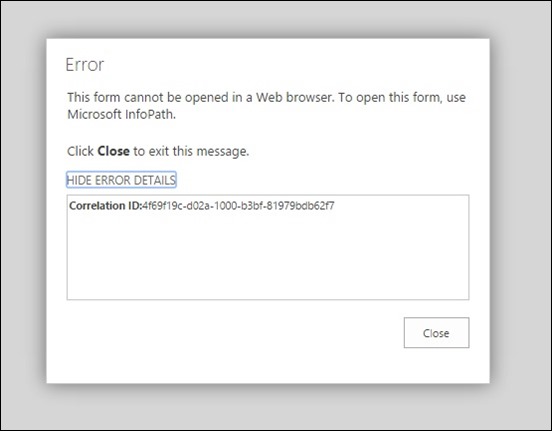
So to save your time, let’s go straight to the solution:
Enable Form Rendering in the Office 365 Admin Console
Go to your Office 365 Portal (http://portal.office.com) and choose Admin console.


Then Enable Form Templates Rendering for Browsers
You will see a warning about InfoPath being discontinued in the future, don’t worry about it for the moment, this is another discussion. For now, you just want to get this done.


Re-publish Your InfoPath Form Again
Now, what you have to do is to:
- Close your browser session
- Republish your InfoPath Form
Note that at the end you will see Security Level: Domain. If you see this, it means it worked. Previously you would see Security Level: Restricted.

That’s it! I hope this was helpful to you and saved you a couple of hours banging your head against the Surface keyboard

Friday, December 4, 2015T12/04/2015 04:00:00 PM
by
I Am Presenting at the Azure Smorgasbord in December 2015
How does your day look like on December 9th 2015?
Come join me a Microsoft to discuss and share ideas about IoT, Azure and Office 365 in Australia.

Session Name: “IoT - The Invasion of Australia”
Abstract: “Five million new IoT devices will come online every day in 2016. Do you want a piece of this 50 billion dollar cake? Join Edge Pereira to discuss a use case of IoT in Australia and why we are in a prime position to lead the world in this area.”
Where Can I Find the Presentation Slides?
Wednesday, December 2, 2015T12/02/2015 01:44:00 PM
by
Hour of Code 2015. I am Volunteer. Again.
Once again this year I am volunteering time for the Hour of Code. And proud of it. Listen what Bill Gates, Mark Zuckerberg, Jack Dorsey and others have to say about this event.
What is the Hour of Code?
Launched in 2013, Code.org is a non-profit dedicated to expanding access to computer science, and increasing participation by women and underrepresented students. The vision is that every student in every school should have the opportunity to learn computer science. Code.org believes that computer science should be part of core curriculum, alongside other courses such as biology, chemistry or algebra.

When It Happens?
Volunteers from all over the world help local teachers and their classes during the Computer Science Education Week that happens every year in December. This year it will be from December 7th to 13th.
How Can You Help?
We have this year 13.000 requests from teachers from all over the world, but only 4.000 volunteers. We need volunteers to help with the activities and help the teachers. Here are a few things you can do also to get involved:
- Recruit co-workers to volunteer: Blog, share, tell your friends and co-workers about the Hour of Code and ask them to sign up as a volunteer.
- If you know someone who’s a volunteer, connect them with people who wants to setup Hour of Code parties.
I Want to be a Volunteer. What Do I Need to Do?
To get a better idea about what your volunteer experience will be like, have a look at this guide. There's also some extra tips about how you can get your employer and community involved with the Hour of Code.
If you know anyone needing help with it, feel free to connect with me. Remember: I am a volunteer!

Sunday, November 22, 2015T11/22/2015 01:02:00 PM
by
Infrastructure Saturday 2015 Social Media Stats #infrasat
Labels:
General,
Office365,
security,
sharepoint,
windows
We’ve just done another successful Infrastructure Saturday event. It takes a lot of time and passion to setup personal time aside and to organize such an event. This is an annual event totally built and sponsored by the community, so the people you find there (attending, organizing or presenting) are 100% committed to the cause. Big shout for the guys organizing: Alan Burchill and Shane Hoey
Below are some of the social media stats collected during the last week up to the event day. This years top contributors were: JustBroady, superedge, david_obrien, pzerger, cloudtidings, bneusergroup, alanburchill, twalex2, blkchninstitute, reecestewart4
If you’ve been to the sessions, thank you very much. I hoped you enjoyed and see you next year.


Top Links about the #infrasat Infrastructure Saturday 2015 Event
- https://www.flickr.com/photos/alborath/albums/72157660731316669
- https://twitter.com/DigitalGlobe/status/667834517428682752
- https://code.visualstudio.com
- http://www.infrastructuresaturday.com/
- http://www.superedge.net/2015/11/ethereum-blockchain-service-bitcoin.html
- https://lnkd.in/b_GeEXZ
- https://lnkd.in/bk9tVcN
- https://doc.co/75WgEz
- http://www.linkedin.com/pulse/want-increase-privacy-protection-your-cloud-data-worries-edge-pereira
- http://www.infrastructuresaturday.com
- http://infrastructuresaturday.org
- https://lnkd.in/buajN7R
- https://lnkd.in/bkYJbY4
- https://lnkd.in/bBgh534
- http://www.superedge.net/2015/11/infrastructure-saturday-2015-australia.html
- https://lnkd.in/bhp3pyZ
Subscribe to:
Posts (Atom)