Watch me here http://projectvirtualconference.com and join the conversation!
Showing posts with label cloud. Show all posts
Showing posts with label cloud. Show all posts
Wednesday, June 6, 2018T6/06/2018 12:18:00 PM
by


2018 Virtual Project Conference - Your Project Online Migration Will Fail, Unless You Do This...
Labels:
cloud,
cycling,
General,
Office365,
ProjectManagement,
sharepoint,
videos
It is my privilege to present @ Project Virtual Conference. Let's talk about project delivery, migrations and cycling.
Watch me here http://projectvirtualconference.com and join the conversation!
Watch me here http://projectvirtualconference.com and join the conversation!

Friday, November 3, 2017T11/03/2017 01:44:00 AM
by
Live Show: Business Productivity Reinvented
Labels:
BYOD,
cloud,
General,
Office365,
ProjectManagement,
security,
sharepoint,
videos

Title: Productivity Reinvented
Session Abstract: Edge is joined by Ryan Darby to discuss how Office 365 is Microsoft's fastest-growing commercial product ever and is now the number one deployed application in the enterprise. It is the company's most profitable business and productivity product. but how does this translates into productivity for business users and project delivery.
Suitable For : Business Analyst, Consultant, IT Architect, IT Pro, Sales
Track : Collab365 Live Show
Live Video : Live Show – Business Productivity Reinvented
T11/03/2017 01:39:00 AM
by
Live Show: Office 365 User Adoption
Labels:
BYOD,
cloud,
General,
Office365,
ProjectManagement,
security,
sharepoint,
videos

Title: Office 365 User Adoption
Session Abstract: In this session Edge is joined by Sonia Cuff MVP and Paul Woods.
End-users often see technology from a very personal point of view. While IT is likely focused with the mechanics and logistics, your clients, the users are scratching their heads thinking "what's the real benefit here?". Cue for the adoption strategy. With Office 365 becoming so pervasive in our business, adoption is now a key consideration in any rollout. Let's discuss the challenges, the goals and risks of this fascinating topic.
Suitable For : Administrator, CIO, COO, CFO, CMO, CTO, End User, Power User
Track : Collab365 Live Show
Live Video: Live Show – Office 365 User Adoption
T11/03/2017 01:30:00 AM
by
Collab 365 Conference: 10 Myths About Moving Your Project Management to the Cloud
Labels:
cloud,
General,
Office365,
ProjectManagement,
security,
sharepoint

Title: 10 Myths About Moving Your Project Management to the Cloud
Session Abstract: Most companies that go to the cloud do so because they need business agility and cost savings. But how can you know if you're getting all the benefits? Or worse, what are you missing? Let's separate fact from fiction and bust these 10 myths about moving your projects to the cloud.
You Will Learn :
- How to make your projects more agile and effective
- How to increase savings on your projects
- Cloud security
- Protecting your business against hackers in the cloud
Suitable For : Business Analyst
Download Slides: Collab 365 – Edge Pereira - 10 Myths About Moving Your Project Management to the Cloud
T11/03/2017 01:23:00 AM
by
Collab365 Conference: How the Jedi Use Project Online to Manage Projects
Labels:
cloud,
General,
Office365,
ProjectManagement

Title: How the Jedi Use Project Online to Manage Projects
Session Abstract: A city-planet, Coruscant is the vibrant heart and capital of the galaxy, home of the Jedi. Let's have a look how they use Project Online to manage government projects. From citizen's ideas list to final infrastructure delivery.
You Will Learn :
- What is and how can you use Project Online
- How to manage projects using Project Online
- How Project Online integrates with other systems
- The project manager track from newbie to expert
Suitable For : Administrator, End User, Power User
Download Slides: Collab 365 Conference – Edge Pereira - How the Jedi Use Project Online to Manage Projects ?
Tuesday, September 5, 2017T9/05/2017 05:42:00 PM
by
Are You Ready? Guest Access in Microsoft Teams is Coming !!
Labels:
cloud,
General,
Office365,
ProjectManagement,
sharepoint
Microsoft Teams is fantastic! It is the ultimate collaboration tool for your business without all the heavyweight of SharePoint.
If your team have Office 365 and use Skype for Business you will love Microsoft Teams! I love Teams, my team love Teams, my customers love Teams…there is only a problem: my customers and my team cannot use Teams in the same project. Sad face! 
Microsoft actually promised this when they launched Teams…you know… that you could invite external folks to your conversation. That promise never eventuated…Until now. Happy Face! 

Guest Access for Microsoft Teams
In June 2017, a few lucky folks started to use guest access in Teams, but then somehow Microsoft went silent on it. Maybe they are doing a closed POC, I thought. So I asked around and actually that’s the case, they have a group of people testing this feature.

If only I had this for my projects I would be a happy chap ….
Microsoft Teams, please I want to be loved!!
Public Access, Anytime, Anywhere, Everywhere, for All Your Team Mates!!
And the best part I noticed: This test is not only internal. The people testing guest access are actual Office 365 people in the wild! It means, yeah you too can soon give it a try.
Anyone keen to invite me to pilot-test it this feature
Why Guest Access Matters?
This is an massive step forward for Teams as many people often work with 3rd parties. I lost count of how many times I went to my customers and thought about it: “oh man, if only I could bring you guys to our common Teams umbrella…oh well, we’ll have to use Groups with External Access”
Guest access matters because without it Teams is a cut-down version of Slack…and we want Teams to be ABOVE Slack…To make it AWESOME!!

Are you part of this Microsoft Teams Guest Access trial? Let me know! I want to have a chat with you!!
Wednesday, July 5, 2017T7/05/2017 01:58:00 PM
by
How To: SQL to Calculate Average of non-Zeroes from a List of Values
I don’t do much coding these days but here’s one I’ve done recently and thought about keeping it for future reference

For a list of values, how to calculate the average only using the ones which are non-zeros?
CREATE FUNCTION dbo.fn_AverageNonZeroes
(@para int, @parb int, @parc int, @pard int, @pare int)
RETURNS DECIMAL(4,2)
AS
BEGIN
DECLARE @average DECIMAL(4,2)DECLARE @a DECIMAL(4,2)
DECLARE @b DECIMAL(4,2)
DECLARE @c DECIMAL(4,2)
DECLARE @d DECIMAL(4,2)
DECLARE @e DECIMAL(4,2)SET @a=CONVERT(DECIMAL(4,2),@para)
SET @b=CONVERT(DECIMAL(4,2),@parb)
SET @c=CONVERT(DECIMAL(4,2),@parc)
SET @d=CONVERT(DECIMAL(4,2),@pard)
SET @e=CONVERT(DECIMAL(4,2),@pare)IF @a>0 OR @b>0 or @c>0 or @d>0 or @e>0
SELECT @average=(@a + @b + @c +@d + @e)
/
(0+
CASE WHEN @a=0 THEN 0 ELSE 1 END +
CASE WHEN @b=0 THEN 0 ELSE 1 END +
CASE WHEN @c=0 THEN 0 ELSE 1 END +
CASE WHEN @d=0 THEN 0 ELSE 1 END +
CASE WHEN @e=0 THEN 0 ELSE 1 END
)
ELSE
SELECT @average=0.0
RETURN @average
END
Tuesday, May 23, 2017T5/23/2017 04:59:00 PM
by
Facebook
Microsoft vs Apple vs Facebook vs Google vs Amazon (in 2017)
Labels:
cloud,
General,
Office365,
ProjectManagement,
security
Here some interesting stats collated by Visual Capitalist. I thought of creating this post just so I can reference it later. In short:
- Microsoft is the leader in portfolio diversification.
- Apple and Alphabet have a good portfolio but little diversity.
- Amazon has good market cap and some diversity.
- Facebook is a one-trick pony

Apple

Microsoft

Alphabet


Amazon

Source: companies annual reports, May/2017 – visualisation by www.visualcapitalist.com
Monday, May 22, 2017T5/22/2017 05:10:00 PM
by
My Project Online Administrator is Locked! How to Fix?
Labels:
cloud,
General,
Office365,
ProjectManagement,
security,
sharepoint
Today I've got a call from a very worried customer: "Help, our Project Online Administrator got locked out! What do we do???"

First, let's bring calm into the conversation. You know people will live after that. If your Project Administrator got locked don't panic, the site collection administrator automatically has administrative privileges. So to fix it quickly, ask the tenant or SharePoint online admin to fix this for you and assign you or someone as site collection admin and then you can go and fix the Project Admin. Done!
Now let’s talk about the B-side.
First, How Did you Get Into this Situation?

I know, soul searching is not easy. If you know what caused the issue, great otherwise you should start asking questions. That's a very important first step to understand what happened. Generally think about the last steps performed in the site. Look for things like:
- Any changes happened to the Administrators in Project Server or in the Administrators from Active Directory
- Any synchronization happened to the AD group in the Resource Center. Maybe this happened and your Admin became inactive.
- Any bulk password changes happened in your organization
- Any user migration recently happened in your organization
You know, things like this to give you a sense of what caused the issue.
So well done! You fixed the problem and you understood what happened.

Let's Learn from this Event…
Let's lay the basics out here. Your company's Office 365 tenant have:
- A global administrator,
- A SharePoint administrator,
- A site collection administrator,
- A Project Online administrator.
Experience tells us that 90% of the time, there is someone which is incorporate ALL of these roles. Pick the person that is the Global Administrator and let's have a chat with this person and find out if anything special has been done to the Project Administration role. If this is the person that helped you reverting the situation as we talked before, even better. Discuss the situation with him/her. Share with him what you think caused the lock.
What About Licencing?
Often times Active Directory changes alone can fix lockout situations, in these cases a site collection admin does not require a dedicated Project Online license. The challenge here is sometimes to fix the issue, the person needs to log into Project Online and in this circumstance the site collection administrator needs a Project Online license. It’s possible that he or she already has one.
I Don't Have Licences Left. What Do I Do?
You can temporarily remove licences from an user and assign to other for this. The licences are not named licences, so that's a perfectly legal manoeuvre. Better yet, remove the license assigned to the locked out user since he/she is not able to use it anyway while you fix this.
Wednesday, April 12, 2017T4/12/2017 10:46:00 AM
by
Free Stock Photos Woman in IT, #STEM
Labels:
cloud,
General,
Office365,
photography,
windows
Do you love to support the efforts to attract more women to #STEM ? Do you support a more diverse workplace, outside of your typical blue eyed, white man, in glasses and fancy suits?
Do yourself a favour and start using this great catalogue of stock photos representing women in technology, from diverse backgrounds and biotypes. I know some of these photos are full of Microsoft logos but a lot of them aren’t, so go ahead they are royalty FREE by WOCinTechChat! Bring new life to your presentations, support a more diverse culture in technology

For the full album of free stock photos of women in IT, STEM click here…


Tuesday, April 11, 2017T4/11/2017 03:21:00 PM
by
Managing Thousands of Projects in Project Online
Labels:
cloud,
Office365,
ProjectManagement,
sharepoint,
windows
If you work with Microsoft Project Online you know how great this product is at streamlining project, resource and portfolio management activities. All this is for a single purpose, to allow you to deliver better projects, on time, on budget.
And now a few changes were released this month. Let have a look at 2 very special ones that I would like you to know:
Create and Manage Up to 30,000 Projects
Traditionally, Project Online allowed for up 5,000 projects. Starting April/2017 this limit will have a significant jump. 6x to be more precise. Now project managers will be able to create and manage up to 30,000 projects in the cloud using Project Online. What was already a fantastic number, now has just increased to great lengths.
Why This is Good?
It offers a better scale, 30,000 projects allows for a much bigger room to move and improve and at the same time offer more flexibility to get more things done.

Pick and Choose the Site URL for your Project Site Configuration
Another great improvement on the way things are done in Project Online is on how information is organized in SharePoint sites. Now project managers can create more project sites and every project now can have a 1-1 relationship with their project site.
Why This is Good?
Again, traditionally this number was limited to 2,000. Often times more sites were needed but this limit was reached, then what people used to do was to split your landscape into several PWA sites, which then extended to another batch of 2,000 sites but the trade-off was that it impacted in the team productivity with a fragmented environment.
…One More Great News Before You Go…
In addition to these great improvements, there is one more fantastic improvement done in Project Online this month: Now users can set the destination URL of the project sites in the Enterprise Project Type template. This not only helps with the meta-hierarchical structure of the organization but also streamlines the process of project creation allocating sites based on similarities and functional equivalences.
How It Works?
For example, if you company has a site collection dedicated to a specific department and all sites are located on it (Sales, Marketing, IT etc), let’s call it https://superedge.sharepoint.com/sites/demo for demonstration purposes, now you can configure your all your departmental projects EPT to provision sites directly into this site collection

You do this by going into each EPT, then in the Project Site section, select Allow users to choose:

What if You Can’t See these Things in Your Environment…
This is a Question that many times people ask me when they see these cool announcements and all the new features and yet they don’t seem to get them. Don’t worry, that’s the nature of Office 365 Releases. Releases are done by zones and via multiple channels. Very often these changes are done slowly and according to geographic zones, so if you don’t see them yet, don’t worry. They are coming!
Wednesday, March 15, 2017T3/15/2017 01:34:00 PM
by
The Test of the Machine
Labels:
cloud,
General,
ProjectManagement

The test of the machine is the satisfaction it gives you. There isn't any other test.
If the machine produces tranquillity it's right. If it disturbs you it's wrong until either the machine or your mind is changed.
One day, the machine will break and you will be in charge of fixing it.
- "Is it hard?" people will ask you
- "Not if you have the right attitudes!! " You will say. "Its having the right attitudes that's hard.”
T3/15/2017 12:32:00 PM
by
The Importance of Continuous Development and Training
Labels:
cloud,
General,
Office365,
ProjectManagement
![2013-01-11T13-02-32_10[3]](https://blogger.googleusercontent.com/img/b/R29vZ2xl/AVvXsEiVfEP1FzUHBPD8lZlV9AEiTNdgTBnVzmHk0ydDurkUQzRVM8-oazAuzJC19gPCAsILDjMwOgwRru261Qw2Iqzv2luy-1h4DwQKlnlMlAEiijwYcOM6XbrpvkeStYSueYu4XSbg/s1600-h/2013-01-11T13-02-32_103%25255B1%25255D.jpg "2013-01-11T13-02-32_10[3]")
‘’Sensei is the Japanese word generally associated with 'teacher'. In the Samurai culture, a sensei aim to be a samurai, and through continuous improvement a samurai is always a Sensei. Tokugawa Ieyasu, one of the greatest Samurai in history was not only an expert swordsmen but also a Zen practitioner. He believed that through Zen a state of no-mindedness was reached. Once in combat, he believed, an empty mind is free and has no need for doubt, fear, calculation. The actions are done automatically by the technique and pure focus. Keep that intro in mind, we will come back to it in a minute.
Looking at the project challenges as battles, it is important to have an empty mind in the Zen sense. We should let our pure focus and technique (developed and filtered by successful project experiences) should drive the outcomes.
Thus the importance of constant training, to sharpen the PMO skillset for battle, so then when we’re in the midst of a challenging project task we let all thinking go and let the purity of action to take over and move forward. A focused mind is the formidable tool against scope creep.
Now, back to the intro, Tokugawa Ieyasu practiced cutting bamboos hundreds of times a day, every day, to demonstrate to us, modern day warriors, that not only we are learning everyday but also that it requires a life-time of dedicated practice to achieve great swordsmanship. Become the Samurai warrior in your project you too as well.
What do you think? How has continuous training (of the lack of) shaped your professional role?
T3/15/2017 12:30:00 PM
by
Why Cloud Projects Fail?
Labels:
cloud,
Office365,
ProjectManagement,
sharepoint
Businesses are moving to the cloud faster than ever with the premise that, in the cloud, project challenges can be tackled faster and efficiently. Yet, new research reports staggering cloud project failure rates. In this session we will discuss the 6 not-so-obvious reasons cloud projects fail and fool proof strategies to make sure project managers are prepared for them.
Thank you everyone who took the time to join the webinar and discuss this very interesting topic. Fee free to reach out to continue the conversation!
Presentation slides can be downloaded here: The 6-not-so-obvious Reasons Why Cloud Projects Fail

Wednesday, September 14, 2016T9/14/2016 02:25:00 PM
by
How Secure is my Data in the Cloud?
This is by far the most common question I get when talking to people about cloud migrations. And rightly so, information security (together with data privacy) is amongst the top concerns for businesses looking to go to the cloud computing.

To be quite frank:
- Generally the data stored in the cloud is very secure and
- Most likely it is safer then it currently is in your company.
A New Model Brings New Threats
Now let’s not make a mistake here, cloud computing does raises security issues that are not typically found when your data is stored on-premises in your own building. So much so that industry standards are still adapting to cloud specific challenges. For example, not many people realises that your company data might be stored in a common datacenter where data from other companies are stored as well. The concept of multi-tenancy scares a hell of a lot of people.
Who is Ultimately Responsible for Securing my Information?
This is an important question and before we answer that, let’s take a step back and discuss the matrix of responsibility here. To answer that question, first we need to assert the nature of the information stored because it is the data sensitivity who will dictate the level of infrastructure security necessary.
OK, so now that we have that in mind, the second part is about addressing the responsibility. The cloud provider is most likely to be responsible for the security and privacy controls which will be available to you.
Then now you have it:
- The cloud provider is responsible for the infrastructure lockdown, and
- the customer is the one who drives the data protection requirements.
It does not matter that you store your data in the cloud but still uses weak password controls or poorly governed processes around your business and data access, right? That’s why a proper cloud security assessment is so important because most likely, when a data breach happens it is because of you. Don’t be ashamed to assume if you have, weak security controls is something very pervasive in our industry as you can see here.
What Are my Responsibilities as a Cloud Customer?
You need to understand what security controls your business need, what data breach controls you want, what regulatory needs your industry requires etc. Cloud companies like Microsoft or Amazon won’t know that. It is your job to know that and bring it to the discussion table. Like I said before, these cloud companies are extremely capable and secure so normally it is up to the customer to up their game.
In short you as a customer have to:
- Understand your data sensitivity
- Ensure your chosen cloud provider offers the controls your business need
So there you have it. Generally the conversation here evolves to “So nothing ever goes wrong in the cloud? Are you telling me that data breaches never happen?”…no, but this is a talk for another day.
See ya later!
Saturday, July 23, 2016T7/23/2016 04:39:00 PM
by
How to Write a Better Technical Document…and Use Windows Bash with it
Labels:
cloud,
Code,
General,
ProjectManagement
Writing a good technical documentation is hard. Most people don’t appreciate this fact. It is hard because we are emotional beings by nature and technical writing is…well…emotionless 
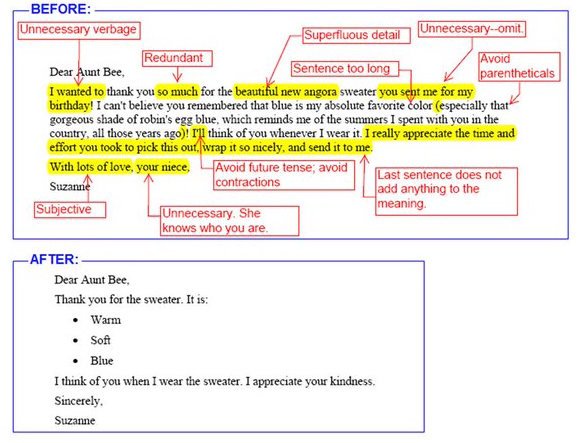
As a person from a Latin background, it is especially hard for me to avoid emotion in my writing. So after many years of hits and misses, I’ve compiled my own guide that helps me stay in check. It is not perfect but I believe it is a good start. Using it helped me to increase the number of hits while lowering the misses and at the end of the day that’s the goal: Not aiming for perfection, but continuous improvement

Interesting thing is, you can use this even when writing in social media. I am also someone who is slowing moving away from the operational IT tasks and more into the business and stakeholder dialogues. Understanding is paramount for this phase of my career.
Oh yeah, before I forget: I don’t care about these recommendations here in my blog. I want my blog to be organic and the closest as possible to the way I speak in real life. Cool?

Checklist for a Better Technical Writing
| # | Check for This… | If Yes, Do This… |
| 1 | Words “I” or “We” | Replace them. The document must be written in the 3rd person |
| 2 | Sentences are written in different verbal tenses | Make sure the whole document is written in past tense |
| 3 | A section called “abbreviation/nomenclature” section in your document | Make sure it towards the start of the document |
| 4 | Use of jargon. (eg.:“the system will go live on xyz”) | Avoid jargon with a clearer expression (“the system will be available for general use on xyz”) |
| 5 | Abbreviations in the “executive summary” or “abstract” sections | avoid them. Expand to their real meaning. |
| 6 | Usage of word “that” | All “that” has to be used when you know whom you are replacing |
| 7 | Usage of word “which” | All “which ” has to be used when you are unsure who is being replaced |
| 8 | Word “So” | Make sure “So” does not start sentences |
| 9 | Word “but” | Replace them with “however” |
| 10 | Word “To” | Make sure it is not at the start or end of a sentence |
| 11 | Words with “-ing” suffix | Make sure they are not starting sentences |
| 12 | Graphics, equations, tables in the document | Make sure they are addressed in a table of contents |
| 13 | Check for judmental constructions “It is very easy to perform the steps A, B, C” or “it is very difficul to determine the result of D, E, F” | Consider removing it or replace with cold, hard construction. What’s easy for you might not be for others and you are telling the readers are incompentent if it does not work. |
| 14 | Statistics and numbers | Make sure their sources are mentioned |
| 15 | Word “will” | Replace them with “may”. |
| 16 | Word “Obvious”, “Of course” | Remove them at once. If it is obvious, no need to state. You’re implying the reader is incompetent. |
| 17 | Sentences with exclamation marks | Remove them at once. |
| 18 | Words “can’t” and “won’t” | Replace them with “cannot” and “will not” |
| 19 | Expressions in parenthesis “()” | Consider replacing them with a comma |
| 20 | Numbers in sentences | Replace for their full wording: “it is 5 MB” should be “it is five megabytes” |
But I am Still an Techie at Heart
and considering that I still love to be a hands-on kind of guy. What you will see now is a series of scripts that can be used in your documents to automate the repetitive task of finding words and expressions that convey a colder and more understandable way to send a message. If you are a techie at heart like me, you will enjoy them

Bash is coming to Windows platform and now there is an expectation that people will quickly pick it up like they did with PowerShell. Once that happens and you also become a fan of Bash, use the following scripts for your work (from Matt):
Bash Script to Find Weasel Words
Weasel phrases or words are those that make you sound too good but does not really convey any meaningful information. Basically they make things unclear for the reader. For example: ”It is quite difficult to find untainted samples” when a better was is “It is difficult to find untainted samples”
#!/bin/bash

weasels="many|various|very|fairly|several|extremely\
|exceedingly|quite|remarkably|few|surprisingly\
|mostly|largely|huge|tiny|((are|is) a number)\
|excellent|interestingly|significantly\
|substantially|clearly|vast|relatively|completely"

wordfile=""

# Check for an alternate weasel file
if [ -f $HOME/etc/words/weasels ]; then
    wordfile="$HOME/etc/words/weasels"
fi

if [ -f $WORDSDIR/weasels ]; then
    wordfile="$WORDSDIR/weasels"
fi

if [ -f words/weasels ]; then
    wordfile="words/weasels"
fi

if [ ! "$wordfile" = "" ]; then
    weasels="xyzabc123";
    for w in `cat $wordfile`; do
        weasels="$weasels|$w"
    done
fi


if [ "$1" = "" ]; then
 echo "usage: `basename $0`  ..."
 exit
fi

egrep -i -n --color "\\b($weasels)\\b" $*

exit $?
Bash Script to Find Passive Voice Usage
Passive voice is a hard one. You can find it everywhere because it is related to the way we think and process sentences. When people advise to read and re-read the text before publishing it, it is because we want to pickup the passive voice. Passive voice usage is bad because often it hides explanatory information, for example: “Termination is guaranteed on any input” instead of “Termination is guaranteed on any input by a finite state-space”
#!/bin/bash irregulars="awoken|\ been|born|beat|\ become|begun|bent|\ beset|bet|bid|\ bidden|bound|bitten|\ bled|blown|broken|\ bred|brought|broadcast|\ built|burnt|burst|\ bought|cast|caught|\ chosen|clung|come|\ cost|crept|cut|\ dealt|dug|dived|\ done|drawn|dreamt|\ driven|drunk|eaten|fallen|\ fed|felt|fought|found|\ fit|fled|flung|flown|\ forbidden|forgotten|\ foregone|forgiven|\ forsaken|frozen|\ gotten|given|gone|\ ground|grown|hung|\ heard|hidden|hit|\ held|hurt|kept|knelt|\ knit|known|laid|led|\ leapt|learnt|left|\ lent|let|lain|lighted|\ lost|made|meant|met|\ misspelt|mistaken|mown|\ overcome|overdone|overtaken|\ overthrown|paid|pled|proven|\ put|quit|read|rid|ridden|\ rung|risen|run|sawn|said|\ seen|sought|sold|sent|\ set|sewn|shaken|shaven|\ shorn|shed|shone|shod|\ shot|shown|shrunk|shut|\ sung|sunk|sat|slept|\ slain|slid|slung|slit|\ smitten|sown|spoken|sped|\ spent|spilt|spun|spit|\ split|spread|sprung|stood|\ stolen|stuck|stung|stunk|\ stridden|struck|strung|\ striven|sworn|swept|\ swollen|swum|swung|taken|\ taught|torn|told|thought|\ thrived|thrown|thrust|\ trodden|understood|upheld|\ upset|woken|worn|woven|\ wed|wept|wound|won|\ withheld|withstood|wrung|\ written" if [ "$1" = "" ]; then echo "usage: `basename $0`..." exit fi egrep -n -i --color \ "\\b(am|are|were|being|is|been|was|be)\ \\b[ ]*(\w+ed|($irregulars))\\b" $* exit $?
Perl Script to Find Lexical Illusions
A lexical illusion is another form of visual illusion, normally happening when a like break contains repeated words but due to the way we read things, it is not easily spotted. Microsoft Word has actually a very good Lexical Illusion detection feature but still a lot of those can be left in place.

#!/usr/bin/env perl

# Finds duplicate adjacent words.

use strict ;

my $DupCount = 0 ;

if (!@ARGV) {
  print "usage: dups  ...\n" ;
  exit ;
}

while (1) {
  my $FileName = shift @ARGV ;

  # Exit code = number of duplicates found.
  exit $DupCount if (!$FileName) ;

  open FILE, $FileName or die $!;

  my $LastWord = "" ;
  my $LineNum = 0 ;

  while () {
    chomp ;

    $LineNum ++ ;

    my @words = split (/(\W+)/) ;

    foreach my $word (@words) {
      # Skip spaces:
      next if $word =~ /^\s*$/ ;

      # Skip punctuation:
      if ($word =~ /^\W+$/) {
        $LastWord = "" ;
        next ;
      }

      # Found a dup?
      if (lc($word) eq lc($LastWord)) {
        print "$FileName:$LineNum $word\n" ;
        $DupCount ++ ;
      } # Thanks to Sean Cronin for tip on case.

      # Mark this as the last word:
      $LastWord = $word ;
    }
  }

  close FILE ;
}
For more tips, you can have a look at http://matt.might.net/articles/shell-scripts-for-passive-voice-weasel-words-duplicates/
So there you go. These are my tips. Share yours in the comments and I will include them here and credit it to you.
Tuesday, June 16, 2015T6/16/2015 03:47:00 PM
by
What Defines Personal Information/Data in the Cloud ?
Labels:
cloud,
General,
Office365,
security,
sharepoint
The cloud technology is great. It allows people and systems to deliver applications to a global scale, with ease and great management power. Data can be stored and retrieved from anywhere in the world. This is a huge benefit, and equally huge challenge.

If you deal with legal documents, store personal information, then independent of your preferred cloud provider (Microsoft, Amazon AWS, Google, IBM, HP etc.) there are challenges you need to consider to manage privacy issues.
The Case for Personal Identifiable Information
Many countries have laws that regulates how personal information data (PI) should be handled. For example, I live in Queensland, Australia and here we have the Information Policy Act 2009 also known as PI Act. This law defines what is PI data here:
"...information or an opinion, including information or an opinion forming part of a database, whether true or not, and whether recorded in material form or not, about an individual whose identify is apparent or can be ascertained".
This is definition is already a great start to help identifying PI data for cloud projects. If you're curious on what's and what's not PI data, the Office of the Information Commissioner (OIC) has a checklist that address this question.
Not All Bytes are Born the Same
It is important to say that laws like the PI Act are applied to personal identifiable data, not only this law can be applied. Any other laws may come on top of that, for example laws that regulates insider trading, or identity theft, for example.
Now that we know the scope of the regulations, the next thing to be aware is that not all data is the same. It means that the type of information and its sensitivity levels have a direct impact on how the data needs to be handled.
Privacy Impact Assessment
Generally speaking, it is common for cloud migration projects handling such data to have them identified in the assessment phase. In these cases, if any personal information is found (for example, a database table that has names and street addresses or an Excel file that contains telephone numbers) a privacy impact assessment (PIA) is conducted. This PIA will generate a report that cross-check the data identified, the impact in the cloud project delivery and how to minimize or avoid any privacy risks involved.
And we are talking here only about data. The next item to check in your cloud migration project is the data flow. Data flow is equally important because what it is "legal" in a place might not be in another. For example, let's assume that Company X applied all measures required by law to protect personal data for a company, however this company has headquarters in another country. Could an email between offices of these 2 countries be shared with the same content?
So as you see, data flow can be as complex as data controls, but we will talk about this on another time.
Images from @MSAU
Subscribe to:
Posts (Atom)