T4/10/2009 10:38:00 PM
by

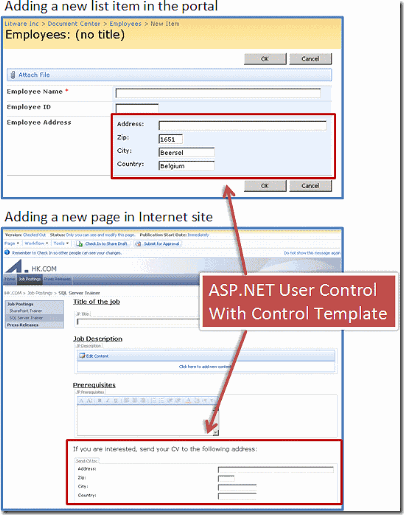


How to do Site Branding in SharePoint?
Labels:
sharepoint
One of the main selling points for implementing SharePoint are its content management capabilities.
This week I went to a client demonstration of our new site and I noticed that a MOSS enabled website is really appealing to them (end users) but not so much because the underline features or that cool RSS integration you demonstrated but mainly because the ability to manage and roll out content on the web itself.

As a topic of later discussion amongst us something was obvious: people do not really understand what’s the concept of Site Branding, and for that I believe it is paramount for us consultants to deliver this message for them very clear so they can have a better grasp of their brand new SharePoint site they will be maintaining themselves when we finish the project.

So what is site branding from SharePoint's point of view?
It is called Web Content Management, WCM, and it’s function is to make a clear cut between what’s site branding and site content.
Site Branding is created by a marketing team, normally a group of designers and sometimes for developers. It responds to questions such as site navigation, look and feel, style etc. In other words, it is about HTML, CSS classes, icons, master pages, page layouts etc.
Site Content is created by site managers, contributors, editors etc. They have the task to choose the layout, choose the icons and images to be displayed in the site sections, they add videos to the pages, they populate the text with links to other relevant sites and contents etc.
So, now that we have this picture well defined we can infer that developing a SharePoint website is also to determine the underline appearance of the site itself.

Normally the task to develop the branding is handled over to a 3rd party company. Someone specialised in websites, and better matching colours and with experience to create a visual identity. As a matter of fact, Microsoft has made available to the general public all the CSS classes used by a typical Windows SharePoint Services application (WSS), they can be seen here
Honestly that’s a concept one has to capture and, like most things in life, it takes practice.
If you are a power user, a site editor, a tester, business analyst, project manager or any other role involved in a SharePoint site that doesn’t need to know how the things works under the hood (workflows, code, architectural designs, service contracts etc) and you are interested in learn more about site customization using SharePoint I suggest to read this 3 part series from MSDN, specifically targeting the Web Content Management features of SharePoint.
You see, handling the client’s expectations with the project its not only meeting the deadlines and delivering the project but also empowering them on the tools they can within SharePoint itself so next time they come talk to you asking for a new variation they will be more aware of the things he can or can’t do.
If you need any more information about how to do branding in SharePoint feel free to email of leave a comment.
See you later
By Edge Pereira

Sunday, April 5, 2009T4/05/2009 12:09:00 AM
by

How to Design a SharePoint Application to the Cloud
Labels:
General,
sharepoint
There is a very common misconception about the uses for SharePoint and I would like to talk about one of them: Using SharePoint as a file repository. Of course SharePoint has great features to enable file sharing and versioning control across the enterprise, but is it so much more than this. So I decided to elaborate a challenge: How would you go about to setup a SharePoint/MOSS solution as an application architecture?
And let’s make the challenge a bit more interesting, shall we. WPF Composite Application Guidance (PRISM), Windows Azure, Sculpture, MVC, ASP.NET. What all these new technologies have in common? They all have deployment options for the Cloud. So, our challenge will be not only design an application using SharePoint but also design a SharePoint application using the Cloud as subsystem.
How can we design an application for the Cloud?
There are many approaches, but I would say the most likely models are:
- Line of Business running as services that can keep their data in the Cloud and have web pages as UI.
- Web applications hosted entirely in the Cloud.
- Various systems designed as message-based applications using the Cloud as media and components like HTTP, REST and SOAP as protocols.
One of my passions is photography so let’s design an application where people can contribute with pictures to the cloud via SharePoint. In our case study, we have to consider the following scenario:
- many pictures can be uploaded by a single user.
- many users can submit their pictures at the same time from several locations across the world.
- Every picture will have a little story about it. Whoever upload the picture must tell the story associated with it.
- the pictures and the stories can have multiple formats
- many devices can be used to upload the pictures (desktop, notebook, mobiles)
In the other side, we will have customers (agencies) consuming these contents via exposed services:
- one agency can query as many times they want for shared and approved content.
- many agencies can submit their queries at the same time
- many devices can be used to query the results (desktop, notebook, mobiles)
So let’s take a look at our suggested model:

Our main enterprise application will be hosted in a SharePoint/MOSS application where the business owners can control it from there, use the BI tolls and apply KPI tools if they wish to. Also via developed custom web parts hosted in our SharePoint site they will have access and create reports targeting our File System impersonated by Windows Azure in the Cloud.
Web services will be developed and exposed using our own APIs to allow communication with our file system in the Cloud. At this point, we want to be agnostic and pragmatic. Just because we are using SharePoint and Microsoft Cloud, it does not mean we have to be attached to Microsoft tools. Since Web services and the Cloud itself work under well-known protocols any client can then interact with them. We can have desktops running Macs searching for pictures and text, we can have mobiles using embedded Java to upload pictures to our application and we can have other agencies using our own exposed API and integrating our system into theirs and querying the results via SQL Reporting Services via XML.
What should be our focus when designing such application ?
It does not matter the chosen technology provider. IMHO, the most important factors to cover here are: Scalability and Application Services
Why Scalability?
Let’s take a step back and think about how is this application going to be in 2 years time. Scalability means provide a good tolerance for expansion without compromising the quality of service in our case. Overtime we expect a growing user base and file storage usage by pictures, descriptions, user profiles, texts or whatever it is; but not only this, we should expect a growing number of requests per day by users all over the place. If we wanted, we could even expose services as plug-in for third-party consumers to provide our services in their own applications. Scalability must provide enough room for this to grow in the future
Let’s take a step back and think about how is this application going to be in 2 years time. Scalability means provide a good tolerance for expansion without compromising the quality of service in our case. Overtime we expect a growing user base and file storage usage by pictures, descriptions, user profiles, texts or whatever it is; but not only this, we should expect a growing number of requests per day by users all over the place. If we wanted, we could even expose services as plug-in for third-party consumers to provide our services in their own applications. Scalability must provide enough room for this to grow in the future
That’s when comes a brand new concept: Infrastructure as a service. High scalability and high availability are the main features of such environment. Who today can offer such a worldwide service? the Cloud. and with another good thing to take: The Cloud is agnostic.
So, here we have our chosen infrastructure media.
We are going now to develop .NET custom code implementing the Windows Azure APIs and make them as components in our SharePoint application, which can be distributed in our SharePoint pages as web parts hosted on Web part Zones.
Why Application Services?
Here the biggest concern is relating to the many devices allowed by the system per user. It is impossible nowadays to have an application dictating what the user/client must use or not, and if you ever do this it will be in no time your competitor's biggest strength.
At the same time, many RIA – Rich Internet Applications are available and will want to be using such a service base, like iPod Touch and other mobile devices. To implement these we need to think about Composition Interfaces.
Composition Interfaces are many pieces of various design patterns combined to allow writing flexible UIs according to the user. We can even use ASP.NET adaptable rendering controls to minimize our design time. So by using a ASP.NET text box within a custom web part in our SharePoint site page to upload pictures, it will be rendered with no problems when this page is accessed via Firefox browser or a Nokia cell phone as well.
Flexible UIs allows us to develop both simultaneously and with personalization according to the user’s needs.
This given scenario is also a great model for sub locating tasks to other groups via design by contract.
To design an application by contract is to specify, document and make available all the expected inputs and returned outputs from our system, in our case our SharePoint site, so others can develop targeting our platform in a very interesting way because now you can give them a task, tell them the APIs to use (for uploading photos or querying texts) and they then develop the module based on the contract. It also introduces a very important aspect of it which is the atomicity. If their part somehow breaks down or has a bug, it won’t affect the main system because the calls specified by contract are already sanitizing the inputs and outputs.
Another added benefit is that such architecture is modular enough from the solution interface. You can clearly give a demonstration to the project’s stakeholders explaining the contract’s model and the interfaces without touching the internal processes and they will most likely to understand. It is like having a helicopter view of the solution.
So, there you go. Now when someone tells you that they use SharePoint to save files and share resources in their Intranet you can tell: “SharePoint can do so much more than this!”By Edge Pereira
Saturday, April 4, 2009T4/04/2009 04:34:00 PM
by
How to Implement a Sharepoint Feature?

Now let’s take a look at the elements.xml file.


Get the folder path, which depending of your solution can be quite big.



Now you just have to copy the content generated and copy/paste into your section.
Right-click your solution and rebuild the project.

Voila! You’re ready to deploy your feature.


Go to the site features, where you can see all the listed features in your site.
Then manually deactivate and activate the feature.

There you go! Your feature is got to be there now.
How to Perform Sharepoint Deployment by Features
Labels:
Code,
sharepoint,
windows
Today I would like to talk about Features in Sharepoint. Features is a model provided by Sharepoint what reduces the complexity of deploying site customizations and at the same time provides to the team a strong and consistent way to perform many deployments as necessary following a well-known and documented process.
By wrapping up content deployment in Features, you are also likely to implement versioning control since each package can be labeled by version.How to Implement a Sharepoint Feature?
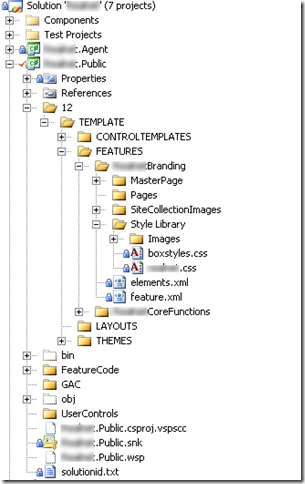
Let’s assume you are using Microsoft Visual Studio.NET. To implement a Feature, you should mimic the current Sharepoint file Path in your solution. Go ahead and create a path called <yoursolution>\12\TEMPLATE\FEATURES

There you will place all the necessary content for the Feature. We will use WSPBuilder as a preferred tool to ease our task as well. If you don’t have WSPBuilder you can get it from our tools page.
You will see a file called Feature.XML, this file will tell you the location of the assemblies, files, references, resources etc included in your Feature deployment. The xml file also will allow you specify a friendly name for your feature. like: MySiteBrandingContenttell , for example.
%5B7%5D.png "sharepoint-feature-deployment (2)")
Now let’s say you want to add a whole bunch of images to your site. Just go to the Style Library/Images folder and add them there. Remember, our folder structure is mirroring the actual Sharepoint folder structure.
%5B6%5D.png "sharepoint-feature-deployment (1)")
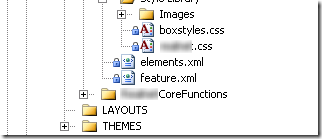
Now let’s take a look at the elements.xml file.
%5B11%5D.png "sharepoint-feature-deployment (3)")
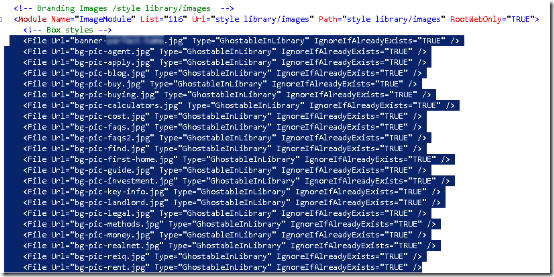
Note the section called ImageModule pointing to the url style library/Images.
This section will ultimately tell Sharepoint (via WSPBuilder) all the files that must be present inside your Feature package. So you should go and edit this file, adding all the images you want to distribute with your Feature.
That’s an OK process, but often we have dozens if not hundreds of images to deploy. So here’s a nice trick to quickly populate the section.
First you open via windows explorer the location where all the images are located.%5B6%5D.png "sharepoint-feature-deployment (4)")
Get the folder path, which depending of your solution can be quite big.
%5B7%5D.png "sharepoint-feature-deployment (5)")
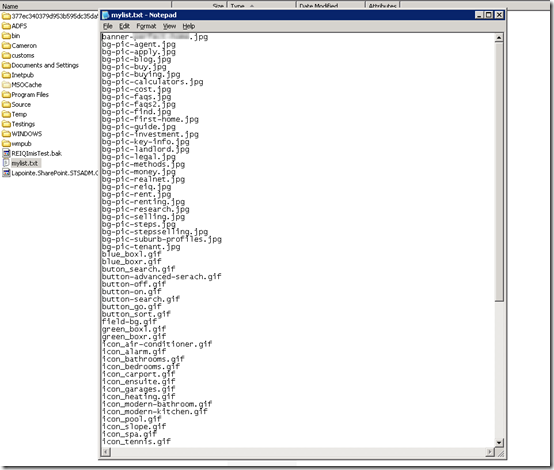
Make a list of all the files you want to add to the xml section into a text file. And here comes again another trick, from the good-old-days of DOS. The command below will list all the files, just the names and save it into a file in your computer.
%5B7%5D.png "sharepoint-feature-deployment (6)")
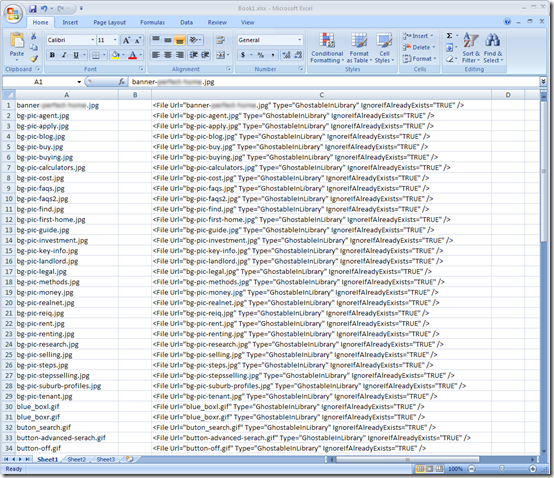
Open this file, select all the files and copy to an Excel spreadsheet (or any other similar toll like the OpenOffice Calc)
%5B7%5D.png "sharepoint-feature-deployment (7)")
%5B6%5D.png "sharepoint-feature-deployment (8)")
Now, another trick. Use this formula within your spreadsheet. This when applied to the content will format the whole document perfectly for use inside your XML feature file.

Now you just have to copy the content generated and copy/paste into your section.
%5B6%5D.png "sharepoint-feature-deployment (9)")
Right-click your solution and rebuild the project.
%5B7%5D.png "sharepoint-feature-deployment (10)")
Voila! You’re ready to deploy your feature.
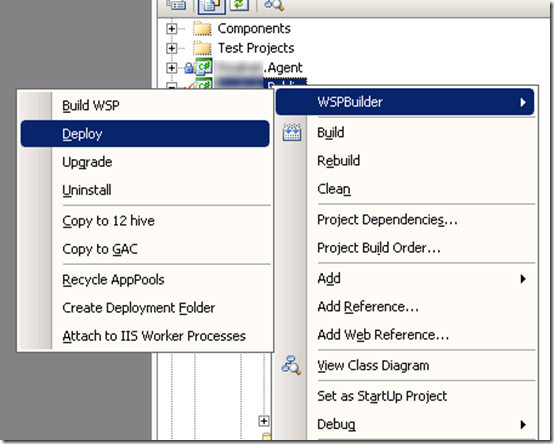
Now comes the part when WSPBuilder is really handy. If you have it installed in your computer you will notice the context-sensitive menu integrated within your Visual Studio environment. Right-click again your solution and choose Build WSP
%5B6%5D.png "sharepoint-feature-deployment (11)")
If everything went as expected, right-click again and then choose Deploy. This will effectively deploy the solution to your environment.
How Does WSPBuilder knows where my Sharepoint Site is? It will pick it up from the project properties/URL path.
In any case, the package will be created under your solution/bin/deploy folder. A batch file called deploy with stsadmn is also going to be created if you decide to deploy it manually without having to remember all the stsadmin –o directives for it, or if you want to take the Feature package to another server.
%5B7%5D.png "sharepoint-feature-deployment (12)")
Now go you your website and see all the changes applied. Your feature should have been deployed successfully!
Why I can not see my deployed features?
That’s because you need to disable the feature and then re-enabled it again to see it in action. By doing this you are forcing the files to be copied over to the actual Sharepoint site.
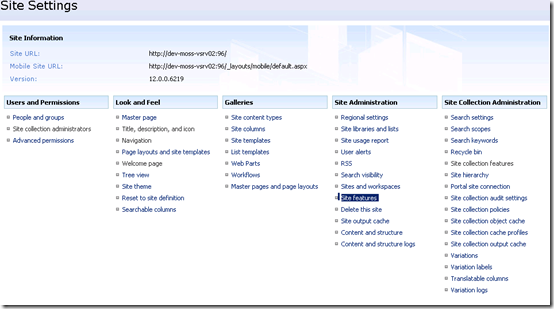
You do this. Go to modify all your site settings:%5B6%5D.png "sharepoint-feature-deployment (13)")
Go to the site features, where you can see all the listed features in your site.
%5B6%5D.png "sharepoint-feature-deployment (14)")
Then manually deactivate and activate the feature.
%5B6%5D.png "sharepoint-feature-deployment (15)")
There you go! Your feature is got to be there now.
By Edge Pereira
Wednesday, March 25, 2009T3/25/2009 04:48:00 PM
by
How to display Asp.Net error messages instead of the default SharePoint error messages on a website?
Labels:
Code,
sharepoint
When configuring, developing or performing any sort of action inside the Sharepoint environment not very often we see error messages, assuming you’ve been doing the right things. For all those other cases when you can’t Sharepoint might display this default error message:

So, how do you know where did your application break?
You certainly can go to the ULS (Universal Logging Service) and trace the enormous log file or you can do this.
Open the web.config file of the website and change these values:
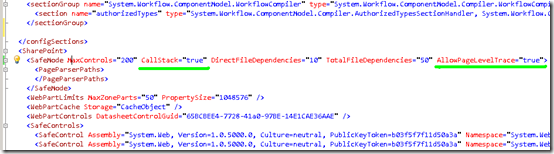
And this one:

Next time you try to run your application you will see the full stack trace, just like any regular .Net application.

Obviously, this is a development tip. The best practices probably won’t recommend you to do this on a live website.

So, how do you know where did your application break?
You certainly can go to the ULS (Universal Logging Service) and trace the enormous log file or you can do this.
Open the web.config file of the website and change these values:

And this one:

Next time you try to run your application you will see the full stack trace, just like any regular .Net application.

Obviously, this is a development tip. The best practices probably won’t recommend you to do this on a live website.
By Edge Pereira
Thursday, March 19, 2009T3/19/2009 01:00:00 PM
by
 Here there is something interesting that I would like to share with you guys.
This code will run faster if you are NOT using the .NET 2005 SQL Connectors or running in a SQL Server 2000. Here we are using the sp_cursoropen to open a cursor, then specifying the forward-only option in the parameter list.
SQL Server 2005 queries running slower then SQL Server 2000
Here there is something interesting that I would like to share with you guys.
Even thou Microsoft SQL Server 2005 is out for quite some time, it is still common to see people working in projects using Microsoft SQL Server 2000 and often in mixed environments.
That's the case I want to talk about: The mixed environment, and I am working in a project where some applications have that hybrid configuration.
So someone told me that my report developed in .NET 2.0 was running slower than the similar one done in the old fashioned ASP. Of course I denied, just to see later the proof I was wrong.
Yes, the same stored procedure executed from the same page from, in the same machine was running faster in the old environment while it was slower in the new (and supposedly improved) environment. How's that possible? I traced the execution, used the SQL profiler but nothing gave me a good clue. Than I found this in the Microsoft website.
In SQL Server 2000, the execution plan for the query uses an Index Seek operator. In SQL Server 2005, the execution plan for the query uses an Index Scan operator. The optimizer produces an index spool for the Index Scan operation. When you use the FORWARD_ONLY cursor, SQL Server scans the index for every FETCH statement. Each fetch takes a long time. Therefore, the query takes a long time to execute.
See that example below:
50 declare @p1 int
51 set @p1=0
52 declare @p3 int
53 set @p3=16388
54 declare @p4 int
55 set @p4=8194
56 declare @p5 int
57 set @p5=0
58 exec sp_cursoropen @p1 output, <Transact-SQL statement> ,@p3 output,@p4 output,@p5 output
This code will run faster if you are NOT using the .NET 2005 SQL Connectors or running in a SQL Server 2000. Here we are using the sp_cursoropen to open a cursor, then specifying the forward-only option in the parameter list.
This is a bug you can only experience if you are using a lot of cursor-based stored procedures from a SQL 2000 to a SQL 2005 environment, and here we have a VERY HIGH cursor usage. (not that I like them neither I defend its usage, it is just a fact from the environment here)
How to fix this?
If you do not want to download and apply the patch and want to fix this in the code itself use "OPTION (FAST 1)" in the stored procedure call. That will make it run faster in the SQL 2005 machine.
See ya later.
By Edge Pereira
Wednesday, March 18, 2009T3/18/2009 07:31:00 PM
by




Why adding more memory won't fix your Out of Memory error ?
Here an interesting case. Consider there 2 scenarios:
Both are running the same website, both have the same amount of users connected.
Now imagine this website has a page to upload pictures, just like any regular photo-album website.
For some reason, at some point the users complain that they see an error page indicating out of memory error.
So, you wonder: How come? they are just uploading a photo to my website, and I still have plenty of memory in my server anyway.
Anyhow, you stop thinking about this and go for the easiest, quick and dirty solution: If the system tells me that my computer does not have enough memory then I just need to add more memory. Right?
And guess what? you still will get the error message.
That's a very common mistake. Having a machine with 10GB of memory does not mean you will have 10GB of memory available. I explain.
It does not matter if your computer or server has 512 MB, 1 GB, 2 GB, 4 GB or 8 GB of RAM. If your machine is a 32-bit machine it will only be able to see/manage 4 GB. That's mathematics, that's life, that's the way things are and you can't do nothing about it. A 32-bit machine can not do more than that.
Additional memory may increase your system performance, but it won't increase the memory availability. Sure your computer will use less the hard disk for swapping operations and will be able put more stuff in memory and start some programs faster, but 4GB is the limit; after this point the memory management module will start doing disk swap and to use the famous page file.
And here comes more bad news: Your Windows system on a 32-bit machine requires 2 GB allocated only for it.
So, if you have 4 GB installed, effectively you will have 2 GB only for applications; your windows will be using alone 2 GB.
So, what does out of memory means?
Well, according to some people at Microsoft, this limit for an average configuration is reached between 600 MB and 800 MB of utilization. That 800 number is NOT A RULE, is a baseline. Generally speaking the largest majority of configurations with website, .NET and SQL Server database might have a problem around this point. Of course, this can vary from system to system...as a matter of fact a system can be out of memory at just 600 MB.
Yes, it does sounds crazy. You look so happy now that you just bought a 4GB RAM notebook and your computer is breaking with just 800MB, hun?
Here is another point for you. Have you ever seen someone bragging that he/she bought a 10-megapixel camera and now he/she believes their pictures are going to be better because of this?
Well, guess what? Just like the number of megapixels in a camera box does not have much to do with picture quality, RAM memory does not have much to do with hard disk space.
That's a common mistake: People buy RAM as if they were buying a hard disk.
RAM usage needs to me continuous, unlike hard disk. A simple 5MB Microsoft Word document when saved in a hard disk can be split up in hundreds of pieces; When you open this file in memory, the RAM requires those 5MB to be allocated continuously.
Can you see now the reason for the 'out of memory' message?
Yes, it really means 'there is not enough continuous memory to place that file in memory'. Your system might have 2GB of RAM but unfortunately it might be too busy with stuff running and there is no enough continuous memory to put the picture you are uploading.
Yeah, you can not do much but you can buy a 64-bit machine then when you add more memory you can really use it more efficiently. And yes, we have Microsoft Windows systems for 64-bit machines.
If you do not want to buy a new system of upgrade you current server to a better version then you should think other solutions in the business process, such as to avoid users upload pictures with more than 1 MB in size to be uploaded.
See you later.
By Edge Pereira
Saturday, March 14, 2009T3/14/2009 09:37:00 PM
by
What Do You Do After Speaking To a Customer?
Labels:
General,
ProjectManagement
I am an IT guy. That's clear but often I think about many situations from a salesman's point of view, trying to view the world from another angle that I sometimes have no idea how it could be.
What do I mean by that? I'll explain but before please let me share with you this.
I must recognize, even thou IT is a really cool area to work and even thou because the pace it is so demanding we must run everyday just to remain in the same place, unfortunately not always we have the chance to deal with cool and state-of-the-art technology. Yes, sometimes we have to deal with repetitive tasks, sometimes boring tasks, sometimes old products etc. If you are an IT person you know that and might agree with me. Legacy base is a consequence of this fast paced world, as well.
In those situations we wonder: Mate, I am doing this because it was handed over to me out of nowhere and I know this is no rocket-science and despite that I must finish it by tomorrow. I bet we all at some point of our carreers dealt with this scenario, which normally leaves a strange taste in our mouth telling us there is nothing new to be learn from that experience.
Fear not my friends, there is always something to learn does not matter the scenario.
Now, let's get back to the sales person thing I was talking about.
The sales guy after a contact, client visit, sales performed, email delivered to a potential customer, whatever the reason, there is something they must do which is ask himself : What could I have done better ?
Sounds easy and trivial but that's a hard thing to do and as a matter of fact that's something I am trying to do with myself: What have I done today that I've could do better ? What I've done wrong today ?
As the time goes by this becomes a habit just like drinking coffee at 3pm and soon you'll picture yourself in a state of eternal improvement, or at least awareness of it. I am not telling you this is a magic rule to follow in order to achieve the perfection, far from it; but it certainly does something to us which IMHO is a must for a better version of ourselves: It takes us out of our comfort zone.
As the time goes by this becomes a habit just like drinking coffee at 3pm and soon you'll picture yourself in a state of eternal improvement, or at least awareness of it. I am not telling you this is a magic rule to follow in order to achieve the perfection, far from it; but it certainly does something to us which IMHO is a must for a better version of ourselves: It takes us out of our comfort zone.
Yet there are people out there who pay for this kind of professional service, Personal Coaching. Honestly, would be great to pay for one of those but I still prefer to put my hard earned money into my mortgage or my kid's school fees. So why not we become our own Personal Coach?
How do I do?
I ask myself: What could I have done better? and I write them on paper. I make a list. I put them on paper because I want that document to be a reminder, and you know what? writing it's free and doesn't hurt, specially the bad things and mistakes we made. Yes, the mistakes are important also because they will be like beacons in this dark ocean of our tries, but I try not to concentrate too much on them after all mistakes are consequences of tries. If you do not do many mistakes it means you haven't tried enough.
Just to illustrate look at our mailboxes with lots of emails trying to sell us stuff. Pay attention to them, I could say that the vast majority is really badly written, from the sales point of view of course. Lots of information about the product requirements, features and prices but very few information about how it would make my life easier or things like why I should buy it now and save effectively 1 hour of coding everyday.
The truth is: very few of them talk about benefits. Very few of them mention how their product will help the customer with its problems.
So, here it goes a good exercise: Try to find out what else that message wants to say in the email selling you stuff. Why I should go for this product instead the competition? How would you write the message to appeal to people like yourself. And how to put yourself in other situations out of your comfort zone? Try to think about markets you don't know much about, like think how would you manage that coffee shop. If you were an attendant how would you receive a client like yourself looking for a good coffee during the working day?
I ask myself: What could I have done better? and I write them on paper. I make a list. I put them on paper because I want that document to be a reminder, and you know what? writing it's free and doesn't hurt, specially the bad things and mistakes we made. Yes, the mistakes are important also because they will be like beacons in this dark ocean of our tries, but I try not to concentrate too much on them after all mistakes are consequences of tries. If you do not do many mistakes it means you haven't tried enough.
Just to illustrate look at our mailboxes with lots of emails trying to sell us stuff. Pay attention to them, I could say that the vast majority is really badly written, from the sales point of view of course. Lots of information about the product requirements, features and prices but very few information about how it would make my life easier or things like why I should buy it now and save effectively 1 hour of coding everyday.
The truth is: very few of them talk about benefits. Very few of them mention how their product will help the customer with its problems.
So, here it goes a good exercise: Try to find out what else that message wants to say in the email selling you stuff. Why I should go for this product instead the competition? How would you write the message to appeal to people like yourself. And how to put yourself in other situations out of your comfort zone? Try to think about markets you don't know much about, like think how would you manage that coffee shop. If you were an attendant how would you receive a client like yourself looking for a good coffee during the working day?
Excellence is not a point to reach, it is a trajectory made up of very very small baby steps. Hundreds of them taken one at a time, one each day.
See you later.
By Edge Pereira
T3/14/2009 09:35:00 PM
by

Why hiding my wireless Internet SSID will not make my connection safer ?
This weekend I went to a friend's house and we talked a lot about photography, another passion of mine. So I decided to use my iTouch to show him my online portfolio:
- sorry man - he said - I have to tell you my home network name. Otherwise you won't see it available to connect.
- what do you mean? Do you hide your wireless SSID?
- Yeah, I do this for security reasons.
And yet again here we go, another old security myth: Hiding your wireless SSID makes your home network safer.
First of all, what is this ?

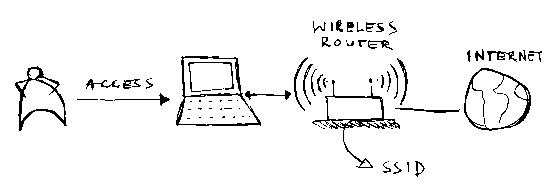
In your house you may have Internet access. If you have a laptop what the people normally do is to buy a router, then connect the Internet cable to the router and then the router will 'emit' the signal to the air. This will allow you to connect to your Internet from your bedroom, kitchen, talk to your mother over MSN while walking around your house etc. Everything wirelessly, as long as you can still get the signal. And for that we give a friendly name to this signal called SSID, so you know where to connect.
The thing is, everyone who has a computer with wireless connection also sees your signal.
So how to avoid them to connect to your Internet and make them surf by stealing your connection? Well, you set a password to connect to your router, so when anyone try to connect they will be asked for it.

And here we get to the point: the SSID is not a password. As a matter of fact, the SSID was designed to be public, yes. So by making it public or hidden it really does not change much the security scenario. And besides remember what all the security experts say: there is no security by obscurity. Just because it's hidden it does not mean that it is safe.
So he decided to hide the SSID. Ok. It does not matter, it is not much hidden anyway. Let's see.
The wireless network that you have at home send packages of data-to-air, some are encrypted, some are not, and inside those who are not encrypted they also contain your SSID name. Simple like that and written in plain-text.
So if I am a hacker, I could use a sniffer program to capture the packages and open up to see what's inside. A lot of them I would see crazy stuff, those are encrypted; but in some of them I would see things of the like: trying to connect to SSID name 'myhomenetwork'.
So there we go, our secret is now gone. Do you still think you're safer after that?
Can you reduce the amount of packages without encrypted information? Yes, but you can not stop them 100%, so at some point they will be sent.
Another thing to worry about. If you use Windows XP we can observe an interesting behaviour. If your SSID is hidden, but the laptop is connected to the Internet, XP still apparently keeps sending requests to join the network, continuously. And guess what? The router will reply to your requests using non-encrypted messages.
Funny thing. If we think about it what we are doing here is make our hidden network sends over and over and over again a bunch of replies with not encrypted data with your so-cool-and-hidden SSID.
Why Windows XP and Windows Vista behave like this by default? because SSIDs were, as I mentioned before, designed to be public and I my guess is that Microsoft did this to comply with some governments cyber-laws. I've heard that in some countries, like the USA, it is a crime to keep your SSID hidden and to use hidden identities and hidden networks... all that stuff. I can't confirm that, so it is a guess, but it makes sense to me.
Hiding the SSID won't hide you from the wireless world. Unfortunately people still relates hidden things with secure things.
So how to make my wireless Internet at home more secure? Use something called WPA/WPA2. That's good enough mostly the times. If you are using WEP, change to WPA2. If you are running Windows XP and you have applied all the updates, you are safe. For Windows Vista is even easier because WPA2 comes with it out-of-the-box.
Here some stuff about securing your wireless internet
See you later.By Edge Pereira
T3/14/2009 09:34:00 PM
by
In my first job about a decade ago, I had to work with protocols and microchip programming. In one of those projects I had to implement a little protocol to communicate 2 heaters. I asked my manager to use C, after all I was studying it at the Uni.
So, I asked for more time, and with more 2 friends we debugged the code. We discovered that we were wasting too much time during the handshake. That's it! we found the bottleneck!
After some fine tuning: the application was now too fast! Win-Win!
Focus the effort in time and money in the most critical parts: Be sure of that; not even Jesus pleased everyone (leaving religious discussions apart) so you also won’t please everyone. And that’s OK! At the end of the day, most the times it does not matter how much effort you placed in the application or how cool you did that module using a new algorithmic path…. there will be always people telling you it could be done better, faster.
The Economics of Software Performance
Labels:
General,
ProjectManagement,
sharepoint
It does not matter the current state in which an application is, everyone always wants a bigger, better and faster version. One of these days, when talking to my peers we discussed this point: If you have to choose amongst these items, which one would you leave for last? I said performance.
Just hold your thought for a minute and bear with me on this before throwing stones ok?  I’ll explain.
I’ll explain.My point is: To design for high performance is expensive and, on these times of ROI, is a good thing to save some $$$ for when we need it most. I am not saying “don’t do it”; I’m saying “do it later”.
In my first job about a decade ago, I had to work with protocols and microchip programming. In one of those projects I had to implement a little protocol to communicate 2 heaters. I asked my manager to use C, after all I was studying it at the Uni.
Back then, there was a group of cool people programming in Assembly and these guys told me to give Assembly a try…for performance reasons. I told them:"Guys, I do not have experience with this and I prefer to use C. ( and It was even going to help me with my grades.)"
Truth must be said: the prototype was done and indeed it was too slow. Way too slow!
It was during my young years and I still remember all the comments I've heard about this bad performance. Those comments just fired me up! I was in a mission now to prove them wrong. (you know how young guns are…)
So, I asked for more time, and with more 2 friends we debugged the code. We discovered that we were wasting too much time during the handshake. That's it! we found the bottleneck!
So we implemented just that handshake part in Assembly.
After some fine tuning: the application was now too fast! Win-Win!
Nowadays, I see people putting too much effort in new technologies, new methodologies and focusing too much about performance where is not really needed: To use datasets or MVC? an array list or a generic list? Sometimes people over-engineering an application. IMHO, this sort of thinking is OK but, once let it loose, it can lead to complex and expensive systems to maintain.
So, lessons I learned from this situation:
First, make sure you have freedom to use your skills in the area you know most: Sometimes we are forced to follow an already designed specification and there is not much freedom for our own ideas. The project priorities supersede our own priorities. If you have this ability then...
Second, do proof of concepts: When you find a proof that is modular enough to detach and that works good enough above the average, move on to the next module...and then...
Focus the effort in time and money in the most critical parts: Be sure of that; not even Jesus pleased everyone (leaving religious discussions apart) so you also won’t please everyone. And that’s OK! At the end of the day, most the times it does not matter how much effort you placed in the application or how cool you did that module using a new algorithmic path…. there will be always people telling you it could be done better, faster.
That's software, that's simple and you know what? that's life
but hey, these are the sort of comments that makes you want to be better, to improve and move stronger ahead, aren't they?
By Edge Pereira
T3/14/2009 09:32:00 PM
by
The Perfect Entity Model Development Framework
The Entity Framework is out there and it is common term already in the framework talks. There are hundreds of sites dedicated to its best applications and best architectures tactics.
When an architect is involved in these talks the good ones always bring the discussion up to a helicopter view, since the discussion will inevitably move towards the best model and to comparisons against the 'what-would-be-the-perfect'.
Now seriously, is there any perfect framework model?
The purists’ attacks against the Microsoft EF always say that "EF is not an independent layer neither multiplatform oriented", so it can't be reused and integrated with ease across the other systems in the enterprise, for that would be the dreams of any architects.
Since the introduction of shared folders you could easily for example place a text file in some URI and use it shared across many systems. Obviously as we can see the data would not be cached and few few mechanisms were available to raise a notification to the data holders about that update. The EF is not supposed to accomplish that task as it is a framework to access data using objects.
So here it comes another point: should we put a data access layer above it?
Remember, Microsoft data access methodologies have been changing dramatically over the last 5 years, which paves the way and gives us hints that in a near future it will change again. Legacy systems will be always a reality of the high paced IT market. The arguments against it is that having so many layers in an application will over-engineer the problem and will affect the performance and maybe the final costs rather than a simple refactoring. Remember the discussion about table normalization and de-normalization? It is pretty much the same here. These people are the same that advocate it is better to achieve the application's ROI before any major refactoring. And honestly, 5 years is not enough time for many application to break even the ROI.
Here's a scenario for discussion: A programmer decides to use EF and he maps a common class against the database. He notices that it is very simple IF ONLY he follows 'the yellow-brick-road'. For what I have seen he must follow the EF rules; he must inherit and implement mandatory interfaces dictated by the EF so everything falls right in place. If not, the EF will be just one big expensive fancy feature. Yeah, there is a term for this: Persistence Ignorant. In a glance is like the EF do no adapt to the model, you have to make the model adapt to the EF.
A model should be model ignorant especially nowadays where test-driven development is becoming common in the companies. You can actually test business rules in a higher level. That's why we start to see things like Linq for SQL and binding interfaces. They want to cover the gap left by the persistence ignorance.
The consequence of this is that more and more people are using EF as a data access tool and left to using Linq in the business layer. The business layers will then return datasets within structures called ObjectContext. And good news, the ObjectContext is transactional meaning that you can use System.Transaction to keep the data update rules properties. EF, Linq and ObjectContext: Is this a new implementation being born? Only time will tell but at least they are simple to use, have good performance and gives the programmer good deliverable times...long gone are the days when developers wanted to stay long hours at the office.
Strong points for the EF:
But it is perfect? IMHO, it is not... and after all, what is perfection anyway?
When an architect is involved in these talks the good ones always bring the discussion up to a helicopter view, since the discussion will inevitably move towards the best model and to comparisons against the 'what-would-be-the-perfect'.
Now seriously, is there any perfect framework model?
The purists’ attacks against the Microsoft EF always say that "EF is not an independent layer neither multiplatform oriented", so it can't be reused and integrated with ease across the other systems in the enterprise, for that would be the dreams of any architects.
Since the introduction of shared folders you could easily for example place a text file in some URI and use it shared across many systems. Obviously as we can see the data would not be cached and few few mechanisms were available to raise a notification to the data holders about that update. The EF is not supposed to accomplish that task as it is a framework to access data using objects.
So here it comes another point: should we put a data access layer above it?
Remember, Microsoft data access methodologies have been changing dramatically over the last 5 years, which paves the way and gives us hints that in a near future it will change again. Legacy systems will be always a reality of the high paced IT market. The arguments against it is that having so many layers in an application will over-engineer the problem and will affect the performance and maybe the final costs rather than a simple refactoring. Remember the discussion about table normalization and de-normalization? It is pretty much the same here. These people are the same that advocate it is better to achieve the application's ROI before any major refactoring. And honestly, 5 years is not enough time for many application to break even the ROI.
Here's a scenario for discussion: A programmer decides to use EF and he maps a common class against the database. He notices that it is very simple IF ONLY he follows 'the yellow-brick-road'. For what I have seen he must follow the EF rules; he must inherit and implement mandatory interfaces dictated by the EF so everything falls right in place. If not, the EF will be just one big expensive fancy feature. Yeah, there is a term for this: Persistence Ignorant. In a glance is like the EF do no adapt to the model, you have to make the model adapt to the EF.
A model should be model ignorant especially nowadays where test-driven development is becoming common in the companies. You can actually test business rules in a higher level. That's why we start to see things like Linq for SQL and binding interfaces. They want to cover the gap left by the persistence ignorance.
The consequence of this is that more and more people are using EF as a data access tool and left to using Linq in the business layer. The business layers will then return datasets within structures called ObjectContext. And good news, the ObjectContext is transactional meaning that you can use System.Transaction to keep the data update rules properties. EF, Linq and ObjectContext: Is this a new implementation being born? Only time will tell but at least they are simple to use, have good performance and gives the programmer good deliverable times...long gone are the days when developers wanted to stay long hours at the office.
Strong points for the EF:
- All the query results are objects and you can parse and traverse them in memory without any cost;
- There is an embedded conceptual layer where you can do things like denormalize the data structure without affecting much the application.
- Linq can be restricted to be used ONLY when needed; Linq is great but it is no silver bullet and people are tempted to overusing it
But it is perfect? IMHO, it is not... and after all, what is perfection anyway?
By Edge Pereira
Monday, March 9, 2009T3/09/2009 01:47:00 AM
by
How to setup Sharepoint sites for HTTPS
Labels:
General,
sharepoint,
windows
Hi guys, I want to share with you a discussion that I’ve participated recently.
Consider this: you are a a host provider and your company will offer Sharepoint support to the public so they can pay you a monthly fee and then they setup a Sharepoint site with you.
You go for a simplistic and cheap design. You have IIS, Sharepoint installed, and you create a web application on the port 80. Within this web app you create multiple site collections. They are the sites your clients will have control for their own setups.
And how do you host multiple websites on the port 80 with a single IP address? Easy. I will use host headers – you say.

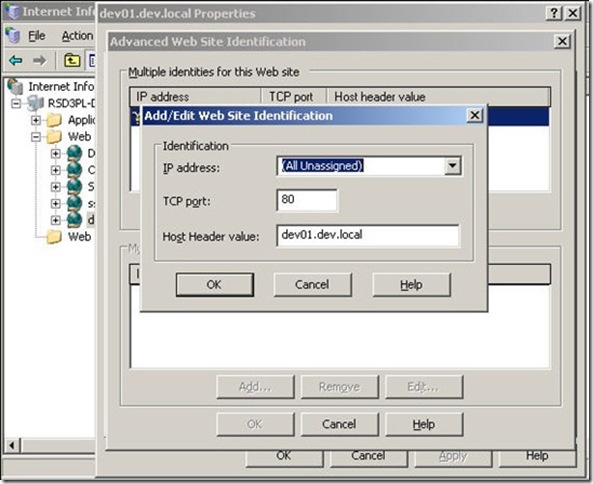 And you think: I should be fine. I will setup in away so each client will have their own separate database, they will redirect to the given URL I will provide them and according to the hosting plan I enable disk quotas for each case. For instance, if my client pays me some little money and he is a ’silver client’ I offer them 10MB; if they are ‘platinum client’ and pay me some more I give them 50MB.
All goes fine and well. You see everybody joining your company, the clients keep coming and your setup is totally independent.
so, what’s the problem here?

You are unable to offer HTTPS in that setup. If one of your clients wants to add a shopping cart area and want it to be secure, you can’t help them with that model.
The thing is, IIS can not resolve an incoming HTTPS request like that. ISS will hold the request and it is going to ask himself: ok, to which website should I give this request? Unfortunately IIS as of now can not address this question following that setup. Everybody is under the same IP.
To fix that one of the recommended approaches is to follow the diagram below:
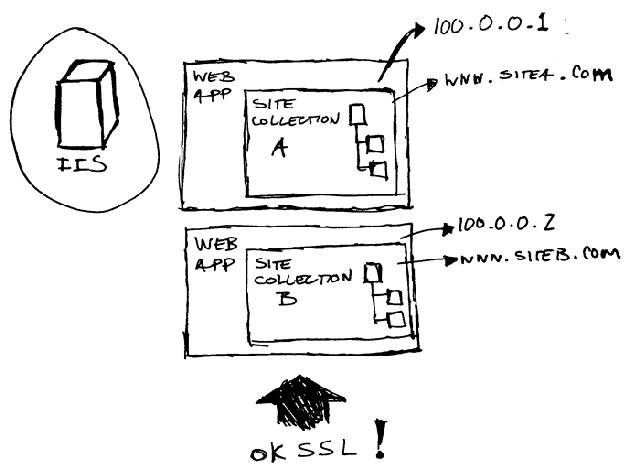
On your IIS you will create multiple web applications, then for each web application you will want to give separate IPs and then host sites on these IPs, and then these web applications are the ones you will offer to your clients.
That’s a little bit more elaborated solution, a little bit more expensive but the gains in scalability will overcome the headaches you might have in the future with an atomic structure that at some point needs to be flexible.
And on that model IIS can finally then fix the SSL dilemma. Because then you will assign the applications to independent IP addresses on the ISS Manager.
Sometimes it takes more than a quick and simplistic approach to design a solution if you only know partially the products involved. Once you have the proposed design please be aware of the issues that are basic in the parts involved. In our case, a knowledge of IIS would have avoided a big trouble in the beginning.
See you later.
Consider this: you are a a host provider and your company will offer Sharepoint support to the public so they can pay you a monthly fee and then they setup a Sharepoint site with you.
You go for a simplistic and cheap design. You have IIS, Sharepoint installed, and you create a web application on the port 80. Within this web app you create multiple site collections. They are the sites your clients will have control for their own setups.
And how do you host multiple websites on the port 80 with a single IP address? Easy. I will use host headers – you say.


All goes fine and well. You see everybody joining your company, the clients keep coming and your setup is totally independent.
so, what’s the problem here?

You are unable to offer HTTPS in that setup. If one of your clients wants to add a shopping cart area and want it to be secure, you can’t help them with that model.
The thing is, IIS can not resolve an incoming HTTPS request like that. ISS will hold the request and it is going to ask himself: ok, to which website should I give this request? Unfortunately IIS as of now can not address this question following that setup. Everybody is under the same IP.
To fix that one of the recommended approaches is to follow the diagram below:

On your IIS you will create multiple web applications, then for each web application you will want to give separate IPs and then host sites on these IPs, and then these web applications are the ones you will offer to your clients.
That’s a little bit more elaborated solution, a little bit more expensive but the gains in scalability will overcome the headaches you might have in the future with an atomic structure that at some point needs to be flexible.
And on that model IIS can finally then fix the SSL dilemma. Because then you will assign the applications to independent IP addresses on the ISS Manager.
Sometimes it takes more than a quick and simplistic approach to design a solution if you only know partially the products involved. Once you have the proposed design please be aware of the issues that are basic in the parts involved. In our case, a knowledge of IIS would have avoided a big trouble in the beginning.
See you later.
By Edge Pereira
Wednesday, March 4, 2009T3/04/2009 11:33:00 PM
by


Filling the SOA gaps
Labels:
Code,
General,
sharepoint
Hi guys,
Let's talk architecture again, reference architecture, more
specifically SOA, and how can we map the available products and resources available from Microsoft given a SOA project?
Before I start, let me make a statement here: I will talk this from the Microsoft's point of view, since this is a blog about Microsoft technologies.
In any case, it doesn't matter what's your preferred provider as long as you are able to correctly do the mapping of functionalities to better fit your business' plans, budget and SLA. And just to revisit: SOA is an architecture where the functionalities of existing business applications are exposed and published as services.
And what would be a service? Services are software components that expose application functionalities in a given SOA architecture and they are:
- self-manageable;
- message-based oriented;
- can handle and support many protocols;
- can be published on a myriad of hosts;
- implement operational contracts, interfaces and message types;
- message-based oriented;
- can handle and support many protocols;
- can be published on a myriad of hosts;
- implement operational contracts, interfaces and message types;
Of course you can design some service that doesn't follow these rules, but let me tell you: Rules are made with a purpose and in our case the purpose is to design a solution where clients and services are highly decoupled, thus paving the way for the reuse of functionalities. One of the goals is to maximize the resource utilization in our project.
I won't talk here about governance, granularity, message routing, service level control etc. I won't go there for it is a much larger topic, so this post is about the technical view. Now, let's make our first diagram given what we've seen so far:

As we can see, we have here the common services of a SOA architecture such as the presentation services, collaboration, systems integration, orchestration services etc.
Looking at this diagram we can identify the aspects that we really want to map in our solution to be successful. Note that in some scenarios sometimes the security is critical, sometimes the orchestration is paramount, sometimes the platform integration is more important.
Now, visualize this filling the gaps with the products that Microsoft has to offer.

An interesting conclusion we can take at first sight is that some products can cross domain frontiers and can handle various capacities at once, such as the Windows Workflow Foundation, which can be used for interoperability services and orchestration at the same time with BizTalk Server.
What's the best option to choose? Well, to be able to see this big picture and to choose the best piece in the puzzle is your job as architect. Unfortunately many architects fall in the problem to overkill the solution.
Also important is to choose not to overkill the solution. Sometimes a simple custom application can fill the gap enough to not require a bigger solution like Windows Workflow Foundation, for example. Otherwise the whole project just becomes harder to handle and to maintain...thus increasing the ROI overtime...and the developers patience.
The message to keep in mind: any good architecture is composed by many capacities. To identify these capacities and which one of them are important for our solution is as critical as choosing the technology provider.
See you later.
By Edge Pereira

Wednesday, May 7, 2008T5/07/2008 01:45:00 AM
by
File Upload and Canonical Issues
Never trust the user input. The incoming data can be the source of many devils and a security flaw can be there just waiting for the right moment and the right person to break your application.
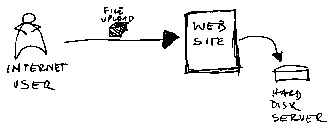
After finishing with the upload control I finally did the integration with the website. Now the users can select the files and send it to the website to be processed.

What are the security risks here? Something that can be called 'canonicalization issue'.
For a start all data can be seen on its canonical form. A canonical form is the most simple and most stardard form that any data can be represented, thus canonicalization is the process of converting the data to its canonical form.
Proficient JavaScript programmers are very aware of what I am talking about, and as a matter of fact in our system the user can search for a name using wildcards. So you can ask him: "Retrieve me a list of all the instances where its canonical form includes Bill as mandatory prefix" The user will probably say: "Retrieve what???" but if you ask them: "Give me a list of all the users where their names start with Bill" they will type in the system 'bill*'. The user normally does not know that but he is doing is performing a 'type of canonical query'.
Now, back to our file upload issue. A file name is a very common canonical type. You can call the same file as:
- thairecipes.doc
- c:\recipes\thairecipes.doc
- c:\\recipes\\thairecipes.doc
- c:\ recipes\thairecipes.doc
- c:%3A%5Crecipes%5Cthairecipes.doc
As you probably figured the last one is the issue. Your Windows operating system will recognize the symbols %5C and %3A.
You see now because we are giving to the user the option to save in our system just about any file name he wants to at the same time we are also opening a door for a sort of canonical attack. Remember : Never trust the user. And by user I am not only talking about a person. In our context an user is any entity who uses a given resource or service, and for that matter an user indeed can be another system or another application.
A hacker would think: "how can I break into this site? Does it allow any easy access to any of its resources?". In our case, yes our website must allow the user to upload files.
What to do now? How to handle a file upload to a web server?
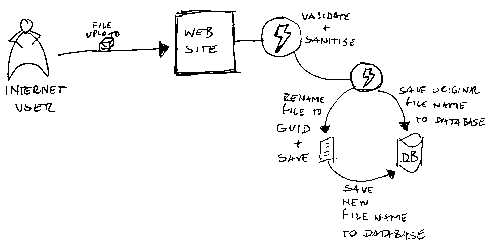
Well, first as a general rule you must not design a website that accept just about any file names created by the user and save it like that. As a matter of fact, any input must be validated and sanitized if possible, not only in client-side but on the server-side as well.
A better design: Do not allow the user to save the file in the web server with the filename that he wants to use. Accept the file, keep the original filename somewhere and let the application rename that file with another name and then save it. I would suggest you to use a GUID string for that matter. That way you are not only closing the doors for a possible canonical attack but also you do not give a chance to a malicious user to try to find out the filenames you might have in your server. For example, If a hacker knows that there is a file called http:\\mywebsite\mydocs\clientid1\file1.doc he will try something like http:\\mywebsite\mydocs\clientid1\file2.doc, and then http:\\mywebsite\mydocs\clientid1\file3.doc and so on. By using an internal name rule creation you minimize his surface.

Another thing to observe: You don't have to fight against and defeat a malicious user, probably there can be hundreds of hackers trying to break your code and you are just one guy against them ( and you don't want to have any sleepless nights during weekends, do you? ) They always find a way to break your code. The best option is to minimize their attack surface. Chances are they are going to move on and concentrate their efforts to break a "weaker website" if your site if strong enough for the first rounds of attack.
These would be some instinctive considerations and additionally I would suggest to take a look at implementing File I/O guidelines as well. At the end of the day, it all depends about how secure you want to be, how much time you have available to implement it and how rigid the specifications were given.
See you later.These would be some instinctive considerations and additionally I would suggest to take a look at implementing File I/O guidelines as well. At the end of the day, it all depends about how secure you want to be, how much time you have available to implement it and how rigid the specifications were given.
By Edge Pereira
Subscribe to:
Posts (Atom)