by

How to Customize My Links Control in SharePoint

User adoption is  everything in a successful SharePoint implementation and one of the main things to attract users to use the site is by customizing the site according to their needs or a previous product. In a lot of cases this never gets 100% done and then one day when a power users is browsing the site he can see things like that: A reference to the Microsoft product inside their own organization.

customize-mylinks-control-sharepoint-0
My SharePoint Sites link being displayed in the client screen
The ideal situation is for a product to be vendor/technology agnostic. From the user's point of view, he doesn't care what is the framework or the company; he just want to have access to his tools.
So, how to customize that My Links control from SharePoint web sites?
Answer: We will create a SharePoint feature to place our own ASCX control in the page instead the default SharePoint OOTB control.
First let's inspect how is this control implemented. If you open the homepage using SharePoint Designer and search for that specific part of the code you will notice that control is a SharePoint DelegateControl.
customize-mylinks-control-sharepoint-1
A delegate control is one of the coolest aspects of the SharePoint ecosystem. This control has the ability to render any user custom ASP.NET controls inside SharePoint pages on the fly by just changing the ControlId.
If we come back to our case, what that line is doing is: at this exact position, render the control called 'GlobalSiteLink2'.
Now remember these functionality are available to the application by features. Let's go then and search for the key 'GlobalSiteLink2' in the TEMPLATE\FEATURES folder on the 12 hive.
customize-mylinks-control-sharepoint-2

You will discover that there is a feature called 'MySite' there which implements the actual control.
Open the file MySiteFeatureElements.xml and you will see this:
   1 <Elements xmlns="http://schemas.microsoft.com/sharepoint/">
    2   <Control Id="GlobalSiteLink1" Sequence="100" ControlSrc="~/_controltemplates/mysitelink.ascx" />
    3   <Control Id="GlobalSiteLink2" Sequence="100" ControlSrc="~/_controltemplates/mylinks.ascx"/>
    4   <Control Id="ProfileRedirection" Sequence="100" ControlSrc="~/_controltemplates/mysiteredirection.ascx"/>
    5 </Elements>
there it is our control Id='GlobalSiteLink2' and its source is in a file called 'mylinks.ascx'.
Next step, we need to find out the mylinks.ascx control. For that you have to navigate to the user controls folder at the 12 hive ($\TEMPLATE\CONTROLTEMPLATES). There you will see all the user controls available to SharePoint.  Let's have a look at the source code of this control.

Code Snippet
  1. <%@ Control className="MyLinksUserControl" Language="C#" Inherits="Microsoft.SharePoint.Portal.WebControls.MyLinksUserControl&#44;Microsoft.SharePoint.Portal, Version=12.0.0.0, Culture=neutral, PublicKeyToken=71e9bce111e9429c" %>
  2. <%@ Register Tagprefix="OSRVWC" Namespace="Microsoft.Office.Server.WebControls" Assembly="Microsoft.Office.Server, Version=12.0.0.0, Culture=neutral, PublicKeyToken=71e9bce111e9429c" %>
  3. <%@ Register Tagprefix="SPSWC" Namespace="Microsoft.SharePoint.Portal.WebControls" Assembly="Microsoft.SharePoint.Portal, Version=12.0.0.0, Culture=neutral, PublicKeyToken=71e9bce111e9429c" %>
  4. <%@ Register Tagprefix="SharePoint" Namespace="Microsoft.SharePoint.WebControls" Assembly="Microsoft.SharePoint, Version=12.0.0.0, Culture=neutral, PublicKeyToken=71e9bce111e9429c" %>
  5. <table><tr>
  6. <td class="ms-globallinks"><SPSWC:MyLinksMenuControl id="MyLinksMenu" runat="server" /></td>
  7. <td class="ms-globallinks"><asp:Literal id="hlMySiteSpacer" runat="server" /></td>
  8. </tr></table>

We now see that MyLinksMenu is an object of MyLinksMenuControl, and this class is defined inside Microsoft.SharePoint.Portal.WebControls.Dll

customize-mylinks-control-sharepoint-6 
That's good news. We find a method called LoadMenuItems() that returns an array list of menu items.
Ok. At this point we have to question ourselves something very important: We should avoid as much as we can interfere during the natural course of SharePoint's behavior. Given that method call we assume that instead modifying it we should be able to configure that string somewhere in the configuration files and then LoadMenuItems() would just return the items with the new label. Would not be the easier and most logical way for Microsoft and everybody else to modify that value?
As much as this proposition might sound correct, unfortunately the answer is no. That string is hardcoded somewhere into the SharePoint source code as a resource file and embedded within the DLL. If you try to inspect that, here's what you get:
customize-mylinks-control-sharepoint-7
The funny thing is that many other areas and messages and labels across the whole SharePoint platform can be configured by updating the resource files, makes you wonder:  "why they did not used the same approach here?"
So, how to fix that?
Using the same delegate control to render your control instead of the out of the box one; and to avoid breaking the natural SharePoint flow of things we are going to create a control inheriting from the OOTB SharePoint MyLinksMenuControl.
We should start by creating a solution that looks like this with WSPBuilder. We will mimic the complete structure for MyLinks.ascx's feature and give it another name.
customize-mylinks-control-sharepoint-5 
 
Compile the solution for the very first time and then extract the public key token. Go to the folder where the DLL is located and execute this command.
customize-mylinks-control-sharepoint-8
Copy and paste the public key token displayed in the screen in our next step, into the ascx source code.
Now will create a similar ascx control just like the original one, but instead of using the webcontrols part we will be using our own MyCustomLinksMenu.ascx
Code Snippet
  1. <%@ Control className="MyLinksUserControl" Language="C#" Inherits="Microsoft.SharePoint.Portal.WebControls.MyLinksUserControl&#44;Microsoft.SharePoint.Portal, Version=12.0.0.0, Culture=neutral, PublicKeyToken=71e9bce111e9429c" %>
  2. <%@ Register Tagprefix="OSRVWC" Namespace="Microsoft.Office.Server.WebControls" Assembly="Microsoft.Office.Server, Version=12.0.0.0, Culture=neutral, PublicKeyToken=71e9bce111e9429c" %>
  3. <%@ Register Tagprefix="SPSWC" Namespace="CustomizeMyLinks" Assembly="CustomizeMyLinks, Version=1.0.0.0, Culture=neutral, PublicKeyToken=995e4d025d306cec" %>
  4. <%@ Register Tagprefix="SharePoint" Namespace="Microsoft.SharePoint.WebControls" Assembly="Microsoft.SharePoint, Version=12.0.0.0, Culture=neutral, PublicKeyToken=71e9bce111e9429c" %>
  5. <table><tr>
  6. <td class="ms-globallinks"><SPSWC:MyCustomLinksMenu id="MyLinksMenu" runat="server" /></td>
  7. <td class="ms-globallinks"><asp:Literal id="hlMySiteSpacer" runat="server" /></td>
  8. </tr></table>

Let's go to www.newguid.net and get ourselves a brand new Guid for the feature. Keep this Guid, we will use it in our next step to assign it to the feature Id.
 customize-mylinks-control-sharepoint-4
This is how it will looks like our new feature.XML.
    1 <?xml version="1.0" encoding="utf-8"?>
    2 <Feature Id="{6fed26c0-57d3-4237-afd7-722c5c13a147}"
    3         Title="Customize MyLinks menu control"
    4         Description="Renames the mention to SharePoint from the MyLinks control, to make the website more vendor agnostic"
    5         Version="1.0.0.0"
    6         Hidden="FALSE"
    7         Scope="Site"
    8         xmlns="http://schemas.microsoft.com/sharepoint/"
    9         ImageUrl ="">
   10   <ElementManifests>
   11     <ElementManifest Location="elements.xml"/>
   12   </ElementManifests>
   13 </Feature>


And this is our new elements.XML which is a copy from MySiteFeatureElements.XML. Note the control GlobalSiteLink2 pointing to our brand new ascx control.
    1 <Elements xmlns="http://schemas.microsoft.com/sharepoint/">
    2   <Control Id="GlobalSiteLink1" Sequence="100" ControlSrc="~/_controltemplates/mysitelink.ascx" />
    3   <Control Id="GlobalSiteLink2" Sequence="100" ControlSrc="~/_controltemplates/MyCustomLinksMenu/MyCustomLinksMenu.ascx"/>
    4   <Control Id="ProfileRedirection" Sequence="100" ControlSrc="~/_controltemplates/mysiteredirection.ascx"/>
    5 </Elements>


And here's the code for the custom control. The comments in the code are self-explanatory.
    1 using System.Collections;
    2 using Microsoft.SharePoint.Portal.WebControls;
    3 using Microsoft.SharePoint.WebControls;
    4 
    5 namespace CustomizeMyLinks
    6 {
    7     /// <summary>
    8     /// Customize the current MyLinks menu control
    9     /// and rename the link 'My SharePoint Sites' to 'Visit Your Sites'
   10     /// </summary>
   11     public class MyCustomLinksMenu : MyLinksMenuControl
   12     {
   13         /// <summary>
   14         /// Loads the menu items.
   15         /// </summary>
   16         /// <returns>a <see cref="ArrayList"/> with
   17         /// all the menu items from <see cref="MyLinksMenuControl.LoadMenuItems"/></returns>
   18         protected override ArrayList LoadMenuItems()
   19         {
   20             // make sure you will call the out of the box method that generates
   21             // the default items in SharePoint
   22             var currentMenuItems = base.LoadMenuItems();
   23 
   24             if ((currentMenuItems != null) && (currentMenuItems.Count>0))
   25             {
   26                 // now that you have the items, you can manipulate them the way you want
   27                 SubMenuTemplate customMenuTemplate;
   28                 using (customMenuTemplate = (SubMenuTemplate) (currentMenuItems[0]))
   29                 {
   30                     if (customMenuTemplate != null)
   31                     {
   32                         customMenuTemplate.Text = "Visit Your Sites"; // or any other text you want here
   33                         currentMenuItems.RemoveAt(0);
   34                         currentMenuItems.Add(customMenuTemplate);
   35                         // you can also try currentMenuItems.InsertAt(0,customMenuTemplate);
   36                     }
   37                 }
   38             }
   39             return currentMenuItems;
   40         }
   41     }
   42 }

Compile. Build the package with WSPBuilder and deploy the feature to the 12 hive, activate the feature in the web site and voilá! You will see the link customized.
 customize-mylinks-control-sharepoint-3
See you later

By

by

Workaround for Aptimize bug and list access denied in SharePoint

Update: It looks like this was a false positive. Yes, all the errors could be replicated by switching the Aptimize on and off but I could not reproduce this issue in a brand new environment which means, Aptimize might not be the problem here but other environmental issues.
As soon as I have more news/fix/info about it I will update this post. Thanks to all the Aptimize people for the contact and great support on this case.


If you are using a product called Aptimize for SharePoint you might have noticed that it is a great product when it comes to minimizing the footprint in the front end and reducing the rendered size of the output. Unfortunately with great power comes also some inconvenient bugs. Like the one below.
In our test scenario we will have a normal SharePoint document library...
aptimize-bug-sharepoint-2007-1
...with versioning, content approval and major and minor versions enabled.
aptimize-bug-sharepoint-2007-2
...Nothing unusual here. Very well.
Then we will have a custom SharePoint page with a custom webpart in it that does a simple thing: loop through the specified library and builds up a list of those items who are published or have a published version.
1 private static void LoadFake(SPSite site, string virtualLibraryPath, IDictionary<string, bool> fake)
2 {
3 using (SPWeb web = site.OpenWeb(virtualLibraryPath))
4 {
5 SPList list = web.GetList(virtualLibraryPath);
6 SPListItemCollection items = list.Items;
7 foreach (SPListItem item in items)
8 {
9 if(item.HasPublishedVersion)
10 {
11 // do anything here...
12 }
13 }
14 }
15 }
The code above works EXCEPT if you have at least one item in that library in pending approval state AND you have APTIMIZE installed in the server; then you will see that SharePoint error.
aptimize-bug-sharepoint-2007-access-denied
error: access denied - current user - you are currently signed in as: xxx - sign in as a different user
If you go to the event viewer you will notice that Aptimize might be running with no problems at all.
aptimize-bug-sharepoint-2007-event-viewer-3
Aptimize Website Accelerator initialized successfully.
Settings:
Enabled: True
RunMode: Development
AutoVersionUrls: True
UseAlternateAutoVersionUrlFormat: False
NewInstall: True
UseDefaultSystemProxy: False
MaxOptimizationsPerSecond: 50
CacheMaxMemory: 100
ResourceSetCacheMaxAge: 172800
PageSpriteCacheMaxAge: 28800
CachePath:
HandlerName: wax.axd
RunAsDaemon: False
VirtualRoot:
DefaultCharset:
PreviewMode: False
IncludeOriginalImageUrl: False
InlineCssImagesOnVista: True
ForceGzipOn: False
ForwardClientAddress: False
TrustedForwarders:
PageCachingEnabled: False
PageCachingVaryBy: Cookie
PageCachingVaryByParam:
IncludeFromDomains: ThisDomain
DiskCacheCleanupInterval: 60
MemoryCacheCleanupInterval: 1
ResourceClientCacheDuration: 259200
ResourceRecheckInterval: 60
PageClientCacheDuration: 30
PageRecheckInterval: 10
Action: Exclude
CombineStyleSheets: All
CombineImages: All
HttpCompression: Smallest
CombineBodyScripts: All
CombineHeadScripts: All
InlineCssImages: True
MaxInlineImageSize: 1200
BodyScriptInsertionPoint: BodyStart
HeadScriptInsertionPoint: BodyStart
AsyncScriptLoading: False
AsyncStyleSheetLoading: False
LogInfoLevel: Info
ProxyCacheable: False
ShrinkCss: True
ShrinkScripts: True
ShrinkImages: True
JpegQuality: 85
ConvertGifToPng: False
HttpFetchTimeout: 5000
EnableClientApi: False
SuppressedErrorCodes:
CacheableMimeTypes: text/css,text/javascript,application/x-javascript,image/gif,image/png,image/jpeg,image/jpg,image/bmp,image/x-icon,application/x-shockwave-flash
CompressableMimeTypes: text/html,application/xhtml+xml,text/css,text/javascript,application/x-javascript,text/xml,application/xml,application/json

But then a lit bit later you will see these two entries in the event log
aptimize-bug-sharepoint-event-viewer-1
Error initializing Safe control - Assembly:Mondosoft.Ontolica.SharePoint.Reporting, Version=3.0.0.0, Culture=neutral, PublicKeyToken=c7127db7656685c6 TypeName: Mondosoft.Ontolica.SharePoint.Reporting.WebControls.WebParts.ReportingWebPart Error: Could not load file or assembly 'Microsoft.ReportingServices.SharePoint.UI.WebParts, Version=9.0.242.0, Culture=neutral, PublicKeyToken=89845dcd8080cc91' or one of its dependencies. The system cannot find the file specified.
For more information, see Help and Support Center at http://go.microsoft.com/fwlink/events.asp
aptimize-bug-sharepoint-2007-event-viewer-2
The description for Event ID ( 8214 ) in Source ( Windows SharePoint Services 3 ) cannot be found. The local computer may not have the necessary registry information or message DLL files to display messages from a remote computer. You may be able to use the /AUXSOURCE= flag to retrieve this description; see Help and Support for details. The following information is part of the event: A request was made for a URL, http://xx.xx.xx.xx, which has not been configured in Alternate Access Mappings. Some links may point to the Alternate Access URL for the default zone, http://www.www.ww. Review the Alternate Access mappings for this Web application at http://myserver:9100/_admin/AlternateUrlCollections.aspx and consider adding http://xxx.xxx.xxx.xx as a Public Alternate Access URL if it will be used frequently. Help on this error: http://go.microsoft.com/fwlink/?LinkId=114854
If you now go to the Aptimize console and turn off the website optimization, the error goes away.
The curious thing. if you debug that code above you will noticed that an exception will happen at line #9.
Apparently Aptimize is doing something under the hood that causes a privilege exception when calling SPListItem.HasPublishedVersion even if you are running as System Administrator and even if you are running using RunWithElevatedPrivileges method. Inspect the returned error and it will see an UnauthorizedAccessException.
The fix for now is to avoid calling HasPublishedVersion until we hear back from the Aptimize guys.
If someone out there seen the same issue and would like to share any ideas, feel free. Meanwhile I hope this workaround helps someone.
See you later

By

by

How to create your own SharePoint HttpContext

Quick and short. Here's a function that I use to create my own SharePoint HttpContext objects outside the SharePoint websites domain. I hope it is somehow useful to someone out there as well.

    1         /// <summary>
    2         /// Enables a share point call from anywhere by creating your own context.
    3         /// </summary>
    4         /// <param name="siteCollectionUrl">The site collection URL where you want to create the context.</param>
    5         /// <example>
    6         /// EnableSharePointCallByCreatingYourOwnContext("http://mysite.com.au");
    7         /// </example>
    8         private void EnableSharePointCallByCreatingYourOwnContext(string siteCollectionUrl)
    9         {
   10             using (var site = new SPSite(siteCollectionUrl))
   11             {
   12                 using (var web = site.OpenWeb())
   13                 {
   14                     // assumes that context does not exists
   15                     var contextCreated = false;
   16 
   17                     // if it does not exists, then create it
   18                     if (HttpContext.Current == null)
   19                     {
   20                         contextCreated = true;
   21                         // creates a request object for the current web URL
   22                         var request = new HttpRequest(string.Empty, web.Url, string.Empty);
   23 
   24                         // open the pipe to output the http stream
   25                         HttpResponse httpResponse;
   26                         using (var responseWriter = new StringWriter())
   27                         {
   28                             httpResponse = new HttpResponse(responseWriter);
   29                         }
   30 
   31                         // creates the context
   32                         HttpContext.Current = new HttpContext(request, httpResponse);
   33 
   34                         // HttpHandlerSPWeb is a the property name where you must assign the current web
   35                         // in order to associate the newly created context to sharepoint
   36                         if (HttpContext.Current.Items != null)
   37                         {
   38                             HttpContext.Current.Items["HttpHandlerSPWeb"] = web;
   39                         }
   40                     }
   41 
   42                     // ...
   43                     // do whatever you want to do here
   44                     // ...
   45 
   46                     // return the application context to the original state prior the execution
   47                     if (contextCreated)
   48                     {
   49                         HttpContext.Current = null;
   50                     }
   51                 }
   52             }
   53         }

See you later

By

by

How to Fix SharePoint MySite Auto-Creation Errors During Self Service ?

SharePoint MySites features is one of the best social features in the platform. It effectively gives to the end user control to his own area leveraging even more the collaboration capabilities of the enterprise.
One of these days we had a strange issue when creating my sites, which should be a trivial task. When an end user goes to his MySite link for the very first time the MySite creation can be automatically triggered, instead this error message was being displayed.
there-has-been-an-error-creating-the-personal-site-contact-your-site-administrator-for-more-information
there has been an error creating the personal site. Contact your site administrator for more information.

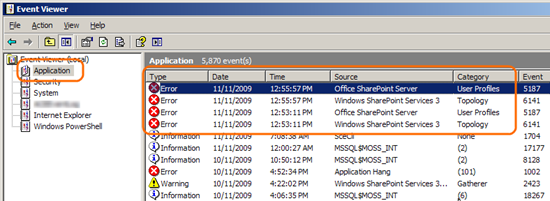
With not so many clues to inspect this case we went to take a look at the event viewer to see what's going on.
event-viewer-sharepoint-application-creation

When we saw this exception logged.
event-viewer-sharepoint-error-my-site
The site /personal/edge could not be created.  The following exception occured: Failed to instantiate file "default.master" from module "DefaultMasterPage": Source path "default.master" not found. For more information, see Help and Support Center at http://go.microsoft.com/fwlink/events.asp.
A little bit further, we see some more exceptions related to that previous entry where we can see a more detailed explanation for the error.
 event-viewer-sharepoint-error
My Site creation failure for user 'CORP\edge' for site url 'http://my.portaldev/personal/edge. The exception was: Microsoft.Office.Server.UserProfiles.PersonalSiteCreateException: A failure was encountered while attempting to create the site. ---> Microsoft.SharePoint.SPException: Failed to instantiate file "default.master" from module "DefaultMasterPage": Source path "default.master" not found. ---> System.Runtime.InteropServices.COMException (0x81070587): Failed to instantiate file "default.master" from module "DefaultMasterPage": Source path "default.master" not found.
   at Microsoft.SharePoint.Library.SPRequestInternalClass.ApplyWebTemplate(String bstrUrl, String& bstrWebTemplate, Int32& plWebTemplateId)
   at Microsoft.SharePoint.Library.SPRequest.ApplyWebTemplate(String bstrUrl, String& bstrWebTemplate, Int32& plWebTemplateId)
   --- End of inner exception stack trace ---
   at Microsoft.SharePoint.Library.SPRequest.ApplyWebTemplate(String bstrUrl, String& bstrWebTemplate, Int32& plWebTemplateId)
   at Microsoft.SharePoint.SPWeb.ApplyWebTemplate(String strWebTemplate)
   at Microsoft.SharePoint.Administration.SPSiteCollection.Add(SPContentDatabase database, String siteUrl, String title, String description, UInt32 nLCID, String webTemplate, String ownerLogin, String ownerName, String ownerEmail, String secondaryContactLogin, String secondaryContactName, String secondaryContactEmail, String quotaTemplate, String sscRootWebUrl, Boolean useHostHeaderAsSiteName)
   at Microsoft.SharePoint.SPSite.SelfServiceCreateSite(String siteUrl, String title, String description, UInt32 nLCID, String webTemplate, String ownerLogin, String ownerName, String ownerEmail, String contactLogin, String contactName, String contactEmail, String quotaTemplate)
   at Microsoft.Office.Server.UserProfiles.UserProfile.<>c__DisplayClass2.<CreateSite>b__0()
   --- End of inner exception stack trace ---
   at Microsoft.Office.Server.UserProfiles.UserProfile.<>c__DisplayClass2.<CreateSite>b__0()
   at Microsoft.SharePoint.SPSecurity.CodeToRunElevatedWrapper(Object state)
   at Microsoft.SharePoint.SPSecurity.<>c__DisplayClass4.<RunWithElevatedPrivileges>b__2()
   at Microsoft.SharePoint.Utilities.SecurityContext.RunAsProcess(CodeToRunElevated secureCode)
   at Microsoft.SharePoint.SPSecurity.RunWithElevatedPrivileges(WaitCallback secureCode, Object param)
   at Microsoft.SharePoint.SPSecurity.RunWithElevatedPrivileges(CodeToRunElevated secureCode)
   at Microsoft.Office.Server.UserProfiles.UserProfile.CreateSite(String strRequestUrl, Boolean bCollision, Int32 lcid).

For more information, see Help and Support Center at http://go.microsoft.com/fwlink/events.asp
So there we go. There is a clue indicating the a file called default.master was not found where it was supposed to be. We step into the Microsoft.SharePoint.Library.SPRequest class to understand what the method ApplyWebTemplate does but not much can be told from there as we can see in the picture. Also there is another method call to a private member, and probably obfuscated by Microsoft, which we can not debug.
ScreenShot013
In these cases, there is a straight forward thing to do which is if possible, compare against a working version of SharePoint and see the differences. Luckily we had one and we noted that (for some reason) the files in the SPSPERS were missing in the 12 hive.
  • \XML\onet.xml
  • blog.xsl
  • default.aspx
 sharepoint-12-hive-template-site-templates-spspers-blog-xsl
 sharepoint-site-templates-one-xml
We just put the files back in there and it is all good and back to normal. If you ever have this problem  also pay special attention if you have done any modifications in these templates.
See you later,

By

by

How to get connection string from BDC and use ADO.NET in your queries ?

The SharePoint BDC is great in a sense that once you target your data to be displayed, the end user can create and format many reports and data grids at his own convenience, however there is a price to pay for that: performance.
The operations executed via BDC can be extremely slow. Just so you know I will talk about a project I had to implement and how an alternative solution can be put in place to maximize the overall performance.
The task was to is to hit a specific database and bring a whole set of records in order to build a report. For many architectural reasons particular to the project, the BDC approach had to be used for the task.
The SharePoint web site makes the request to the BDC, the BDC then drags the data out of the external database and then this data is manipulated and displayed back in the end user report page. The transaction is much like the picture below:
bdc-performance-connection-string-sharepoint-2
In this specific case, the whole task takes approximately 6 minutes. Yeah, I know. Painful.
Let's run a profiler against that page and see what it tells about it. (I will blur all text which might contain sensitive information about the client.)
bdc-sharepoint-performance
Well, once we have analyzed that data in our hands outlining all the calls being executed during this specific SharePoint's page  life cycle and what's going on behind the scenes we can draw a few conclusions and the most important conclusion here is that 2 single calls are responsible for almost 99% of the total execution time. Now that an impressive bottleneck.
Let's dive a bit further on it into the internal calls and we can identify the very single calls responsible for these times.
 bdc-sharepoint-performance-5

 bdc-sharepoint-performance-4
When we go back to the source code to take a look at them, it turns out that they were the ones connecting and loading the data from the BDC.
The world would be perfect if we only could have done things our way, but unfortunately due to requirements restrictions this can not be changed.
As a good exercise I made myself a mirror copy of this environment to test a theory. What if we change the approach to loading data from the BDC?
The idea is to connect to the BDC and only extract the necessary connection string to the external data source and from there I would load the data via ADO.Net. That would be great because :
  • we are not performing any breaking changes in the current structure
  • the BDC still plays the game
  • All the permissions and security levels are still managed by the BDC definition
  • I have an opportunity to retrieve data from an external source much faster than via BDC
 bdc-performance-connection-string-sharepoint-3
  • 1 and 2 we would get the BDC connection string.
  • 3 and 4 we will query the external database and get the data displayed on screen. 
Using the properties in the code below you can get the properties returned from the BDC catalog and amongst them you can see the returned connection string with all the permissions etc for your use in your SharePoint code. Neat!
Note that the code is also using Entity Framework.
   25         public static void SetSharedServiceProvider(SPSite site)
   26         {
   27             try
   28             {
   29                 if (site != null)
   30                 {
   31                    
   32                     SqlSessionProvider.Instance().SetThreadLocalSharedResourceProviderToUse(
   33                         ServerContext.GetContext(site));
   34                 }
   35             }
   36             
   37             catch (Exception)
   38             {
   39                 // Ignore the exception if a provider
   40                 // is already set.
   41             }
   42             
   43         }
   44 
   45         public static EntityConnection GetOnePortalConnectionString(SPSite site)
   46         {
   47             const string instanceName = "TEST_Instance";
   48             SetSharedServiceProvider(site);
   49             LobSystemInstance instance = ApplicationRegistry.GetLobSystemInstances()[instanceName];
   50             var properties = instance.GetProperties();
   51 
   52            
   53             return GetEntityConnection(GetProperty(properties, "CONN Data Source"),
   54                                        GetProperty(properties, "CON Initial Catalog"));
   55         }

Once implemented the results are impressive. The page that use to load in minutes now takes a couple of seconds to run.
Now moving from the current scenario to the improved version is easier said than done and the lesson learned here is that BDC can be as great as mush as it can be plain dangerous to kill an application.
See you later,

By

by

General Talk

by

Project Home

by

SharePoint Home

by

bicycle rides in 2010


June

Sun Mon Tue Wed Thu Fri Sat


July

Sun Mon Tue Wed Thu Fri Sat


August

Sun Mon Tue Wed Thu Fri Sat
1 2 3 4 5 6 7
8 9 10 11 12 13 14
15 16 17 18 19 20 21
22 23 24
http://j.mp/d7wcpk

http://j.mp/9uKRB4
25 26

http://j.mp/9ybXHU

http://j.mp/cSz6kJ
27 28
29 30 31        

September

Sun Mon Tue Wed Thu Fri Sat


October

Sun Mon Tue Wed Thu Fri Sat


November

Sun Mon Tue Wed Thu Fri Sat


December