
Sunday, March 20, 2016T3/20/2016 04:13:00 PM
by


InfoPath on SharePoint Online error: “This form cannot be opened in a web browser. To open this form, use InfoPath”
Labels:
Office365,
sharepoint
Here’s an annoying error you might experience when using InfoPath Forms with Office 365 (SharePoint Online).
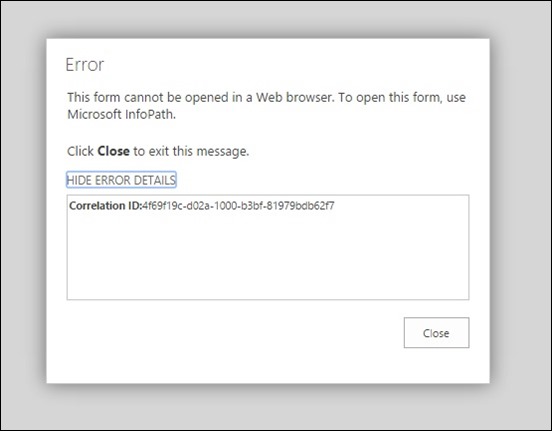
So to save your time, let’s go straight to the solution:
Enable Form Rendering in the Office 365 Admin Console
Go to your Office 365 Portal (http://portal.office.com) and choose Admin console.


Then Enable Form Templates Rendering for Browsers
You will see a warning about InfoPath being discontinued in the future, don’t worry about it for the moment, this is another discussion. For now, you just want to get this done.


Re-publish Your InfoPath Form Again
Now, what you have to do is to:
- Close your browser session
- Republish your InfoPath Form
Note that at the end you will see Security Level: Domain. If you see this, it means it worked. Previously you would see Security Level: Restricted.

That’s it! I hope this was helpful to you and saved you a couple of hours banging your head against the Surface keyboard


Friday, January 8, 2016T1/08/2016 06:33:00 PM
by
How is Machine Learning Used in Cyber Security?

Let's start with 2 points:
- The objective of cyber security (strategy) is not to avoid 100% the attacks, something unattainable; but to reduce the "attack surface" to a minimal.
- the number of attack perpetrators will be always bigger than the number of people trying to protect against attacks.
With that in mind, several companies discovered soon enough that fighting for protection was becoming an ever increasing ($$) exercise. The biggest security/infrastructure firms (symantec, mcafee, palo alto, checkpoint etc) united to work in common initiatives, such as developing web apps against DDoS attacks (web apps not in the sense of website but in firewall webapps, also called next generation firewalls).
The SecIntel Exchange
Now, a very important concept here to remember: They do not exchange their solutions, they do exchange their attacks. That's a very important point. This is called SecIntel Exchange. The whole idea behind this is: To understand how attacks are done and what types of exploits are there, we need to increase our catch network, so they can be aware of attacks BEFORE they become a real worry.
OK, now that these companies found a common protocol to receive and analyze their attacks, and are able to collect information about what's going on out there in the wild, each company go about and find solutions appropriate for their own products. This is a great strategy, defend as a stronghold, attack as a militia. However, another challenge comes up: Slowly but surely this process is also becoming time-consuming and expensive. In short, it does not scale. Remember, while a company has a team of 10 people to protect, the world always will have thousands working 24x7 trying to break it. (that also explains why Linux/Unix systems don't have as many vulnerabilities as Windows for example, but that's another topic)

The Machine Learning Angle
Good. Now that's when machine learning (ML) comes in nicely! In conjunction with other technologies (virtual machines, test simulators, honey pots etc) machine learning algorithms can pick up the information collected by the SecIntel and QUICKLY SCALE the analysis process. What used to take 2 days for an InfoSec team to understand, takes 1 day for an ML algorithm to understand...but that's not the main benefit of ML. The main benefit is that the ML algorithms will learn and predict based on experience and results. It means that today it takes 1 day, tomorrow it will take 20 hours, the next day it will take 12 hours and so on. ML by "learning and predicting" effectively scale the effort to a level human teams cannot do, specially when dealing with automated tasks.
A Real World Analogy
Imagine when you do blood tests if your blood had to be analysed individually. It would take weeks before you get your results not because the process is slow but mainly because the queue to get to you will be too large and by then the effort to get the results could be potentially wasted. By scaling the effort, ML will free up the InfoSec teams to focus in the higher ground and strategy trying to be one step ahead of the game.
It is about scale and quick response to market.
images credits: @msau


Friday, December 4, 2015T12/04/2015 04:00:00 PM
by
I Am Presenting at the Azure Smorgasbord in December 2015
How does your day look like on December 9th 2015?
Come join me a Microsoft to discuss and share ideas about IoT, Azure and Office 365 in Australia.

Session Name: “IoT - The Invasion of Australia”
Abstract: “Five million new IoT devices will come online every day in 2016. Do you want a piece of this 50 billion dollar cake? Join Edge Pereira to discuss a use case of IoT in Australia and why we are in a prime position to lead the world in this area.”
Where Can I Find the Presentation Slides?
Wednesday, December 2, 2015T12/02/2015 01:44:00 PM
by
Hour of Code 2015. I am Volunteer. Again.
Once again this year I am volunteering time for the Hour of Code. And proud of it. Listen what Bill Gates, Mark Zuckerberg, Jack Dorsey and others have to say about this event.
What is the Hour of Code?
Launched in 2013, Code.org is a non-profit dedicated to expanding access to computer science, and increasing participation by women and underrepresented students. The vision is that every student in every school should have the opportunity to learn computer science. Code.org believes that computer science should be part of core curriculum, alongside other courses such as biology, chemistry or algebra.

When It Happens?
Volunteers from all over the world help local teachers and their classes during the Computer Science Education Week that happens every year in December. This year it will be from December 7th to 13th.
How Can You Help?
We have this year 13.000 requests from teachers from all over the world, but only 4.000 volunteers. We need volunteers to help with the activities and help the teachers. Here are a few things you can do also to get involved:
- Recruit co-workers to volunteer: Blog, share, tell your friends and co-workers about the Hour of Code and ask them to sign up as a volunteer.
- If you know someone who’s a volunteer, connect them with people who wants to setup Hour of Code parties.
I Want to be a Volunteer. What Do I Need to Do?
To get a better idea about what your volunteer experience will be like, have a look at this guide. There's also some extra tips about how you can get your employer and community involved with the Hour of Code.
If you know anyone needing help with it, feel free to connect with me. Remember: I am a volunteer!

Sunday, November 22, 2015T11/22/2015 01:02:00 PM
by
Infrastructure Saturday 2015 Social Media Stats #infrasat
Labels:
General,
Office365,
security,
sharepoint,
windows
We’ve just done another successful Infrastructure Saturday event. It takes a lot of time and passion to setup personal time aside and to organize such an event. This is an annual event totally built and sponsored by the community, so the people you find there (attending, organizing or presenting) are 100% committed to the cause. Big shout for the guys organizing: Alan Burchill and Shane Hoey
Below are some of the social media stats collected during the last week up to the event day. This years top contributors were: JustBroady, superedge, david_obrien, pzerger, cloudtidings, bneusergroup, alanburchill, twalex2, blkchninstitute, reecestewart4
If you’ve been to the sessions, thank you very much. I hoped you enjoyed and see you next year.


Top Links about the #infrasat Infrastructure Saturday 2015 Event
- https://www.flickr.com/photos/alborath/albums/72157660731316669
- https://twitter.com/DigitalGlobe/status/667834517428682752
- https://code.visualstudio.com
- http://www.infrastructuresaturday.com/
- http://www.superedge.net/2015/11/ethereum-blockchain-service-bitcoin.html
- https://lnkd.in/b_GeEXZ
- https://lnkd.in/bk9tVcN
- https://doc.co/75WgEz
- http://www.linkedin.com/pulse/want-increase-privacy-protection-your-cloud-data-worries-edge-pereira
- http://www.infrastructuresaturday.com
- http://infrastructuresaturday.org
- https://lnkd.in/buajN7R
- https://lnkd.in/bkYJbY4
- https://lnkd.in/bBgh534
- http://www.superedge.net/2015/11/infrastructure-saturday-2015-australia.html
- https://lnkd.in/bhp3pyZ
Thursday, November 19, 2015T11/19/2015 08:59:00 AM
by
Azure DevTest Labs Now in Preview
Busy week for Microsoft Azure. Another feature comes in preview today: Azure DevTest Labs

What it is ?
Azure DevTest Labs gives developers on-demand self-service for Azure-based test environments. With DevTest Labs developers can:
- Quickly provision development and test environments.
- Minimize waste with quotas and policy enforcement.
- Set automated shutdowns to minimize costs.
- Create a VM in a few clicks with reusable templates.
- Get going quickly using VMs from pre-created pools.
- Build within Windows and Linux environments.
- Integrate directly with your preferred CI tool, IDE, or automated release pipeline.
A really cool feature is that the Dev VMs can be saved as templates and reused across organizational teams of developers.

How Much it Costs?
Azure DevTest Labs is a free service. However, you will be charged for other Azure resources that are created in the Lab. For example, you will be charged for the virtual machines that are created in the DevTest Labs per our virtual machine.
See this new product here at the Azure DevTest Labs webpage
T11/19/2015 08:36:00 AM
by
Azure Disk Encryption Now Available
Brand new feature deployed today on Microsoft Azure as preview: Disk Encryption
About Azure Disk Encryption
Azure Disk Encryption for virtual machines (VMs) is the answer to many organizations that could not have VMs running in the cloud mainly due to security and legislation compliance requirements.

What it Does?
What this technology does it to encrypt the VM disks, including boot and data disks, with keys and policies which are controlled in the Azure Key Vault.

It Works for non-Windows Systems
Disk Encryption for VMs works for both Linux and Windows operating systems. It also uses Key Vault to safeguard, manage, and audit the use of disk encryption keys. All the data in your VM disks is encrypted at rest using industry-standard encryption technology in your Azure Storage accounts.

What Encryption is Used?
Windows VMs uses BitLocker and the Linux VMs are using dm-crypt
How Much it Costs?
This is at no charge. Gratis! The reason for that is because this is brand new and still in preview mode. Microsoft is expected to start charging for it in some way when the product becomes live. Meanwhile it is a great opportunity for you to start playing around with it and testing your systems.
Tuesday, November 17, 2015T11/17/2015 02:02:00 PM
by
I’m Speaking at the Infrastructure Saturday 2015 Australia
Once again I am honoured to be part of the Infrastructure Saturday event in Australia. This is such a great opportunity to connect with the local IT community and talk about tech and experiences with a local flavour and feel.
Session Details
- Title: “When a data breach happens, what’s your plan ?”
- Abstract: “Ashley Madison, Sony, Kapersky Labs, LastPass, CentreLink, G20 event in Brisbane…What do they all have in common? They were victims of data breaches. And as you probably know by now, some were handled better than others. In this session we will talk about strategies, from mitigation to handling, used when a data breach happens (not “if”) and what controls do we have if you are using Office 365.”
- Local: Microsoft Offices, George St, 4000, Brisbane, Australia
Where Are the Slides?
Looking forward to talk about this topic!! Below are some of the art done to promote my session. Loved the work


Monday, November 16, 2015T11/16/2015 01:44:00 PM
by
List of the Most Common Passwords
Labels:
BYOD,
General,
security,
sharepoint,
windows
Ah the joys of working on a specialized cloud security company. This list got to my hands and I am quickly circulating them with you. These guys do a lot of pen testing, network and cloud vulnerability assessment, cloud assurance etc.
Is any of these your current password somewhere? I hope not!


Thursday, November 12, 2015T11/12/2015 02:10:00 PM
by
Microsoft to Store Data in Germany. Make it Harder for Foreign Authorities. Safe Harbour Lesson #1.
Here’s a way to increase your data protection from US government access: Store it in Germany!
As you probably know, in October 2015 the European Court of Justice declared invalid a "Safe Harbor" agreement between the European Union and the U.S. that allowed Facebook and other firms to transfer data in huge quantities to their servers in the U.S.
The court threw this deal in the bin because it was worried about "mass indiscriminate surveillance and interception" of personal data by the U.S. authorities.
And that’s what’s Microsoft is proposing: to make it harder for Government authorities to put their hands in people’s data.

Why Germany?
After the whole saga between Microsoft vs. USA Justice Department, European consumers, rights groups and lawmakers have expressed concern about what U.S.-based companies share with American authorities.

The European Union has very rigorous rules to protect data, and Germany's regulations are considered especially strict. Besides that EU authorities have been clamping down on data protection in recent months over concerns about mass spying by U.S. intelligence services. Especially after the revelations made by former NSA contractor Edward Snowden that the U.S. spied on German officials, including Chancellor Angela Merkel, angered Berlin.
Where Will the Datacenters be Located in Germany?
They will be in Magdeburg and Frankfurt. These new datacenters will maintain the same level of expectations , security, service and quality standards as all Microsoft datacenters globally. The services offered will abide by the Microsoft trusted cloud principles of security, privacy, control, compliance and transparency, as well as consistency with Microsoft’s global cloud services.

The reason for 2 datacenters is to ensure business continuity. Also their data will be exchanged through a private network to ensure data resides in Germany even in transit.
What is Planned to be Stored in Germany?
As part of this big initiative, Office 365 customers will soon be able to choose to store all data from the following products in Germany:
- Azure,
- Office 365 and
- Dynamics CRM Online
Who Will Oversee this Data?
Deutsche Telekom will be the assigned data trustee and will control and oversee access to all customer data.
What is a Data Trustee?
Data trustee is an entity that will handle data on your behalf. In this case, it will be a company called T-Systems, which is a subsidiary of Deutsche Telekom. It means that Microsoft will not be able to access this data without the permission of either:
- customers or
- the data trustee itself
and if permission is granted by the data trustee, will only do so under its supervision.
This is ground-breaking stuff. Never done it before in Europe and after the repercussion of the Safe Harbour case, this service is expected to grow rapidly.
What are the Impacts on Compliance for Customers?
These new cloud services in Germany will specifically address organizations and enterprises operating in data-sensitive areas such as the public, financial or health sector. The immediate effect on this is positive: Now you can even choose the datacenter within the EU jurisdiction which will translate in a better granularity of controls.
We are talking about the German Government which traditionally have a very high level of data handling regulations and security by default. As a matter of fact, Germany is one of the leaders in this quadrant. Together with Customer Lockbox, customers will be able to view how and where data is processed.
Will this Avoid the US Authorities to Access my Data?
Honestly, No. Any government that requires access to data stored in the cloud, regardless of the provider (Microsoft, AWS, Google etc) will get this access. In a fight between governments and private companies, governments always win.
However this move will make it increasingly harder for governments to have this access. And that’s the main goal here. It is not to block the access, but to put stronger controls around data access by other people except the data owner.
This move will be likely followed by Amazon and Google very soon.
Sounds Great! When Can I Move my Data to Germany?
There is a LOT of ground work to cover. Involving auditing, certifications, and buildings construction. Microsoft is releasing this information now to calm-down the nerves of some big customers. The expected timeline for availability will be around the 2nd semester of 2016
Wednesday, November 11, 2015T11/11/2015 05:49:00 PM
by
CheckList to Buy an Used iPhone
I am in the market for a new phone. Got tired of my Windows Phone, which I gave so much love for years but unfortunately the market didn’t care for it. Windows Phone is like a beautiful princess locked in a castle that noone knows where it is.
I am going for an iPhone. You can’t beat its app store. Nowadays people don’t buy phones, they buy the app store.
I am thinking about buying a 2nd-hand device so I listed a few things to check when I found one and I am sharing these tips here with you. Hope it helps you as well if you’re in similar situation.
Here are my 9 checks to perform a good smoke-test on the device you want to buy:
- Check for Warranty and Support Status
- Check the iPhone Activation Lock Status
- Examine the Device
- Test the Display
- Access the Internet over Wi-Fi and Cell Network
- Make a Call and Send a Text to a Friend
- Take a Picture and Make a Movie
- Check the Battery
- Disassociate the Device from iCloud
And now let’s go into more details on how to check them.
1) Check for Warranty and Support Status
If the phone you’re buying is sold as “under warranty”, make sure it is. Enter the iPhone serial number into the Apple’s site to see the report. You can check this here.

2) Check the iPhone Activation Lock Status
Before transferring ownership of an iPhone make sure the Activation Lock has been disabled and the device is ready for the next user. This also applies for iPad, iPods and Apple Watches. You can check this here.

Note: Once an IMEI is blocked, let’s say due to theft or lost device, it cannot be undone. It means the device has officially become a brick. With no use for noone except the recycling company. So if the IMEI is locked here, don’t bother testing anything else…actually, you CAN report it to the police.
3) Examine the Device
Scratches, chipped glass, dock connector. Then plug the phone in a charger to make sure it will take a charge. Listen to music through the headphones. Use the headphone’s controls to navigate music and volume.
4) Test the Display
This is tricky as well. Make sure you are in a place with good natural light when inspecting the phone screen. Visit this website iPhone Dead Pixel Tester to test for dead pixels. Make sure the screen displays a solid colour and it does not have any stuck pixels that won’t go away.

5) Access the Internet over Wi-Fi and Cell Network
Go and browse places like news or weather sites because they have tend to have small local caches.
6) Make a Call and Send a Text to a Friend
This is to make sure the phone perform trivial tasks as expected. During the call, put the volume up and down. Pay attention how you communicate with your friend and check if the call behaves as expected.
7) Take a Picture and Make a Movie
Make sure the photo does not look weird, too dark or too bright or have fuzzy spots.
8) Check the Battery
Go to Settings/General/Usage and check the time when the device had the last full charge. This is a bit tricky, but once you have the phone use it as much as you can and see if you are getting the battery duration expected.
9) Disassociate the Device from iCloud
Hopefully you won’t be buying a stolen iPhone so make sure the current owner disassociates the device from the iCloud account otherwise you won’t be able to login using your credentials and activate your new phone. See how to do this here.

If you find out later that the previous owner did not disassociated it properly or he/she doesn’t know how to do it, ask him/her to go to iCloud, login and remove the device from their account. They can do this by going here.

T11/11/2015 09:58:00 AM
by
Ethereum Blockchain as a Service Now Available on Microsoft Azure
Microsoft and ConsenSys are partnering to offer Ethereum Blockchain as a Service (EBaaS) on Microsoft Azure so Enterprise clients and developers can have a single click cloud based blockchain developer environment. The initial offering contains two tools that allow for rapid development of SmartContract based applications:
- Ether.Camp - An integrated developer environment, and
- BlockApps - a private, semi-private Ethereum blockchain environment, can deploy into the public Ethereum environment.

What is Ethereum?
If you’re not following closely the whole movement started with BitCoin, have a look at this video.
Why Ethereum?
The Enterprise Partner Group at Microsoft is on the front lines with some of our largest customers. Everyone, particularly Financial Services, is interested in Blockchain technology. While a platform like Bitcoin has many great uses specifically as a Cryptocurrency, Ethereum provides the flexibility and extensibility many of our customers were looking for.
In Financial Services particularly, Blockchain is a major disruptor to some of their core businesses, and FinTech companies are driving innovation in this space. Ethereum is open, flexible can be customized to meet our customer’s needs allowing them to innovate and provide new services and distributed applications or Đapps.
Ethereum enables SmartContracts and Distributed Applications (ĐApps) to be built, potentially cutting out the middleman in many industry scenarios streamlining processes like settlement. But that is just scratching the surface of what can be done when you mix the cryptographic security and reliability of the Blockchain with a Turing complete programming language included in Ethereum, we can’t really image what our customers and partners will build.
‘'Ethereum Blockchain as a Service” provided by Microsoft Azure financial services customers and partners to play, learn, and fail fast at a low cost in a ready-made dev/test/production environment. “
It will allow them to create private, public and consortium based Blockchain environments using industry leading frameworks very quickly, distributing their Blockchain products with Azure’s World Wide distributed (private) platform.
That makes Azure a great Dev/Test/Production Environment for Blockchain applications. Surrounding capabilities like Cortana Analytics (machine learning), Power BI, Azure Active Directory, Office 365 and CRMOL can be integrated into apps launching a new generation of decentralized cross platform applications.
How to Try Ethereum?
It is available as an Azure VM Template. It means you need to spin up an Azure VM with the Ethereum template loaded. The virtual machine main system is Ubuntu, and it will contain a Go Ethereum client and a Genesys block. Also this template is available on GitHub, you can get it here.
Deploying with PowerShell
You will need Azure PowerShell to perform the deployment. You can install Azure PowerShell from here.
Switch-AzureMode AzureResourceManager
New-AzureResourceGroupDeployment -Name <deployment-name> -ResourceGroupName <resource-group-name> -TemplateUri https://raw.githubusercontent.com/azure/azure-quickstart-templates/master/go-ethereum-on-ubuntu/azuredeploy.json
All this is a pretty straight forward process, you will need to specify:
- Azure Storage Account Name
- DNS Name (it must be unique since it will be referenced by a public IP)
- Administrator name and password
- Size of the VM
- Location of the VM anywhere on the several Azure datacenters around the globe.
Read more about this exciting announcement here.
Subscribe to:
Posts (Atom)