by

Surface Pro 3 Battery Problems

Do you have a Surface Pro 3?

image

Are you experiencing very low, fast battery duration like the case mentioned below? (from winsupersite)

image

If yes, looks like you’re in for a bit of a pain. Microsoft has acknowledged some Surface Pro 3 models have a battery issue where the battery charge is continuously draining and soon it will be unusable. Think in terms of, 1 or 2 hours max of duration. A far cry from ideal. There is a thread now also in Reddit on the topic and on the apparent silence from Microsoft on this.

How Do I Know My Surface Pro has this Issue?

The issue is related to the manufacturer, called SIMPLO. All models that have a battery from this manufacturer have or will have this problem.

How Do I Know the Battery Manufacturer of my Surface Pro ?

There is a neat command-line utility in windows that gives you that information. In your command-prompt type the command powerfcg /batteryreport

image

This will generate an HTML report about your battery, including the manufacturer as you can see here:

image

If the manufacturer reads “SIMPLO”, your device has a problematic battery. In this case, the manufacturer is “LGC-LGC” which indicates this device has an OK battery.

What Should I do if My Surface Pro 3 has a Bad Battery ?

If you’re Surface has less than 1 year, you’re covered by warranty. After that, you should raise your voice and complain to  Microsoft here. There is already a growing list of people doing that and pressing Microsoft for a reasonable solution, after all it is a poor component.

by

How to Write a Better Technical Document…and Use Windows Bash with it

Writing a good technical documentation is hard. Most people don’t appreciate this fact. It is hard because we are emotional beings by nature and technical writing is…well…emotionless Smile The less emotion, the better.

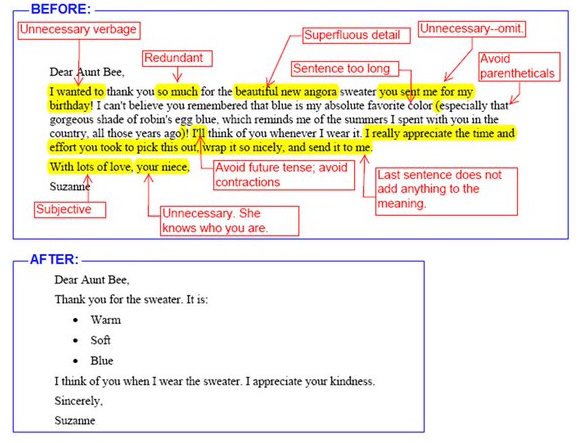
As a person from a Latin background, it is especially hard for me to avoid emotion in my writing. So after many years of hits and misses, I’ve compiled my own guide that helps me stay in check. It is not perfect but I believe it is a good start. Using it helped me to increase the number of hits while lowering the misses and at the end of the day that’s the goal: Not aiming for perfection, but continuous improvement Smile It can be quickly summarized in the following graphic:

image

Interesting thing is, you can use this even when writing in social media. I am also someone who is slowing moving away from the operational IT tasks and more into the business and stakeholder dialogues. Understanding is paramount for this phase of my career.

Oh yeah, before I forget: I don’t care about these recommendations here in my blog. I want my blog to be organic and the closest as possible to the way I speak in real life. Cool? Winking smile

Checklist for a Better Technical Writing

# Check for This… If Yes, Do This…
1 Words “I” or “We” Replace them. The document must be written in the 3rd person
2 Sentences are  written in different verbal tenses Make sure the whole document is written in past tense
3 A section called “abbreviation/nomenclature” section in your document Make sure it towards the start of the document
4 Use of jargon. (eg.:“the system will go live on xyz”) Avoid jargon with a clearer expression (“the system will be available for general use on xyz”)
5 Abbreviations in the “executive summary” or “abstract” sections avoid them. Expand to their real meaning.
6 Usage of word “that” All “that” has to be used when you know whom you are replacing
7 Usage of word “which” All “which ” has to be used when you are unsure who is being replaced
8 Word “So” Make sure “So” does not start sentences
9 Word “but” Replace them with “however”
10 Word “To” Make sure it is not at the start or end of a sentence
11 Words with “-ing” suffix Make sure they are not starting sentences
12 Graphics, equations, tables in the document Make sure they are addressed in a table of contents
13 Check for judmental constructions “It is very easy to perform the steps A, B, C” or “it is very difficul to determine the result of D, E, F” Consider removing it or replace with cold, hard construction. What’s easy for you might not be for others and you are telling the readers are incompentent if it does not work.
14 Statistics and numbers Make sure their sources are mentioned
15 Word “will” Replace them with “may”.
16 Word “Obvious”, “Of course” Remove them at once. If it is obvious, no need to state. You’re implying the reader is incompetent.
17 Sentences with exclamation marks Remove them at once.
18 Words “can’t” and “won’t” Replace them with “cannot” and “will not”
19 Expressions in parenthesis “()” Consider replacing them with a comma
20 Numbers in sentences Replace for their full wording: “it is 5 MB” should be “it is five megabytes”
      

But I am Still an Techie at Heart

and considering that I still love to be a hands-on kind of guy. What you will see now is a series of scripts that can be used in your documents to automate the repetitive task of finding words and expressions that convey a colder and more understandable way to send a message. If you are a techie at heart like me, you will enjoy them Smile That are done in Bash.

Bash is coming to Windows platform and now there is an expectation that people will quickly pick it up like they did with PowerShell. Once that happens and you also become a fan of Bash, use the following scripts for your work (from Matt):

Bash Script to Find Weasel Words

Weasel phrases or words are those that make you sound too good but does not really convey any meaningful information. Basically they make things unclear for the reader. For example: ”It is quite difficult to find untainted samples” when a better was is “It is difficult to find untainted samples”

#!/bin/bash
 
weasels="many|various|very|fairly|several|extremely\
|exceedingly|quite|remarkably|few|surprisingly\
|mostly|largely|huge|tiny|((are|is) a number)\
|excellent|interestingly|significantly\
|substantially|clearly|vast|relatively|completely"
 
wordfile=""
 
# Check for an alternate weasel file
if [ -f $HOME/etc/words/weasels ]; then
    wordfile="$HOME/etc/words/weasels"
fi
 
if [ -f $WORDSDIR/weasels ]; then
    wordfile="$WORDSDIR/weasels"
fi
 
if [ -f words/weasels ]; then
    wordfile="words/weasels"
fi
 
if [ ! "$wordfile" = "" ]; then
    weasels="xyzabc123";
    for w in `cat $wordfile`; do
        weasels="$weasels|$w"
    done
fi
 
 
if [ "$1" = "" ]; then
 echo "usage: `basename $0`  ..."
 exit
fi
 
egrep -i -n --color "\\b($weasels)\\b" $*
 
exit $?


Bash Script to Find Passive Voice Usage

Passive voice is a hard one. You can find it everywhere because it is related to the way we think and process sentences. When people advise to read and re-read the text before publishing it, it is because we want to pickup the passive voice. Passive voice usage is bad because often it hides explanatory information, for example: “Termination is guaranteed on any input” instead of “Termination is guaranteed on any input by a finite state-space”

#!/bin/bash
 
irregulars="awoken|\
been|born|beat|\
become|begun|bent|\
beset|bet|bid|\
bidden|bound|bitten|\
bled|blown|broken|\
bred|brought|broadcast|\
built|burnt|burst|\
bought|cast|caught|\
chosen|clung|come|\
cost|crept|cut|\
dealt|dug|dived|\
done|drawn|dreamt|\
driven|drunk|eaten|fallen|\
fed|felt|fought|found|\
fit|fled|flung|flown|\
forbidden|forgotten|\
foregone|forgiven|\
forsaken|frozen|\
gotten|given|gone|\
ground|grown|hung|\
heard|hidden|hit|\
held|hurt|kept|knelt|\
knit|known|laid|led|\
leapt|learnt|left|\
lent|let|lain|lighted|\
lost|made|meant|met|\
misspelt|mistaken|mown|\
overcome|overdone|overtaken|\
overthrown|paid|pled|proven|\
put|quit|read|rid|ridden|\
rung|risen|run|sawn|said|\
seen|sought|sold|sent|\
set|sewn|shaken|shaven|\
shorn|shed|shone|shod|\
shot|shown|shrunk|shut|\
sung|sunk|sat|slept|\
slain|slid|slung|slit|\
smitten|sown|spoken|sped|\
spent|spilt|spun|spit|\
split|spread|sprung|stood|\
stolen|stuck|stung|stunk|\
stridden|struck|strung|\
striven|sworn|swept|\
swollen|swum|swung|taken|\
taught|torn|told|thought|\
thrived|thrown|thrust|\
trodden|understood|upheld|\
upset|woken|worn|woven|\
wed|wept|wound|won|\
withheld|withstood|wrung|\
written"
 
if [ "$1" = "" ]; then
 echo "usage: `basename $0`  ..."
 exit
fi
 
egrep -n -i --color \
 "\\b(am|are|were|being|is|been|was|be)\
\\b[ ]*(\w+ed|($irregulars))\\b" $*
 
exit $?

Perl Script to Find Lexical Illusions

A lexical illusion is another form of visual illusion, normally happening when a like break contains repeated words but due to the way we read things, it is not easily spotted. Microsoft Word has actually a very good Lexical Illusion detection feature but still a lot of those can be left in place.

image

#!/usr/bin/env perl
 
# Finds duplicate adjacent words.
 
use strict ;
 
my $DupCount = 0 ;
 
if (!@ARGV) {
  print "usage: dups  ...\n" ;
  exit ;
}
 
while (1) {
  my $FileName = shift @ARGV ;
 
  # Exit code = number of duplicates found.  
  exit $DupCount if (!$FileName) ;
 
  open FILE, $FileName or die $!; 
   
  my $LastWord = "" ;
  my $LineNum = 0 ;
   
  while () {
    chomp ;
 
    $LineNum ++ ;
     
    my @words = split (/(\W+)/) ;
     
    foreach my $word (@words) {
      # Skip spaces:
      next if $word =~ /^\s*$/ ;
 
      # Skip punctuation:
      if ($word =~ /^\W+$/) {
        $LastWord = "" ;
        next ;
      }
       
      # Found a dup? 
      if (lc($word) eq lc($LastWord)) {
        print "$FileName:$LineNum $word\n" ;
        $DupCount ++ ;
      } # Thanks to Sean Cronin for tip on case.
 
      # Mark this as the last word:
      $LastWord = $word ;
    }
  }
   
  close FILE ;
}

For more tips, you can have a look at http://matt.might.net/articles/shell-scripts-for-passive-voice-weasel-words-duplicates/ 

So there you go. These are my tips. Share yours in the comments and I will include them here and credit it to you.

by

IoT, Office 365 and the Prime Position of STEM Kids in Australia


5 million new IoT (Internet of Things) devices will come online every day in 2016. How can companies join the party for a piece of this 50 billion dollars’ cake?

Come to Microsoft Innovation Centre in Brisbane (level 28, 400 George st, Brisbane) and join me to discuss:

  • The state of connected devices in Australia,
  • How can we use IoT and Office 365, and
  • Why Australians are in a prime position to lead the world in this area and the role of the STEM programs for kids is an important strategic move in the innovation agenda.

image

image

image


Where Can I Download the Presentation Slides?

You can download the slides for this presentation here.

by

I’ll be at the GovHack Australia 2016!

I am humbled, honoured and excited to be part of the GovHack Australia 2016. I will be there as a Team Leader helping with the idea and concepts of the solution. If you never heard about this event, let me explain a bit more about what it is.

image

What is GovHack?

GovHack is an event that build teams to create innovative solutions using Open Government Data. Teams are formed with project managers, entrepreneurs, developers, designers, researchers, open data enthusiasts etc. Even story tellers are in there Smile Have a look at the report from last year’s event here.


What is a Hack?

A hack is to take something and make it better.  Our teams will look at the available data exposed by open government data sources and make a cool, useful and engaging application.


How Does it Work?

On the Friday night launch the competition categories are announced, the teams are formed and the event runs for the next 46 hours. The teams will then look at the datasets and create things with them. The best applications are in for prizes in International, National and Local categories. At the end of the GovHack a proof-of-concept and a video are created explaining the solution. Teams work through the weekend and by Sunday 5pm a 3 minute video of your concept and any code/source materials must be made public.


When is GovHack Happening?

In 2016, GovHack will happen from 29th to 31st July. Yep, the Prime-Minister supports it Smile


Who is Behind the GovHack?

This is a non-profit event proudly run by volunteers who form the GovHack Coordination Team. Our ongoing thanks to everyone who gets involved and makes GovHack awesome! That is, the hackers, data providers, sponsors, mentors and a special thanks to the volunteers who run Local GovHack events.


Who is Sponsoring GovHack Australia 2016?

Several big IT companies and Fare behind this effort such as:

image

image

by

How to Setup a Private Network Connection to your Office 365 ?

Here’s a question I get quite often during my compliance and data protection presentations. I thought about writing this post so I can easily redirect folks here. I am all about reusing explanations Smile

Is it Possible to Have a Secure Tunnel Connection to SharePoint Online? My Own Private Connection?

Yes, it is. Using Express Route. Not only to SharePoint Online, but to the whole Office 365. I would say, 80% of the time when folks are looking for this answer is because they are talking about a hybrid environment where they want to integrate their SharePoint on-premise with SharePoint Online and normally involved handling sensitive data.

image

What is Express Route and What it Does?

ExpressRoute initially was an Azure-only solution that got expanded to Office 365. It’s goal is to establish a private and managed connection to Office 365. What it does is to provide a dedicated network connectivity through a private connection from their (users) network to Microsoft Azure or Office 365.

How Does it Look Like from a Helicopter View?

Here’s a simple diagram of how ExpressRoute can be used with Office 365.

image

Will Having my Own Private Network to Office 365 Impact Performance?

Yes and No. Network performance will be as predictable as your own on-premises environments, it is up to you then to take care of your own network performance, of course. In some ways this is like having an Office 365 environment in your own datacenter.  One added benefit you will certainly have is that using ExpressRoute most Office 365 network traffic can be configured to avoid the public Internet, providing additional data privacy. And here is your answer for privacy and sensitivity concerns.

As usual, your data is still your data.

Who Are the Best Candidates to Use Express Route with Office 365?

Organizations that require a higher class, premium managed connectivity to the cloud. Governments also can use it. Actually Microsoft did this as a development of the famous Safe Harbour case issue.

What if my Company has Multiple Locations Across the Globe?

No worries. ExpressRoute offers something called “circuits” that applies the traffic to different geographic locations with redundancy and geo-resiliency.

image

Explain a Bit More What these Circuits are…

OK, so these ExpressRoute Circuit are geographically distributed connections that delivers by default 2 active physical connections for high availability. The networking elements are still backed by Microsoft’s connection uptime SLA (99.9 %). On a cool note, as of today, Microsoft is the only public cloud provider to offer this level of guaranteed availability for the connection. An additional benefit is that if you have Azure applications, you can this same single ExpressRoute connection.

image


How Do I Buy ExpressRoute?

There is no additional licensing costs to use ExpressRoute, however not everyone can guarantee these circuits for you, so you will have to work with the Microsoft Cloud Approved Providers. These guys can guarantee the premium network connectivity required by Microsoft and they have their own price list. Here’s a list of the MS Cloud Approved Providers for your query.

I Want It!! What Should I Do?

Network capacity plan. I mean, you are deciding to setup your own private connection to the public cloud, you’ve got to do your homework Smile Here’s a good link with some guidelines for your network infrastructure plan then contact one of the Approved Providers.

Good Luck. If you’ve done an ExpressRoute for Office 365 project, share your thoughts with the wider community. Love to hear from you.

See ya!

by

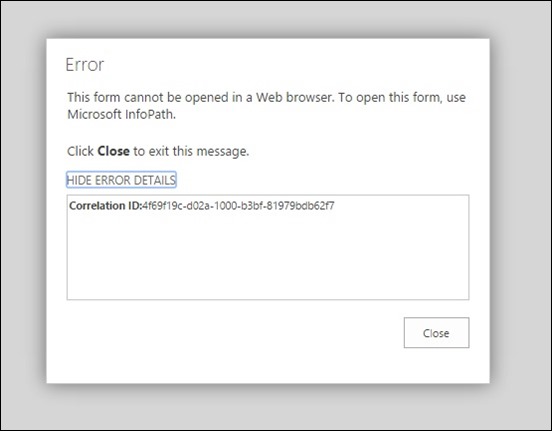
InfoPath on SharePoint Online error: “This form cannot be opened in a web browser. To open this form, use InfoPath”

Here’s an annoying error you might experience when using InfoPath Forms with Office 365 (SharePoint Online).

infopath-office 365-this form cannot be opened in a web browser-use infopath-

So to save your time, let’s go straight to the solution:

Enable Form Rendering in the Office 365 Admin Console

Go to your Office 365 Portal (http://portal.office.com) and choose Admin console.

infopath-office 365-this form cannot be opened in a web browser-use infopath- (1)

infopath-office 365-this form cannot be opened in a web browser-use infopath- (2)

infopath-office 365-this form cannot be opened in a web browser-use infopath- (3)

Then Enable Form Templates Rendering for Browsers

You will see a warning about InfoPath being discontinued in the future, don’t worry about it for the moment, this is another discussion. For now, you just want to get this done.

infopath-office 365-this form cannot be opened in a web browser-use infopath- (4)

infopath-office 365-this form cannot be opened in a web browser-use infopath- (5)


Re-publish Your InfoPath Form Again

Now, what you have to do is to:

  1. Close your browser session
  2. Republish your InfoPath Form

Note that at the end you will see Security Level: Domain. If you see this, it means it worked. Previously you would see Security Level: Restricted.

infopath-office 365-this form cannot be opened in a web browser-use infopath- (6)

That’s it! I hope this was helpful to you and saved you a couple of hours banging your head against the Surface keyboard Smile

by

How is Machine Learning Used in Cyber Security?

Also posted at Quora

image

Let's start with 2 points:

  1. The objective of cyber security (strategy) is not to avoid 100% the attacks, something unattainable; but to reduce the "attack surface" to a minimal.
  2. the number of attack perpetrators will be always bigger than the number of people trying to protect against attacks.

With that in mind, several companies discovered soon enough that fighting for protection was becoming an ever increasing ($$) exercise. The biggest security/infrastructure firms (symantec, mcafee, palo alto, checkpoint etc) united to work in common initiatives, such as developing web apps against DDoS attacks (web apps not in the sense of website but in firewall webapps, also called next generation firewalls).


The SecIntel Exchange

Now, a very important concept here to remember: They do not exchange their solutions, they do exchange their attacks. That's a very important point. This is called SecIntel Exchange. The whole idea behind this is: To understand how attacks are done and what types of exploits are there, we need to increase our catch network, so they can be aware of attacks BEFORE they become a real worry.

OK, now that these companies found a common protocol to receive and analyze their attacks, and are able to collect information about what's going on out there in the wild, each company go about and find solutions appropriate for their own products. This is a great strategy, defend as a stronghold, attack as a militia. However, another challenge comes up: Slowly but surely this process is also becoming time-consuming and expensive. In short, it does not scale. Remember, while a company has a team of 10 people to protect, the world always will have thousands working 24x7 trying to break it. (that also explains why Linux/Unix systems don't have as many vulnerabilities as Windows for example, but that's another topic)


image


The Machine Learning Angle

Good. Now that's when machine learning (ML) comes in nicely!  In conjunction with other technologies (virtual machines, test simulators, honey pots etc) machine learning algorithms can pick up the information collected by the SecIntel and QUICKLY SCALE the analysis process. What used to take 2 days for an InfoSec team to understand, takes 1 day for an ML algorithm to understand...but that's not the main benefit of ML. The main benefit is that the ML algorithms will learn and predict based on experience and results. It means that today it takes 1 day, tomorrow it will take 20 hours, the next day it will take 12 hours and so on. ML by "learning and predicting" effectively scale the effort to a level human teams cannot do, specially when dealing with automated tasks.


A Real World Analogy

Imagine when you do blood tests if your blood had to be analysed individually. It would take weeks before you get your results not because the process is slow but mainly because the queue to get to you will be too large and by then the effort to get the results could be potentially wasted. By scaling the effort, ML will free up the InfoSec teams to focus in the higher ground and strategy trying to be one step ahead of the game.

It is about scale and quick response to market.

images credits: @msau

by

I Am Presenting at the Azure Smorgasbord in December 2015

How does your day look like on December 9th 2015?

Come join me a Microsoft to discuss and share ideas about IoT, Azure and Office 365 in Australia.

iot edge


Session Name: “IoT - The Invasion of Australia”

Abstract: “Five million new IoT devices will come online every day in 2016. Do you want a piece of this 50 billion dollar cake? Join Edge Pereira to discuss a use case of IoT in Australia and why we are in a prime position to lead the world in this area.”

Click here to register


Where Can I Find the Presentation Slides?

You can find the slides for this presentation here.

by

Hour of Code 2015. I am Volunteer. Again.

Once again this year I am volunteering time for the Hour of Code. And proud of it. Listen what Bill Gates, Mark Zuckerberg, Jack Dorsey and others have to say about this event.


What is the Hour of Code?

Launched in 2013, Code.org is a non-profit dedicated to expanding access to computer science, and increasing participation by women and underrepresented students. The vision is that every student in every school should have the opportunity to learn computer science. Code.org believes that computer science should be part of core curriculum, alongside other courses such as biology, chemistry or algebra.


Untitled

When It Happens?

Volunteers from all over the world help local teachers and their classes during the Computer Science Education Week that happens every year in December. This year it will be from December 7th to 13th.


How Can You Help?

We have this year 13.000 requests from teachers from all over the world, but only 4.000 volunteers. We need volunteers to help with the activities and help the teachers. Here are a few things you can do also to get involved:

  1. Recruit co-workers to volunteer:  Blog, share, tell your friends and co-workers about the Hour of Code and ask them to sign up as a volunteer.
  2. If you know someone who’s a volunteer, connect them with people who wants to setup Hour of Code parties.


I Want to be a Volunteer. What Do I Need to Do?

To get a better idea about what your volunteer experience will be like, have a look at this guide. There's also some extra tips about how you can get your employer and community involved with the Hour of Code.


If you know anyone needing help with it, feel free to connect with me. Remember: I am a volunteer! Smile

by

Infrastructure Saturday 2015 Social Media Stats #infrasat

We’ve just done another successful Infrastructure Saturday event. It takes a lot of time and passion to setup personal time aside and to organize such an event. This is an annual event totally built and sponsored by the community, so the people you find there (attending, organizing or presenting) are 100% committed to the cause. Big shout for the guys organizing: Alan Burchill and Shane Hoey

Below are some of the social media stats collected during the last week up to the event day. This years top contributors were: JustBroady, superedge, david_obrien, pzerger, cloudtidings, bneusergroup, alanburchill, twalex2, blkchninstitute, reecestewart4

If you’ve been to the sessions, thank you very much. I hoped you enjoyed and see you next year.

imageimage

image

image


image

image

image

image

image

image

image


Top Links about the #infrasat Infrastructure Saturday 2015 Event

  1. https://www.flickr.com/photos/alborath/albums/72157660731316669
  2. https://twitter.com/DigitalGlobe/status/667834517428682752
  3. https://code.visualstudio.com
  4. http://www.infrastructuresaturday.com/
  5. http://www.superedge.net/2015/11/ethereum-blockchain-service-bitcoin.html
  6. https://lnkd.in/b_GeEXZ
  7. https://lnkd.in/bk9tVcN
  8. https://doc.co/75WgEz
  9. http://www.linkedin.com/pulse/want-increase-privacy-protection-your-cloud-data-worries-edge-pereira
  10. http://www.infrastructuresaturday.com
  11. http://infrastructuresaturday.org
  12. https://lnkd.in/buajN7R
  13. https://lnkd.in/bkYJbY4
  14. https://lnkd.in/bBgh534
  15. http://www.superedge.net/2015/11/infrastructure-saturday-2015-australia.html
  16. https://lnkd.in/bhp3pyZ